NoteGPT

免费的图片转提示词工具

将任意图像转换为针对 GPT Image、Midjourney、FLUX 和 Nano Banana 优化的 AI 提示词。

上传粘贴 图片
支持 PNG、JPG、JPEG、WebP 格式 (最大 20MB)
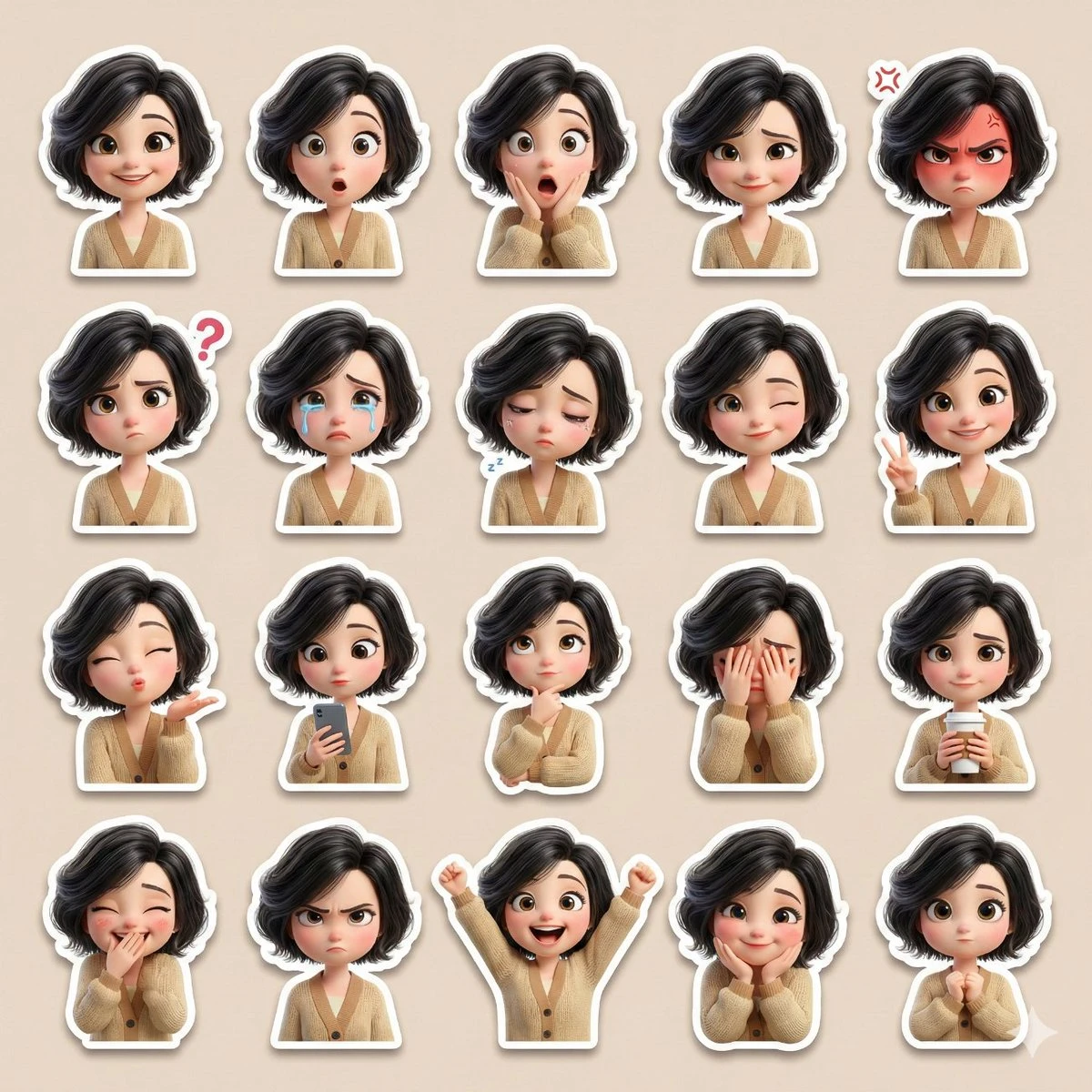
Please use the attached reference image as the base character.
Create a single high-resolution collage containing at least 20 cute sticker-style illustrations of the same female character. Ensure the face, skin tone, hairstyle, and overall appearance perfectly match the reference image.
Art Style: {argument name="art style" default="3D Pixar-style / Disney-style cartoon"}, soft cinematic lighting, smooth pastel colors, large expressive eyes, rounded cute facial proportions, ultra-detailed 3D rendering.
Character Details:
• Lightly permed black hair
• Large expressive eyes
• Beige cardigan
• Cute, slightly chubby proportions
Expressions and Reactions (all distinct):
Happy smile, surprised, shocked, shy smile, angry, confused, crying, sleepy, winking, peace sign, blowing a kiss, holding a cell phone, thinking, covering face, holding coffee, covering mouth while laughing, annoyed, excited, affectionate expression, cute neutral pose (over 20 total).
Sticker Design:
• Each reaction as a separate sticker
• Clean white border on all stickers
• Soft drop shadow
• No text, no watermark
Layout:
• All stickers neatly arranged in one collage
• Balanced grid layout
• Soft beige/pastel-toned background
• Instagram/WhatsApp-style sticker pack design
Quality:
Ultra-high definition, high resolution, smooth 3D finish, professional-grade sticker pack style, lovingly expressive.
Please use the attached reference image as the base character. Create a single high-resolution collage containing at least 20 cute sticker-style illustrations of the same female character. Ensure the face, skin tone, hairstyle, and overall appearance perfectly match the reference image. Art Style: {argument name="art style" default="3D Pixar-style / Disney-style cartoon"}, soft cinematic lighting, smooth pastel colors, large expressive eyes, rounded cute facial proportions, ultra-detailed 3D rendering. Character Details: • Lightly permed black hair • Large expressive eyes • Beige cardigan • Cute, slightly chubby proportions Expressions and Reactions (all distinct): Happy smile, surprised, shocked, shy smile, angry, confused, crying, sleepy, winking, peace sign, blowing a kiss, holding a cell phone, thinking, covering face, holding coffee, covering mouth while laughing, annoyed, excited, affectionate expression, cute neutral pose (over 20 total). Sticker Design: • Each reaction as a separate sticker • Clean white border on all stickers • Soft drop shadow • No text, no watermark Layout: • All stickers neatly arranged in one collage • Balanced grid layout • Soft beige/pastel-toned background • Instagram/WhatsApp-style sticker pack design Quality: Ultra-high definition, high resolution, smooth 3D finish, professional-grade sticker pack style, lovingly expressive.
Example
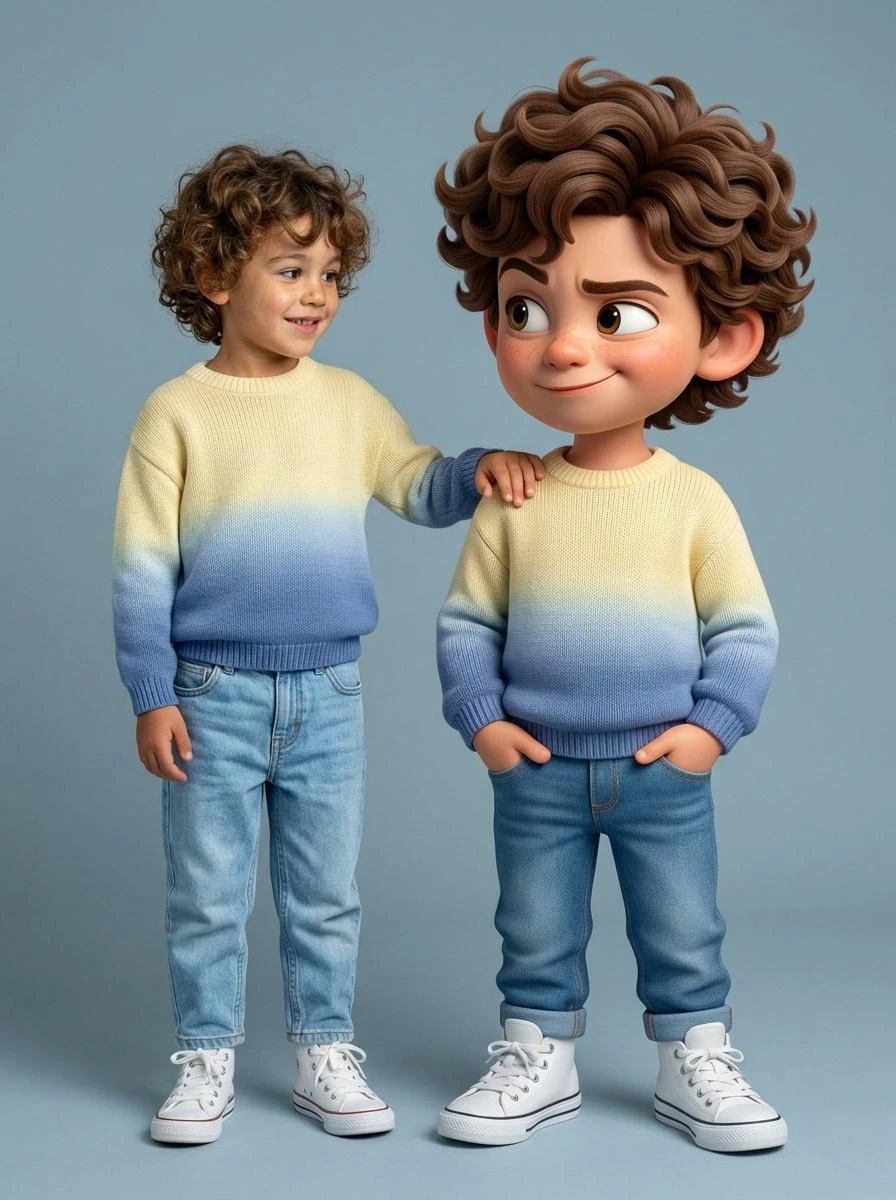
Ultra-high-quality hyper-realistic photo featuring a real human and a giant 3D Pixar-style version of THE SAME person both strictly based on the uploaded reference image. The real person and the Pixar character must have identical facial structure, hairstyle, facial expression, body proportions, height, and clothing.
Both are wearing a knitted sweater with a gradient from light yellow to pink, high-waisted blue jeans, and white high-top sneakers.
The pose must exactly match the reference: the real person stands relaxed with a friendly smile, with their hand naturally resting on the shoulder of the Pixar character. The Pixar version stands slightly wider, arms confidently positioned near the pockets, with a playful sly smirk, one raised eyebrow, and expressive Pixar-style eyes.
The Pixar character should be proportionally larger, but anatomically identical to the real person. The facial expression, head tilt, posture, and body language must precisely replicate the reference image.
Clean gray-blue studio background, soft even studio lighting, realistic shadows, crisp fabric texture, smooth Pixar-style skin shading, cinematic sharpness.
DO NOT change the pose, reaction, clothing, or proportions. Strict adherence to the reference.
Ultra-high-quality hyper-realistic photo featuring a real human and a giant 3D Pixar-style version of THE SAME person both strictly based on the uploaded reference image. The real person and the Pixar character must have identical facial structure, hairstyle, facial expression, body proportions, height, and clothing. Both are wearing a knitted sweater with a gradient from light yellow to pink, high-waisted blue jeans, and white high-top sneakers. The pose must exactly match the reference: the real person stands relaxed with a friendly smile, with their hand naturally resting on the shoulder of the Pixar character. The Pixar version stands slightly wider, arms confidently positioned near the pockets, with a playful sly smirk, one raised eyebrow, and expressive Pixar-style eyes. The Pixar character should be proportionally larger, but anatomically identical to the real person. The facial expression, head tilt, posture, and body language must precisely replicate the reference image. Clean gray-blue studio background, soft even studio lighting, realistic shadows, crisp fabric texture, smooth Pixar-style skin shading, cinematic sharpness. DO NOT change the pose, reaction, clothing, or proportions. Strict adherence to the reference.
Example
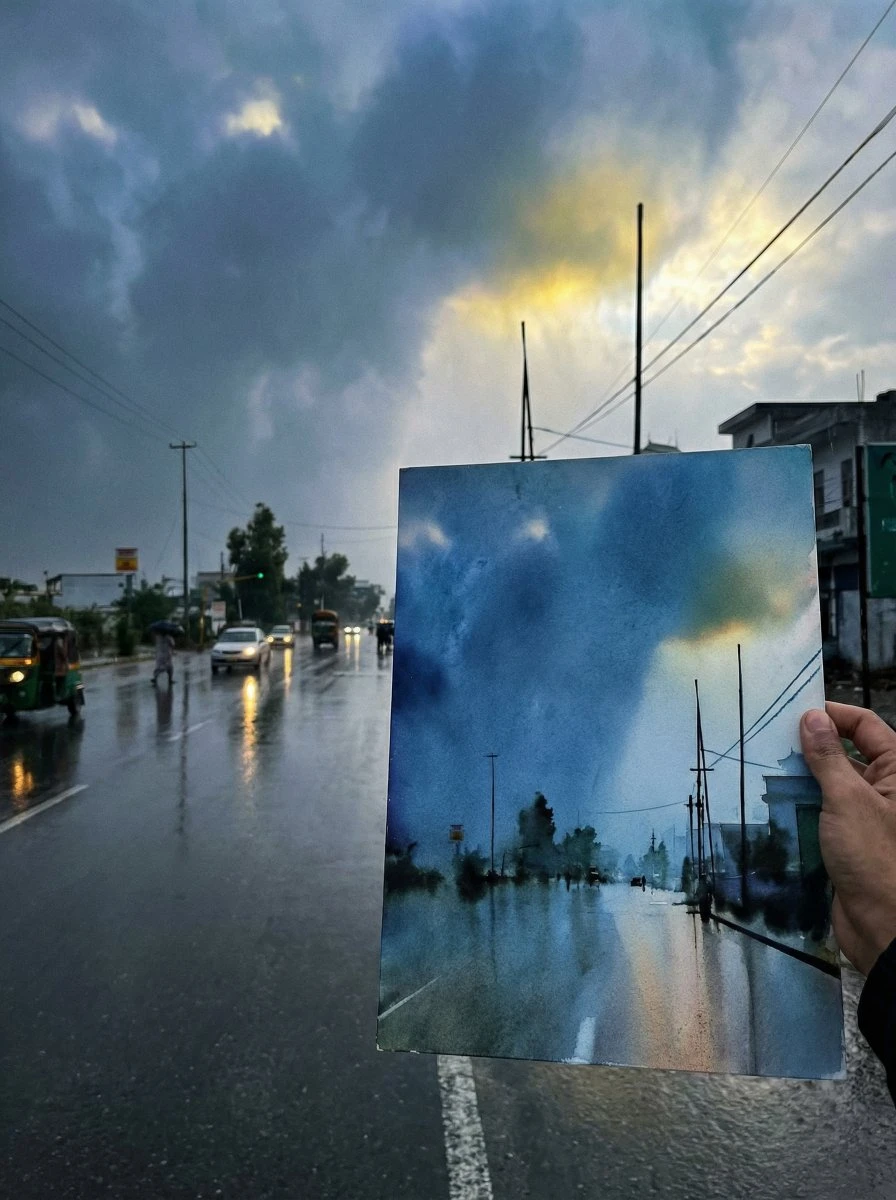
If you like drawing, try drawing something you like, and then take a photo of it together with the drawing.
{argument name="scene description" default="Just finished a sketch, place the drawing paper together with the real scene for a photo, showcasing the finished effect."}"
If you like drawing, try drawing something you like, and then take a photo of it together with the drawing. {argument name="scene description" default="Just finished a sketch, place the drawing paper together with the real scene for a photo, showcasing the finished effect."}"
Example
{
  "project": "CuisineInfographic",
  "metadata": {
    "style": "Hyper-Realistic",
    "theme": "Kashmiri Wazwan",
    "resolution": "8K_Ultra_HD"
  },
  "scene_setup": {
    "background": "Rustic_Dark_Wood",
    "lighting": "Cinematic_Studio_Warm",
    "camera": {
      "type": "DSLR_Full_Frame",
      "focus": "Sharp_Macro",
      "depth_of_field": "Shallow_Bokeh"
    }
  },
  "render_elements": {
    "base_anchor": {
      "object": "Traditional_Kashmiri_Copper_Bowl",
      "content": "Steaming_Rogan_Josh",
      "effects": ["Dramatic_Steam", "Volumetric_Vapor"]
    },
    "levitating_entities": [
      { "item": "Tender_Mutton_Chunks", "texture": "Juicy_Fibrous" },
      { "item": "Fried_Paneer_Cubes", "texture": "Golden_Crispy" },
      { "item": "Kashmiri_Red_Chili", "state": "Whole_Dried" },
      { "item": "Saffron_Water_Splashes", "viscosity": "Glossy_Orange" },
      { "item": "Green_Cardamom_Pods", "arrangement": "Motion_Frozen" },
      { "item": "Cinnamon_Bark", "detail": "Ultra_Textured" },
      { "item": "Fresh_Mint_Leaves", "color": "Vibrant_Green" }
    ],
  "ui_overlay": {
    "language": "{argument name="overlay language" default="Indonesian"}",
    "elements": {
      "pointer_lines": "Thin_Minimalist_White",
      "font_style": "Modern_Editorial_Sans",
      "labels": {
        "mutton": "{argument name="mutton label" default="Daging Domba Lembut"}",
        "chili": "Cabai Merah Kashmir",
        "paneer": "Tahu/Paneer Goreng",
        "sauce": "Kuah Merah Kental"
      }
    }
  }
}
{ "project": "CuisineInfographic", "metadata": { "style": "Hyper-Realistic", "theme": "Kashmiri Wazwan", "resolution": "8K_Ultra_HD" }, "scene_setup": { "background": "Rustic_Dark_Wood", "lighting": "Cinematic_Studio_Warm", "camera": { "type": "DSLR_Full_Frame", "focus": "Sharp_Macro", "depth_of_field": "Shallow_Bokeh" } }, "render_elements": { "base_anchor": { "object": "Traditional_Kashmiri_Copper_Bowl", "content": "Steaming_Rogan_Josh", "effects": ["Dramatic_Steam", "Volumetric_Vapor"] }, "levitating_entities": [ { "item": "Tender_Mutton_Chunks", "texture": "Juicy_Fibrous" }, { "item": "Fried_Paneer_Cubes", "texture": "Golden_Crispy" }, { "item": "Kashmiri_Red_Chili", "state": "Whole_Dried" }, { "item": "Saffron_Water_Splashes", "viscosity": "Glossy_Orange" }, { "item": "Green_Cardamom_Pods", "arrangement": "Motion_Frozen" }, { "item": "Cinnamon_Bark", "detail": "Ultra_Textured" }, { "item": "Fresh_Mint_Leaves", "color": "Vibrant_Green" } ], "ui_overlay": { "language": "{argument name="overlay language" default="Indonesian"}", "elements": { "pointer_lines": "Thin_Minimalist_White", "font_style": "Modern_Editorial_Sans", "labels": { "mutton": "{argument name="mutton label" default="Daging Domba Lembut"}", "chili": "Cabai Merah Kashmir", "paneer": "Tahu/Paneer Goreng", "sauce": "Kuah Merah Kental" } } } }
Example

AI 图片提示词生成器 - 不会写提示词?上传图片,AI 帮你反推

图片转提示词工具可在线反向解析任何图像的AI提示词。支持GPT Image、Nano Banana、Seedream等,提取风格、光照、构图参数。在线操作,无需注册。

AI 图片提示词生成器 - 不会写提示词?上传图片,AI 帮你反推

什么是图片转提示词生成器?

图片转提示词是一种 AI 工具,可以将任意图片反向解析为详细的、可直接用于模型的文本提示词。您只需上传照片、艺术作品或参考图,AI 就会分析其视觉特征——主体、风格、光照、色彩、镜头角度、纹理——然后生成一份完整的提示词,您可以直接粘贴到 Midjourney、Stable Diffusion、DALL-E、FLUX 或任何文生图工具中使用。
什么是图片转提示词生成器?

为什么选择我们的图片转提示词工具?

大多数通用视觉 AI 只会给出平淡的描述——"一只猫坐在窗台上"。而我们的图片转提示词工具提供完整的提示词工程栈:具体的艺术家参考("Greg Rutkowski 风格")、相机元数据("35mm f/1.4 镜头,黄金时刻光线")、媒介识别("数字绘画,Octane 渲染")以及针对特定模型的格式化输出。
为什么选择我们的图片转提示词工具?

还在猜测图片提示词怎么写?

上传任何参考图,即刻生成 AI 就绪的提示词。我们的图片转提示词工具能提取主体、风格、光照、构图和其他关键细节,帮助您告别猜测和不计其数的试错,轻松生成精准提示词。
还在猜测图片提示词怎么写?

Image to Prompt 生成器核心功能

探索让 Image to Prompt 比传统提示词创建更快、更智能、更精准的核心功能。

反向解析任意图片为提示词

几秒内将任意图片转化为详细的 AI 提示词。跳过手动编写提示词,以更高的精度和更少的精力重现视觉效果。

检测风格与视觉细节

自动识别艺术风格、光照、构图、色彩、镜头角度等,生成与原始图片高度匹配的提示词。

适用于所有 AI 图像模型

生成与 GPT Image、FLUX、Midjourney、Stable Diffusion、Ideogram 及其他主流 AI 图像生成器兼容的结构化提示词。

三步骤使用图片转提示词

只需几步即可将任意图片转换为详细的 AI 提示词。上传图片,让 AI 分析它,获取可直接用于您常用 AI 图像模型的即用型提示词。

步骤 1:上传您的图片

步骤 1:上传您的图片

选择或拖放您想要分析的图片。我们的 AI 支持多种图像格式,并会立即开始处理您的图片。

步骤 2:AI 分析图片

步骤 2:AI 分析图片

AI 自动检测主体、风格、光照、构图、色彩等视觉细节,生成精准的结构化提示词。

步骤 3:复制并使用提示词

步骤 3:复制并使用提示词

查看生成的提示词,一键复制,直接在 GPT Image、FLUX、Midjourney、Stable Diffusion 或其他 AI 图像生成器中使用。

将任何图片转化为完美提示词

别再猜测那些惊艳的 AI 图片是如何创作出来的了。上传任意图片,让 AI 即刻分析其风格、构图、光照和细节,生成高质量提示词,可直接用于您常用的 AI 图像生成模型。

免费生成提示词

用户对图片转提示词的评价

ES avatar

ES

AI 艺术家

我搞 AI 艺术创作快两年了,提示词工程对我来说依然像炼金术一样玄妙。有人在 Discord 上发了一张惊艳的图片,却没分享提示词,你就只能干瞪眼。图片转提示词彻底改变了这一切——我上传参考图,就能获取光照、相机参数和风格参考的详细分析,几分钟内就能生成相似品质的图片,再也不用花几小时反复试错了。

KD avatar

KD

创意总监

作为创意总监,我需要管理三位设计师和 12 个客户账户的视觉统一性。以前我们得花好几个小时来描述"那个感觉"。现在我把情绪板图片丢进图片转提示词,以结构化数据的形式提取视觉参数,然后构建整个团队都能用的提示词模板。跨项目交付的作品一致性大幅提升。
TN avatar

TN

AI 艺术讲师

我教 AI 艺术和提示词工程。初学者最大的障碍就是在"我知道我要什么"和"我知道用什么词汇能实现它"之间架起桥梁。图片转提示词已经成了核心教学工具——学生上传参考图,研究提取出的提示词,通过直接观察来学习词汇和技巧。
RY avatar

RY

婚礼摄影师

我是一名婚礼摄影师,正在尝试用 AI 为客户制作风格化照片。难点在于不同光线和地点的拍摄要保持一致性。图片转提示词让我能从最佳作品中提取视觉标签,构建可复用的模板并持续应用。相机元数据的提取精度更是出乎意料地准确。
SB avatar

SB

社交媒体经理

我们的营销团队每周大约生成 50 张社交媒体图片。我从表现最佳的图片中提取提示词,现在每位团队成员都从同一个视觉蓝本出发。我们的内容首次呈现出真正的统一感,制作时间还缩短了约 60%。
MC avatar

MC

社区经理

我运营一个同人艺术社区,最大的障碍不是创意——而是执行力。创作者们经常记不住自己用的提示词。我利用社区上传的作品建了一个共享提示词库,新成员不再需要花第一周的时间摸索什么词汇有效,直接上手创作。

关于图片转提示词的常见问题