



The AI landscape moves at a breakneck pace, but few releases have stirred as much genuine excitement among power users as the arrival of Claude Opus 4.7. As Anthropic’s most sophisticated model to date, Claude Opus 4.7 represents a seismic shift in how we interact with machine intelligence—moving beyond simple chat interfaces toward true "agentic" partnership. Whether you are a developer looking to refactor complex legacy code or a researcher drowning in thousand-page PDFs, this guide will show you why the latest Claude iteration is dominating the conversation and, more importantly, how you can skip the bureaucratic login hurdles to start using it immediately.

Image source: Anthropic Introducing Claude Opus 4.7
What is Claude Opus 4.7? (The Benchmarks)
If you’ve been following the "AI arms race," you know that version numbers often feel like incremental marketing tweaks. However, Claude Opus 4.7 is different. It isn't just a faster version of its predecessor; it’s a smarter, more empathetic, and significantly more observant model.
From 4.0 to 4.7: What Changed in the Claude Ecosystem?
The jump from the 4.0 series to Claude 4.7 is characterized by a move toward "Reliability First." In earlier iterations, AI models often suffered from "hallucination fatigue"—the more complex the task, the more likely they were to lose the plot. Anthropic has addressed this by fine-tuning the model's internal consistency. In the current ecosystem, Claude 4.7 sits at the top of the hierarchy, outperforming the "Sonnet" and "Haiku" variants in deep reasoning and high-stakes creative work. It’s the difference between a quick-witted intern and a seasoned consultant with twenty years of experience.
Key Technical Specs: Why "Opus" Remains the Gold Standard
Why do we call it the "Gold Standard"? It comes down to the architecture. Claude Opus 4.7 boasts a refined attention mechanism that allows it to "weight" information more effectively. While other models might get distracted by "noise" in a large dataset, Opus 4.7 maintains a laser focus on the core user intent. With a massive context window and improved token efficiency, it can digest the equivalent of several thick novels in seconds without forgetting what happened in Chapter 1.
Top 5 Features of Claude 4.7 You Should Know
What does this look like in your daily life? Let’s break down the five pillars that make Claude Opus 4.7 the current king of the hill.
Enhanced Reasoning: Complex Logic Made Simple
We’ve all had that moment where an AI gives you a "technically correct" but practically useless answer. Claude 4.7 minimizes this through superior logic. If you ask it to plan a 14-day logistics route through Europe while considering varying tax laws and warehouse capacities, it doesn't just list cities—it builds a logical framework. It understands the why behind your constraints, making it an incredible partner for strategic decision-making.
Advanced Visual Analysis: Decoding Complex Images & Charts
This is where the "4.7" update really flexes its muscles. The Claude Opus 4.7 image analysis capability is frighteningly good. You can upload a messy, hand-drawn whiteboard session from a brainstorming meeting, and it will transcribe the text, turn the arrows into a logical flow chart, and suggest the next steps. It doesn't just "see" pixels; it understands context. Upload a complex financial candlestick chart, and it can help you identify trends that a human eye might overlook.
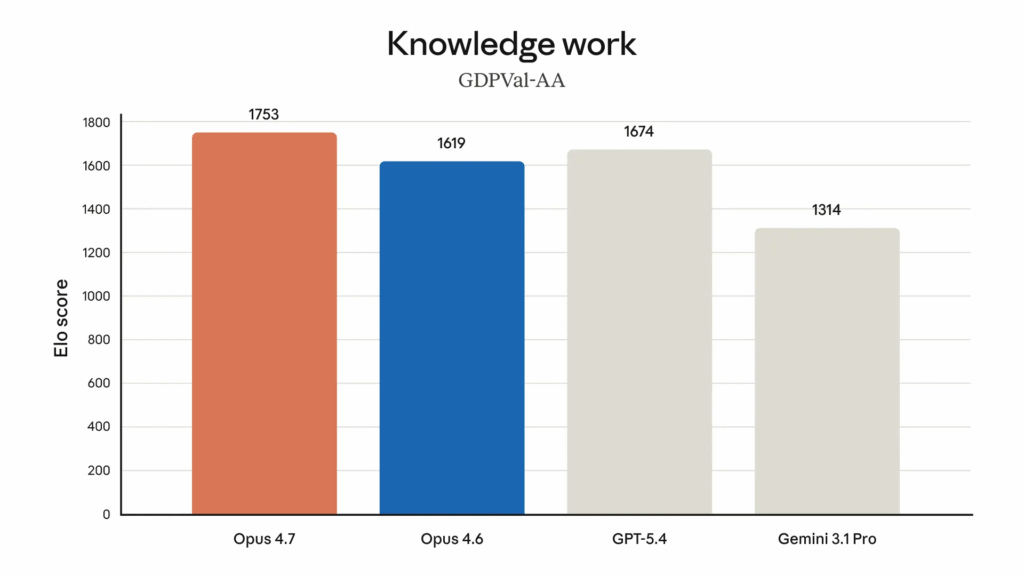
Image source: Anthropic Introducing Claude Opus 4.7
Expanded Context Window: Handling Massive Documents
The "memory" of an AI is measured by its context window. With Claude 4.7, you can feed in massive legal contracts, entire codebases, or year-long email threads. The model doesn't just skim these; it indexes them. This allows you to ask hyper-specific questions like, "In which of these 50 documents did we mention the liability clause for third-party contractors?" and get an instant, accurate citation.
Agentic Task Execution: Automating Multi-Step Workflows
We are entering the era of "AI Agents." Unlike older models that wait for a prompt for every single step, Claude Opus 4.7 can handle "agentic" workflows. If you give it a goal—e.g., "Research these 5 competitors and create a summary table"—it can break that down into sub-tasks (identifying competitors, looking for pricing, checking feature lists) and execute them in a structured sequence.
Superior Writing Quality: More Human, Less Robot
The "AI scent"—that repetitive, overly formal tone—is almost gone here. Claude 4.7 writes with a level of nuance that mirrors human thought. It understands sarcasm, subtle professional tones, and even the "unwritten rules" of different writing genres. If you need a blog post that sounds like a person wrote it in a coffee shop rather than a machine in a data center, this is your model.
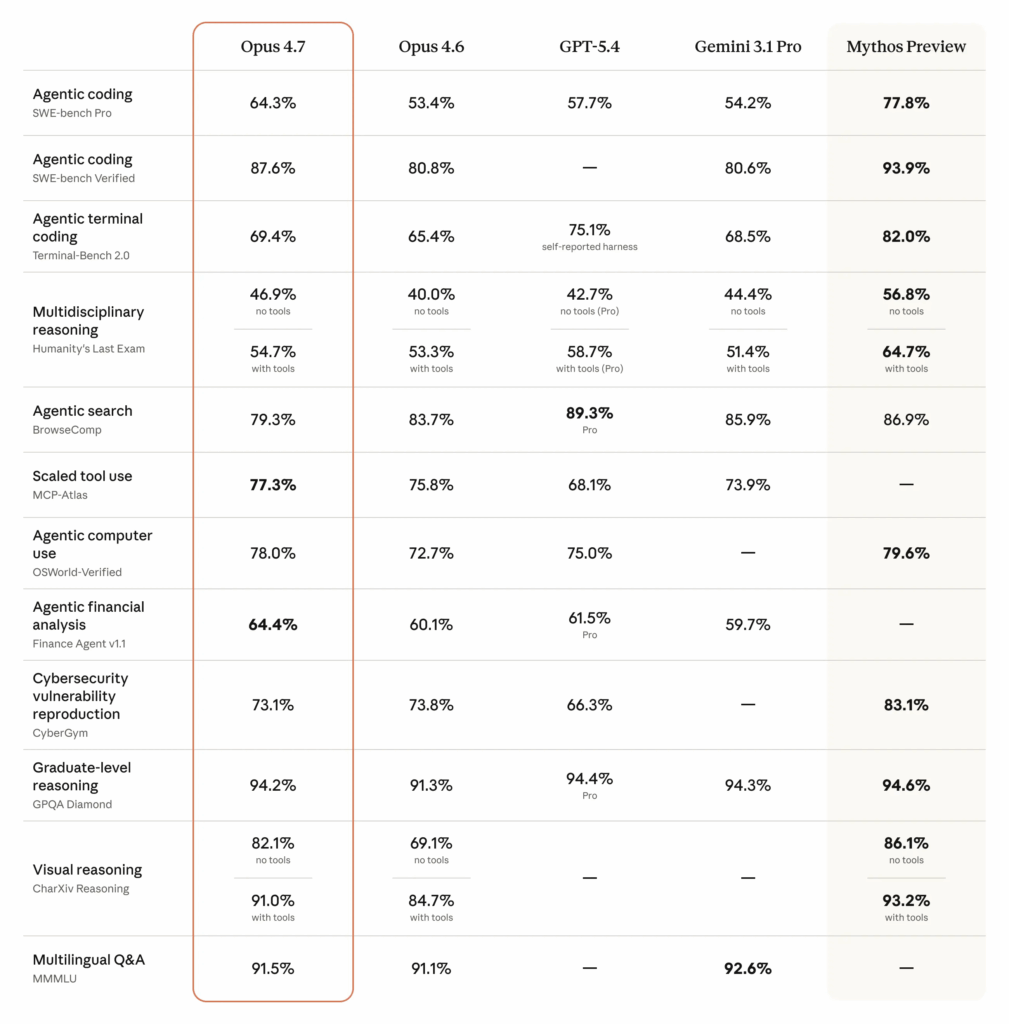
Image source: Anthropic Introducing Claude Opus 4.7
Real-World Use Cases: Where Claude 4.7 Shines
Coding & Instant UI-to-Code Generation
For developers, Claude Opus 4.7 is a "senior dev in a box." One of the most mind-blowing use cases is its ability to take a screenshot of a website or a UI mockup and instantly generate the React, Tailwind, or HTML/CSS code to replicate it. It saves hours of boilerplate work and is exceptionally good at debugging "spaghetti code" that other models struggle to parse.
Academic Research & Deep Data Summarization
Researchers are using Claude 4.7 to cross-reference multiple papers at once. You can upload five different PDF studies on a niche topic and ask, "Where do these authors disagree on the methodology?" The model will highlight the discrepancies, saving you days of manual cross-referencing.
Creative Content Strategy & Brand Tone Development
Marketing teams leverage Claude Opus 4.7 to maintain brand consistency. By feeding the model your existing brand guidelines and past successful social media posts, you can train it to generate new content that perfectly captures your specific "voice." It’s particularly adept at long-form storytelling, where maintaining a consistent narrative arc is crucial.
While the capabilities of Claude Opus 4.7 are undeniably transformative, there is a significant gap between the model's potential and the average user's ability to actually use it. If you’ve tried to sign up recently, you know exactly what I’m talking about. Let's look at why the "official" path is often the most frustrating one.
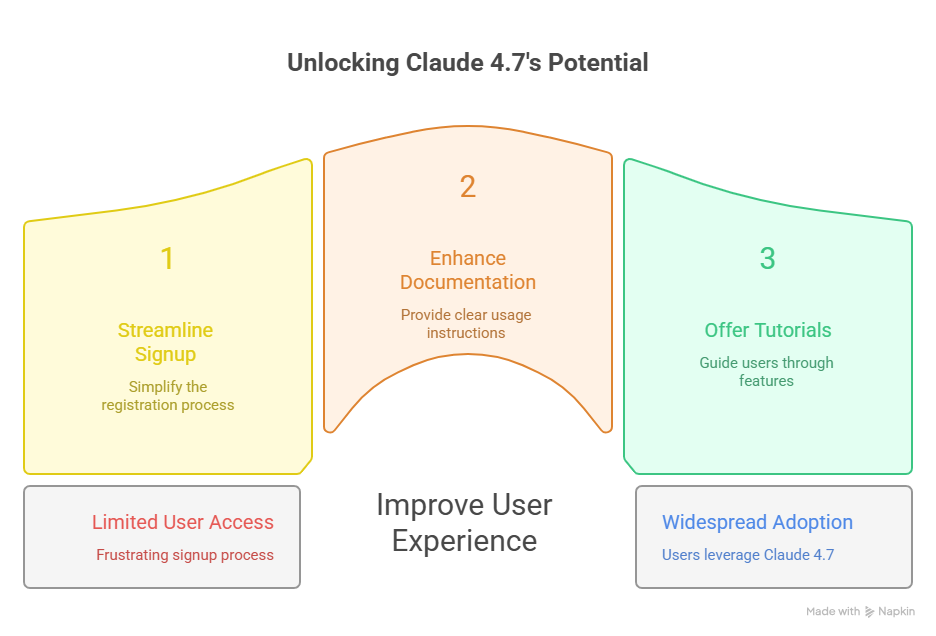
Why Most Users Struggle to Access Claude Opus 4.7
For an AI designed to make life easier, the onboarding process for the official Anthropic interface can feel like an obstacle course. This friction is particularly annoying for professionals who just want to get their work done without a side project in "account management."
The Friction of Regional Phone Verification
The most common "wall" users hit is the dreaded SMS verification. As of 2026, Claude's official web access is still restricted in several territories. Even in supported regions, the system is notoriously picky about VOIP numbers or certain mobile carriers. If you are a digital nomad or a specialist working in a region without direct support, you’re essentially locked out of the world’s most powerful reasoning engine simply because of your area code.
High Monthly Subscription Costs for Occasional Users
Then there is the "SaaS fatigue." To access the full power of Claude Opus 4.7—including the higher message limits and priority processing—you are usually looking at a $20+ monthly commitment. For a power user, that’s a steal. But for the small business owner, the freelance writer, or the student who only needs the model’s "big brain" for a specific project twice a month, that subscription fee is a steep barrier to entry.
Technical Hurdles of API Keys and Developer Consoles
"Just use the API," the tech-savvy crowd says. But for the average marketer or SEO specialist, setting up an Anthropic Console account, managing API keys, monitoring "burn rates," and finding a third-party UI to plug that key into is a massive time-sink. Most people don't want to manage a developer environment; they just want a chat box where they can drop a file and get an answer.
How to Use Claude Opus 4.7 Without Complicated Login
So, how do you bridge the gap? There are two main paths: the high-resistance path and the "efficiency" path.
The Traditional Way: Navigating Official Account Barriers
The traditional route involves a VPN, a foreign phone number, and a recurring credit card payment. You spend thirty minutes setting up the "environment" before you even send your first prompt. While this gives you the "native" experience, it leaves you vulnerable to account flags if the system detects a location mismatch. It’s a high-maintenance solution for a high-speed world.
The Efficient Way: Direct Access via NoteGPT’s Claude 4.7 Portal
This is where the landscape changes. By using the NoteGPT Claude Opus 4.7 page, you are essentially taking a shortcut directly to the model. NoteGPT integrates the official API into a streamlined, web-based interface that removes the regional and login barriers.
You don't need to hunt for a compatible phone number or navigate complex console settings. You simply land on the page and start interacting with the Claude 4.7 model. It’s the "plug-and-play" version of high-end AI, designed specifically for those who value their time as much as their output.
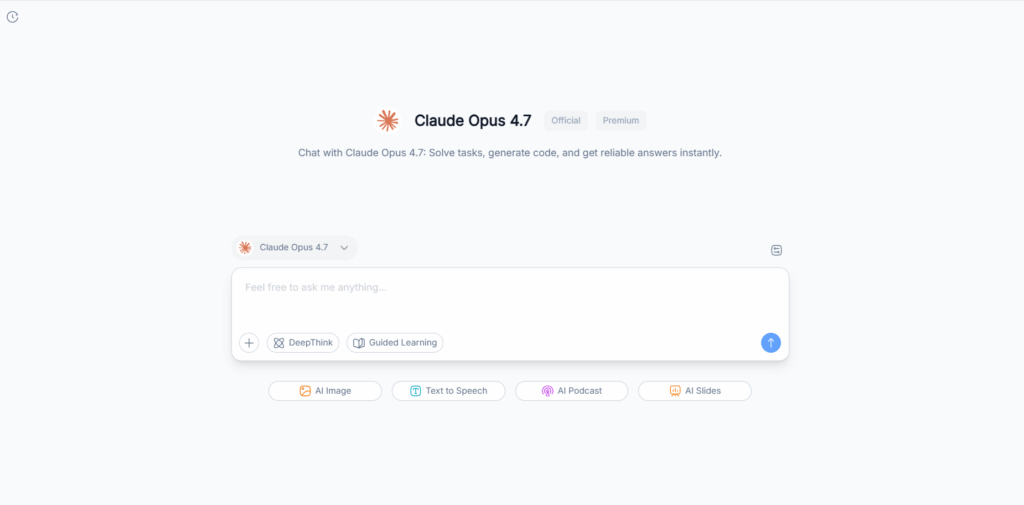
Why NoteGPT is Best for Visual Tasks and PDF Summaries
NoteGPT isn't just a mirror; it’s an ecosystem. Because the platform is built for "intelligent note-taking," it enhances the native capabilities of Claude Opus 4.7. When you upload a 200-page PDF or a complex architectural diagram for visual analysis, NoteGPT’s interface is optimized to handle the document parsing and summary generation alongside the model’s reasoning. It’s a workflow-first approach: you get the answer, and you can immediately save, categorize, or expand on it within your workspace.
Expert Tips to Maximize Your Claude 4.7 Output
Having the tool is one thing; wielding it like a pro is another. To truly get your money's worth (or your time's worth) out of Claude Opus 4.7, you need to adjust your prompting strategy.
Master the "Chain of Thought" Prompting
Claude 4.7 loves to "think out loud." If you give it a complex SEO strategy task, don't just ask for the final list of keywords. Start your prompt with: "First, analyze the search intent for these terms, then evaluate the competition, and finally, create a content map." By forcing the model to explain its reasoning step-by-step, you significantly reduce the chance of errors and get a much deeper, more logical output.
Visual Prompting: How to Get Better Insights from Images
When using the Claude 4.7 image analysis feature, be specific about the "lens" you want the AI to use. Instead of saying "What is this?", try: "Analyze this heat map of our landing page. Identify the three areas with the highest friction and suggest UI changes to improve the conversion rate based on best practices." The more context you provide about the goal of the image, the more surgical the AI’s analysis becomes.
Pairing AI Outputs with Note-Taking Tools for Retention
The biggest mistake AI users make is leaving the "gold" in the chat box. When Claude Opus 4.7 generates a brilliant 5nd-step execution plan, don't just let it sit there. Use a platform like NoteGPT to "capture" that insight. Turn the AI’s output into a living document where you can track progress, add human comments, and build a permanent knowledge base for your brand or project.
Conclusion
The release of Claude Opus 4.7 marks a turning point where AI stops being a "novelty" and starts being a core infrastructure for professional work. Its ability to reason, see, and act with agent-like autonomy is unparalleled. However, the best technology in the world is useless if you can't access it.
By bypassing the traditional login headaches and using a dedicated portal like NoteGPT, you can stop fighting with the interface and start leveraging the intelligence. Whether you’re coding the next big app, researching a thesis, or building a content empire, Claude 4.7 is the partner you’ve been waiting for. Don’t let a login screen stand in the way of your next breakthrough.