


If you're looking for a video transcript example, you probably want to see what a finished transcript actually looks like before creating one yourself. A video transcript turns spoken content into readable text, often with timestamps and speaker labels to make the content easier to follow.
In this guide, you'll find video transcript examples for YouTube videos, interviews, podcasts, webinars, and online courses. You'll also learn how to transcribe video to text with AI and create a transcript with NoteGPT using Transcribe Video to Text in just a few steps.
What Is a Video Transcript?
A video transcript is a written, text-based version of the spoken content in a video. Instead of watching or listening to the recording, you can read what was said from beginning to end.
Traditionally, creating a transcript meant listening to a recording and typing the dialogue manually. Today, AI video transcription tools can analyze the audio and turn speech into text automatically, making the process much faster.
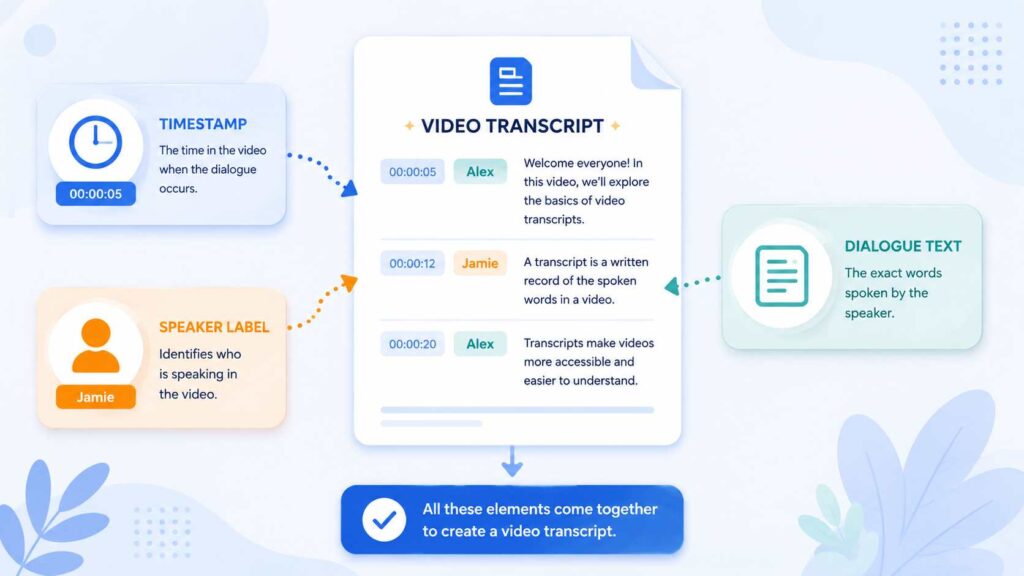
A typical video transcript may include several elements:
- Timestamps – markers that show when each part of the dialogue was spoken, making it easier to find specific sections.
- Speaker labels – names or labels such as "Host," "Guest," or "Speaker 1" that identify who is talking.
- Dialogue text – the actual spoken words presented in a readable format.
Not every transcript needs all three elements. A short tutorial with one speaker may only need the dialogue, while an interview or panel discussion usually benefits from timestamps and speaker labels.
Video Transcript Examples for Different Types of Videos
A transcript can look different depending on the type of video and how the content will be used. The following video transcript examples show some common formats.
YouTube Video Transcript Example
YouTube tutorials, educational videos, and creator content often use a straightforward timestamp-and-dialogue format, especially when there is only one main speaker.
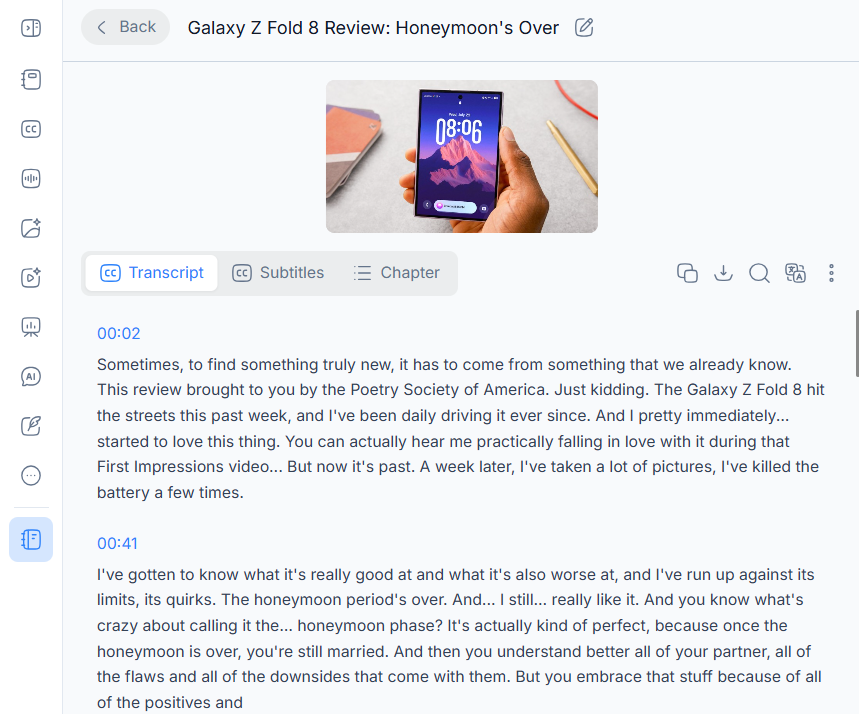
This YouTube video transcript example shows how spoken content can be organized with timestamps while keeping the original flow of the video. A searchable transcript also makes it easier to review specific parts of a longer recording.
Interview and Podcast Transcript Example
Interviews and podcasts often involve two or more speakers, so speaker labels are especially useful. A typical transcript might look like this:
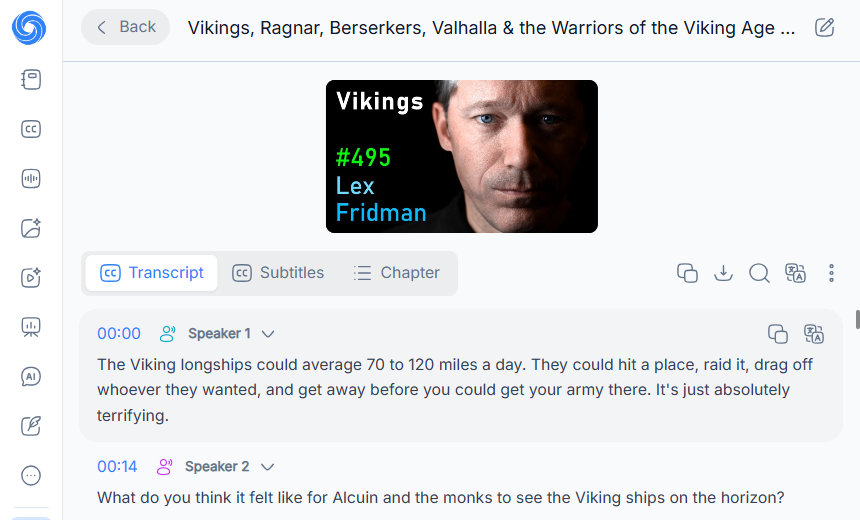
This interview transcript example makes it clear who is speaking at each point. The same format works well for video podcasts, expert interviews, panel discussions, and recorded conversations.
Webinar and Online Course Transcript Example
Webinars, online courses, and training videos often contain longer explanations and multiple sections. Their transcripts may use timestamps and speaker labels to make the material easier to navigate.
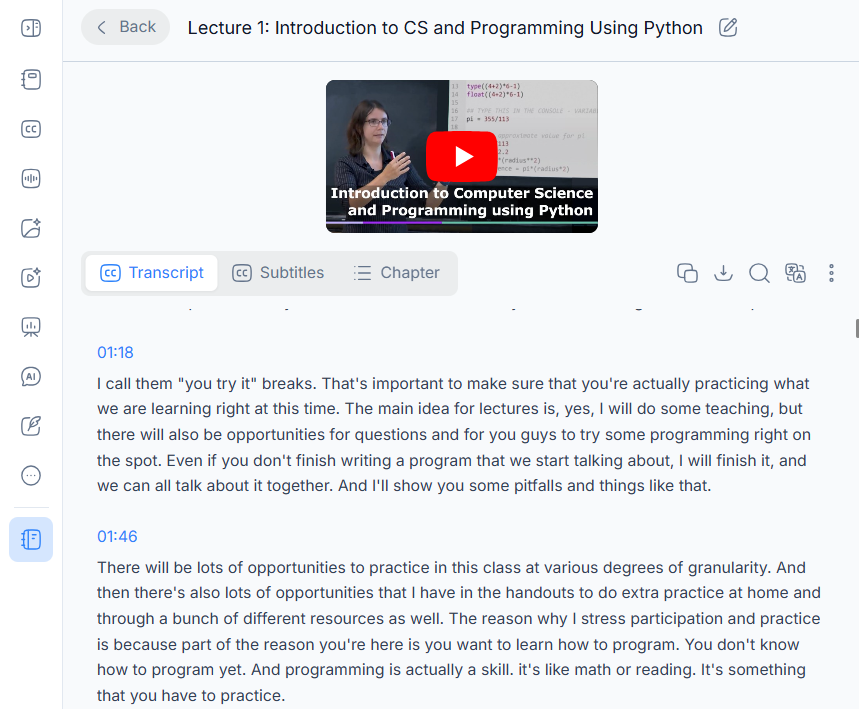
A webinar or online course transcript can be useful for reviewing lessons, finding specific information, and turning recorded classes or training sessions into searchable learning materials.
How to Transcribe Video to Text with AI — Step by Step
Once you know what a finished transcript looks like, the next step is creating one from your own video. With an AI video transcription tool such as NoteGPT's Transcribe Video to Text, you can turn spoken content into text without typing everything manually.
Step 1: Upload a Video or Add a Video Link
Start by uploading a video file directly or adding a supported video link. NoteGPT supports video sources including YouTube, TikTok, Instagram, and Google Drive, giving you multiple ways to provide the content you want to transcribe.
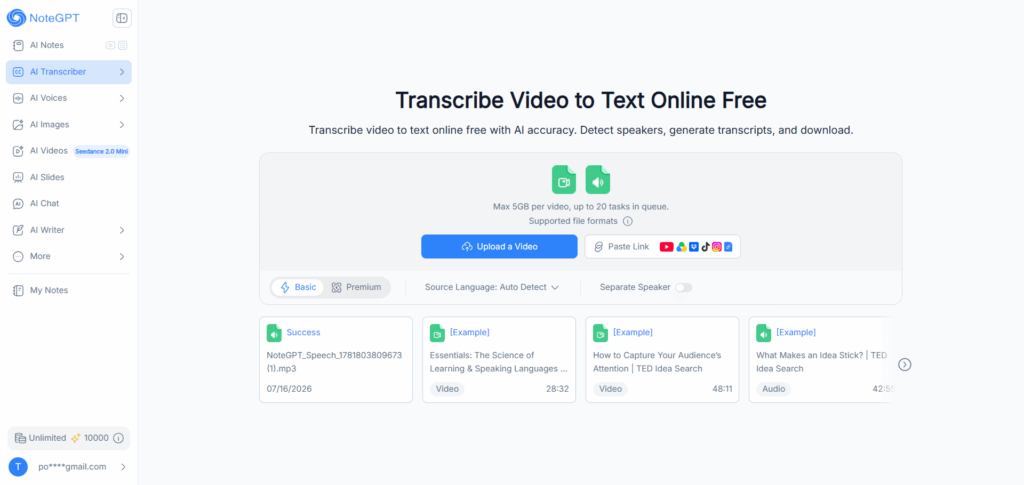
Step 2: Generate Your Video Transcript with AI
After you submit the video, NoteGPT analyzes the speech and converts it into written text. If you enable the Separate Speaker option, the tool can distinguish between different speakers, which is particularly useful for interviews, podcasts, meetings, and other multi-speaker recordings.
This process eliminates the need to listen to the entire video and type each sentence manually.
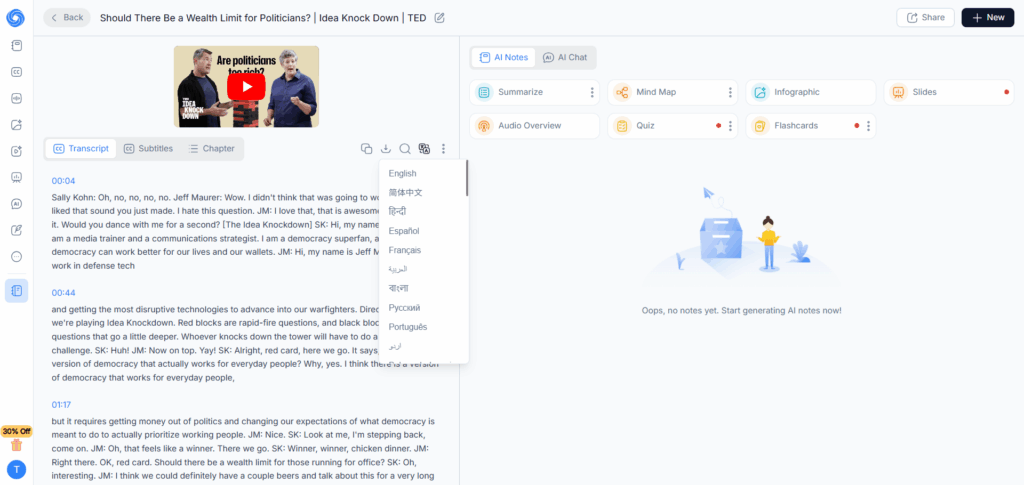
Step 3: Review and Export Your Transcript
Once the transcription is complete, review the generated text and make any necessary edits. You can then download the transcript in a format that fits your workflow.
NoteGPT supports exports including TXT, SRT, VTT, PDF, DOCX, and CSV, with options for working with timestamps depending on your needs.
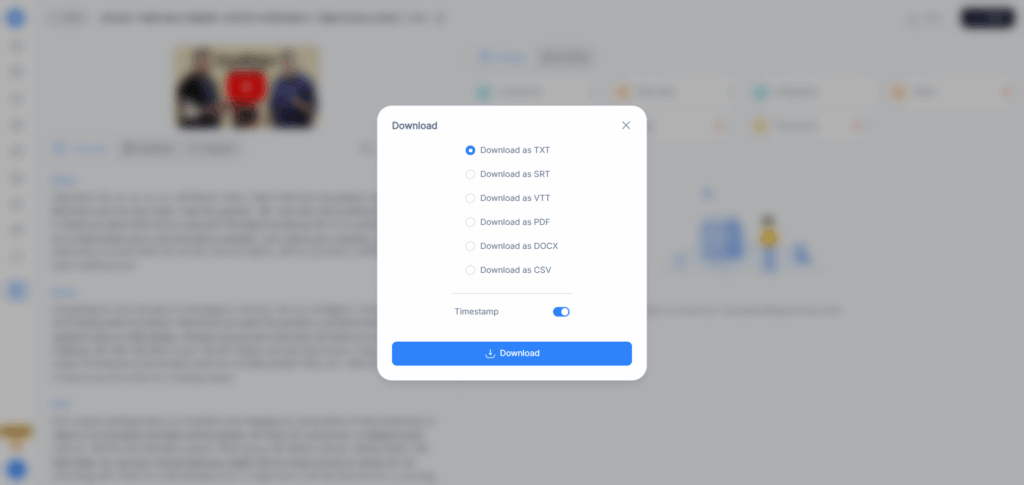
AI Video Transcription vs Manual Transcription
If you're deciding between manual transcription and AI video transcription, the biggest difference is the amount of time and effort involved.
| Factor | AI Video Transcription | Manual Transcription |
| Speed | Much faster for most recordings | Requires continuous listening and typing |
| Manual effort | Minimal typing | High |
| Long videos | Easier to process | Can become time-consuming |
| Review | Output can be reviewed and edited | Requires checking while transcribing |
| Scalability | Suitable for processing multiple recordings | Becomes harder as volume increases |
Manual transcription can still be useful when a recording contains highly specialized terminology or audio that requires extensive human interpretation. For many everyday videos, however, AI transcription provides a faster starting point that can then be reviewed for accuracy.
Why Use AI to Transcribe Video to Text?
AI video transcription is useful for more than simply saving time. Turning a recording into text makes the information easier to search, review, edit, and reuse.
Here are some common benefits:
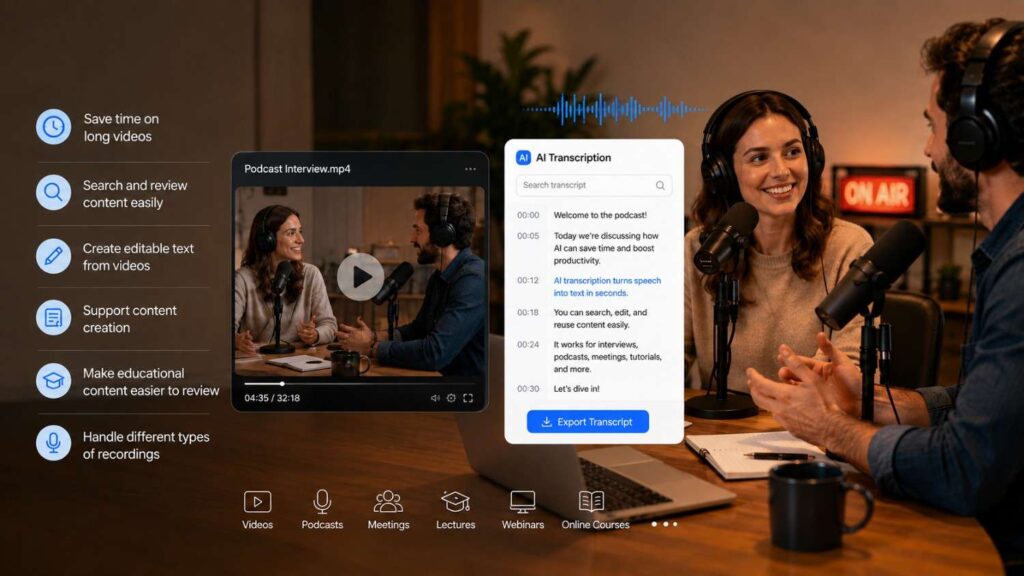
- Save time on long videos – AI can handle the initial transcription instead of requiring you to type every sentence.
- Search and review content more easily – Written text makes it easier to locate specific topics, quotes, or sections.
- Create editable text from videos – A transcript can be copied, edited, or exported for different workflows.
- Support content creation – Creators can use transcripts as a starting point for blog posts, notes, captions, or other written content.
- Make educational content easier to review – Students and educators can turn lectures, webinars, and courses into searchable text.
- Handle different types of recordings – Interviews, podcasts, meetings, tutorials, and online courses can all be converted into text.
With NoteGPT's Transcribe Video to Text, you can handle the transcription process in one place instead of manually typing the content from a recording.
Frequently Asked Questions About Video Transcripts
What Is an Example of a Video Transcript?
An example of a video transcript is a written version of the spoken content in a video, usually presented in the same order as the original speech. Depending on the video, it may include timestamps and speaker labels.
For example:
[00:05] Host: Welcome to today's tutorial. In this video, we'll cover three simple steps.
The exact format can vary depending on the type of video and how the transcript will be used.
Can I Transcribe a YouTube Video to Text Automatically?
Yes. AI video transcription tools can automatically turn the spoken content of a supported YouTube video into text. Instead of manually typing the dialogue, you can provide the video link and let the transcription tool process the recording.
How Do I Transcribe a Video to Text for Free?
You can use a free AI video transcription tool such as NoteGPT by uploading a supported video or adding a video link. The tool processes the audio and generates editable text without requiring you to manually type the entire recording.
What's the Difference Between a Transcript and Captions?
A transcript is a written version of a video's spoken content that can usually be read separately from the video. Captions are timed text displayed alongside the video and are synchronized with the corresponding audio.
In simple terms, a transcript is designed to be read as standalone text, while captions are designed to be viewed while watching the video.
How Accurate Is AI Video Transcription?
AI transcription accuracy depends on factors such as audio quality, background noise, accents, overlapping speech, and specialized terminology. Clear recordings with distinct speech generally produce better results.
It's still a good idea to review the generated transcript, especially when the content includes names, technical terms, numbers, or other details where small errors can matter.
How Long Does It Take to Transcribe a 1-Hour Video with AI?
AI transcription is generally much faster than manually typing a one-hour recording, but processing time varies depending on the tool, video length, file size, and server conditions.
For that reason, it's better to think of AI transcription as a significantly faster alternative to real-time manual transcription rather than assuming every one-hour video will finish within a fixed number of minutes.
Final Thoughts: Create Video Transcripts Faster with AI
A video transcript turns spoken content into searchable, editable text, and seeing real video transcript examples makes it easier to understand how the finished result can be structured. Whether you're working with a YouTube tutorial, podcast interview, webinar, or online course, the right transcript format can make long videos much easier to review and reuse.
Instead of typing every sentence manually, AI video transcription can handle the initial conversion from speech to text and leave you with more time to review and use the content.
With NoteGPT, you can upload a video or add a supported link, generate a transcript with AI, separate speakers when needed, and export the result as TXT, SRT, VTT, PDF, DOCX, or CSV.
Try Transcribe Video to Text for free.