


From Sora to Kling: The Reality of the AI Video Revolution
Welcome to 2026, where the phrase "I’ll fix it in post" has officially been replaced by "I’ll fix it in the next prompt." If you have spent even five minutes messing around with a modern ai video generator, you know that the honeymoon phase lasts for exactly one generation. You type a prompt, wait a few minutes, and—boom—an absolute cinematic masterpiece appears on your screen. A neon-lit cyberpunk street so detailed you can practically smell the synthetic rain. You feel like Stanley Kubrick. You are the future of filmmaking.
Then, you try to generate the next shot.
You want your character to turn around and order a coffee. You hit generate. But instead of the cyberpunk hero you just created, the AI hands you someone who looks like their distant, slightly melted cousin. The hair color is off, the jacket changed from leather to denim, and suddenly your cinematic universe crumbles into a hilarious game of digital shapeshifting.
This, dear creators, is the brutal reality of the AI video revolution. We’ve mastered the art of the stunning single shot, but we are still fighting for our lives when it comes to narrative continuity.
The Hollywood Standard vs. The Reality of Content Creation
When OpenAI dropped Sora, the world marveled at its photorealistic physics. Soon after, Kling AI dominated with impressive human-object interactions, like an AI character eating noodles.
But as the hype cleared, creators, marketers, and educators ran face-first into two major bottlenecks:
The Acoustic Vacuum: These models create a silent film aesthetic. You get a breathtaking scene, but it is dead silent. This forces you to leave the platform, find a separate audio tool, and manually align waveforms in a video editor—a tedious process that drains your creative energy.
Character Blinking (Facial Drift): Mainstream models operate on a lottery system. Because their architectures generate frames based on mathematical probabilities, they struggle to maintain exact facial geometry across different cuts. Burning hundreds of dollars in credits just to hit "regenerate" 50 times is not a viable workflow.
Enter Gemini Omni: The First Native Multimodal AI Video Era
This is where the paradigm shifts. While the industry has been trying to fix these issues by stitching different AI models together like a digital Frankenstein, Google took a radically different path with Gemini Omni.

Gemini Omni isn't just a text-to-video model with an audio generator glued onto the back end. It is a native end-to-end multimodal network. This means the model processes text, imagery, and audio simultaneously within the exact same neural architecture. When it renders a frame of a glass shattering, it isn't guessing what sound goes there later; it understands the physical impact of the glass and generates the synchronized audio at the exact same timestamp the visual occurs.
But how do regular creators harness this raw power without a computer science degree or a Silicon Valley budget?
The Ultimate Showdown: Gemini Omni vs. Sora vs. Kling
While Sora and Kling have generated massive buzz for their cinematic visual quality, high-volume content creators need tools optimized for sustainable daily production, not just movie-level concept trailers.
The biggest bottlenecks in video marketing aren't resolution; they are character drifting and tool fatigue. To help you cut through the marketing hype, here is a quick, visual look at how these three powerhouses stack up in the features that actually impact your weekly output:
| Key Feature | 🚀 Gemini Omni | 🎬 Sora | 🤖 Kling |
| Character Locking (Consistency) | ⭐⭐⭐⭐⭐ | ⭐⭐ | ⭐⭐⭐ |
| Audio & Lip-Sync (Native) | ⭐⭐⭐⭐⭐ | ⭐ | ⭐⭐⭐ |
| Workflow Speed (Efficiency) | ⭐⭐⭐⭐⭐ | ⭐⭐ | ⭐⭐⭐ |
| Value for Daily Creators | ⭐⭐⭐⭐⭐ | ⭐⭐ | ⭐⭐⭐ |
Step-by-Step Guide: How to Generate Consistent AI Videos with Gemini Omni on NoteGPT
You don't need to build your own API pipeline to access this technology. NoteGPT has successfully tamed this multimodal beast by wrapping it into a clean, creator-first interface: the NoteGPT Gemini Omni agent.
Instead of forcing you to rely on vague text prompts to describe a face, NoteGPT introduces a structural UI approach to solve the continuity crisis, making it the most reliable ai video generator for narrative continuity. Let’s break down exactly how to use it to create flawless, multi-shot narratives without losing your mind.
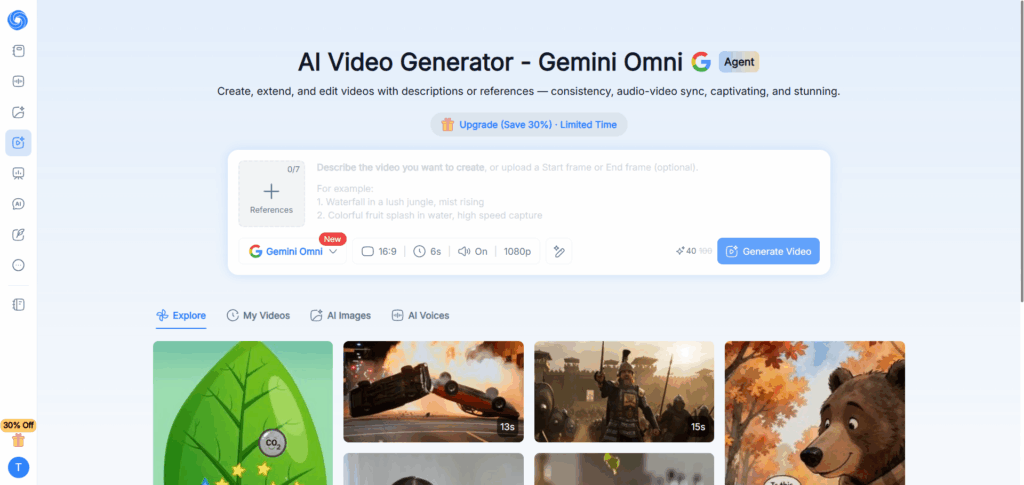
Step 1: Lock Your Character with 7 Slots (0/7 References)
The absolute gold standard rule of text to video with references is simple: one image is an accident; seven images is an identity. Most platforms give you a single "Image-to-Video" slot. If you upload a profile picture of your character facing forward, the AI has no idea what the back of their head looks like, how their jawline shifts when they laugh, or how shadows fall across their face in a dark room.
NoteGPT solves this by providing a dedicated 0/7 References matrix. To get the absolute best AI video character consistency, do not just upload one selfie. Instead, upload a diverse character sheet:
- A clean, well-lit front facial shot.
- A 45-degree three-quarter view.
- A sharp profile (side) view.
- An emotional expression (smiling, frowning, or intense focus).
By populating these slots, you are effectively giving the Gemini Omni model a 360-degree blueprint of your subject. When the camera moves, the model references multiple points of data simultaneously, ensuring the character's facial skeleton remains structurally identical across cuts.
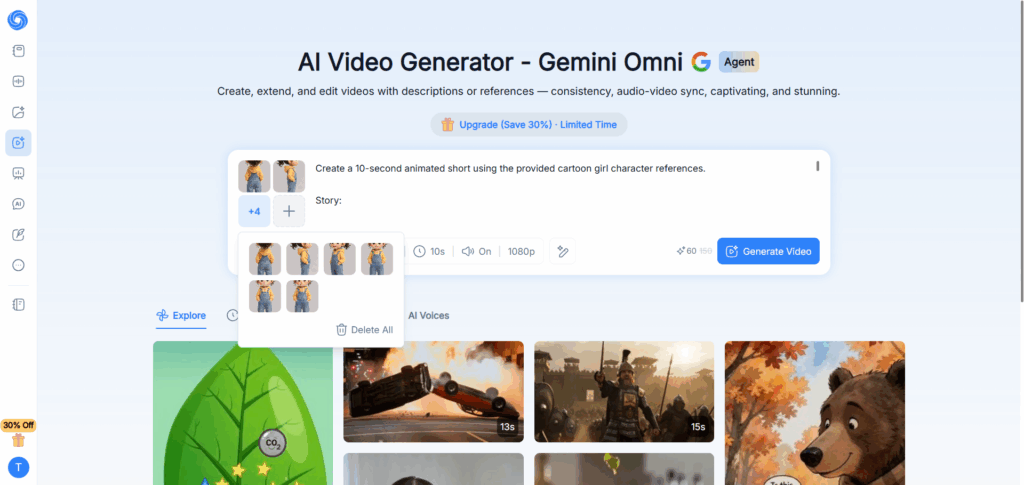
Step 2: Formulate Scene-Agnostic Prompts and Switch Audio ON
Once your character's identity is locked into the reference slots, your prompt text should focus strictly on the environment, the action, and the cinematic style. Do not waste tokens re-describing the character's face or hair. Since we are building a continuous narrative—whether your protagonist is a charming 3D cartoon little girl for a children's story or a stylized hero for a comic—your prompts should simply place that existing identity into new situations.
Here are two battle-tested prompt templates that you can easily adapt for your specific character type:
Template A: The Animation Storybook Scene (Perfect for cartoon or stylized characters)
Prompt: Character from references sitting on a giant fluffy cloud in a vibrant pastel sky, reading a glowing magical storybook, whimsical 3D animation style, soft ambient lighting, floating sparkles around, cinematic medium shot --audio on
Template B:The Dynamic Exploration Sequence
Prompt: Prompt: Character from references walking through a mysterious, enchanted forest filled with giant glowing mushrooms, looking around in wonder, Pixar aesthetic, beautiful volumetric light rays, tracking camera movement --audio on
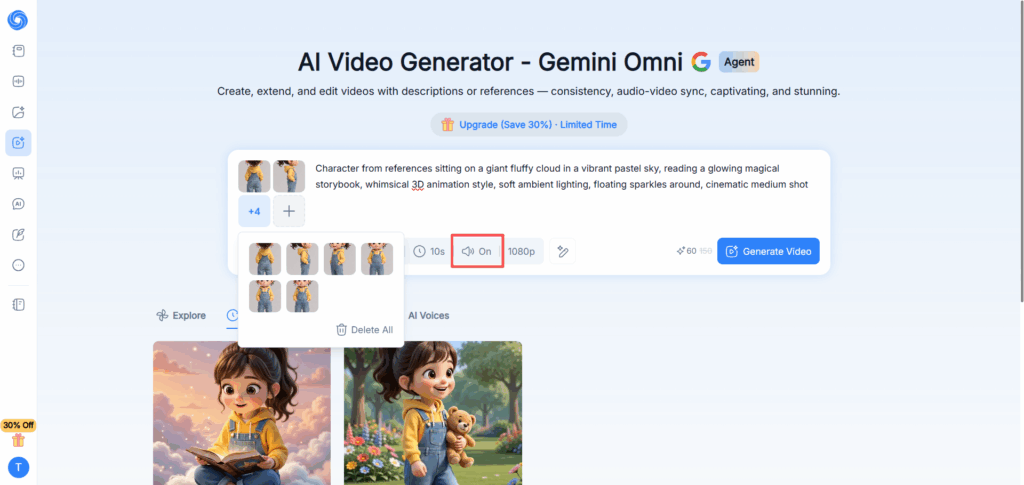
The Critical Step: Before you hit that generate button, look at the bottom right corner of your NoteGPT console and toggle the Audio switch to ON. This is your secret weapon. By activating this, you are telling the Gemini Omni agent to synthesize native environmental soundscapes that match your actions perfectly—whether it's the magical, twinkling chimes of a glowing book or the soft, ambient whispers of an enchanted forest.
Step 3: Streamline, Render, and Download Your High-Res Video
With your references set, your prompt polished, and the High dynamic option checked, click Generate.
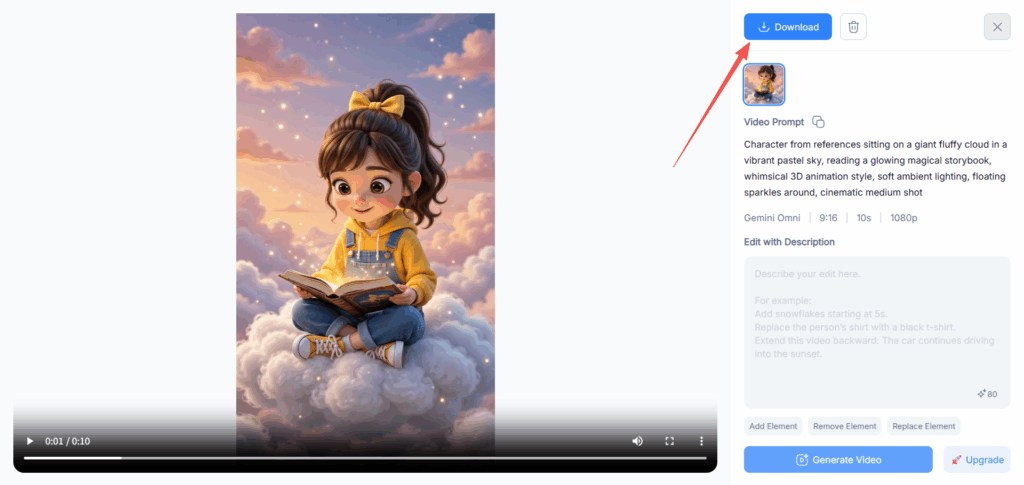
Because NoteGPT optimizes token distribution on the cloud, you won't be sitting around for hours waiting in a rendering queue. Within minutes, the platform returns a beautiful, high-definition 6-to-10 second sequence. Take a close look at the output: the face matches your reference matrix flawlessly, the character's unique clothing handles the animation track without randomly transforming between frames, and when you hit play, the audio is completely synced to the visual beats.
No external editors, no audio-splicing headaches—just a production-ready storytelling asset ready for download.
Real-World Use Cases: Where Gemini Omni Shines
Now that we have cracked the technical code of how to generate consistent AI videos, let’s talk about the actual business of creation. Software features are great on paper, but they only matter if they can save you time, make you money, or keep you from pulling your hair out during a tight deadline.
By utilizing the Gemini Omni engine inside NoteGPT, different industries are completely changing how they approach media production. Here is how this multi-modal powerhouse behaves in the wild across three major domains: Work, School, and Business.
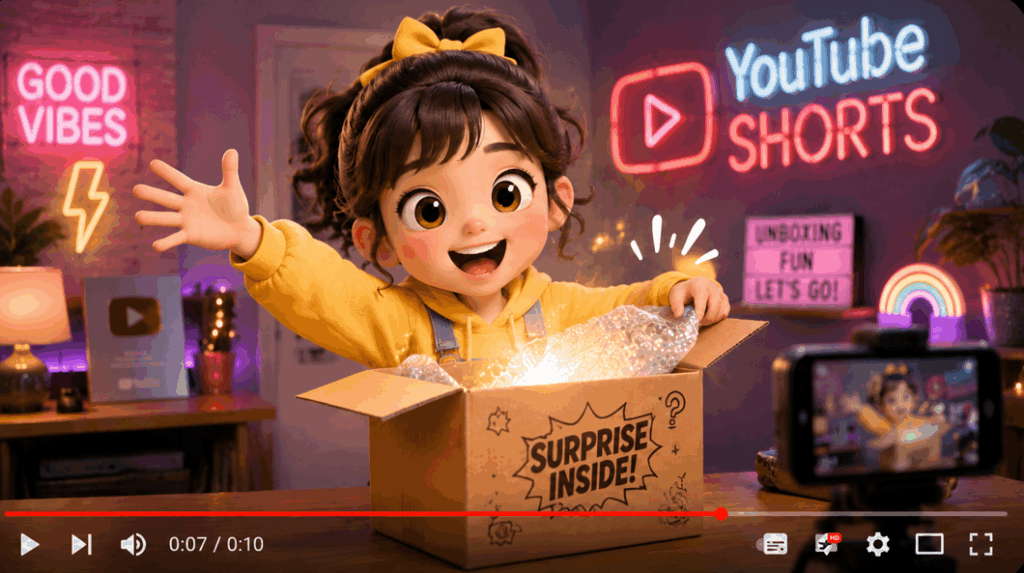
For Content Creators & Social Media (Work): High-Volume Shorts & TikToks
Social media algorithms demand relentless, predictable volume. Before native consistency existed, creating a multi-part AI storytelling series was a nightmare because characters randomized by episode three. With NoteGPT, you can build a permanent digital actor sheet using the 7 reference slots. Keep your character identical across cyberpunk cafes, medieval castles, or spaceships, allowing you to scale up to 15 short-form videos a day without a camera crew.
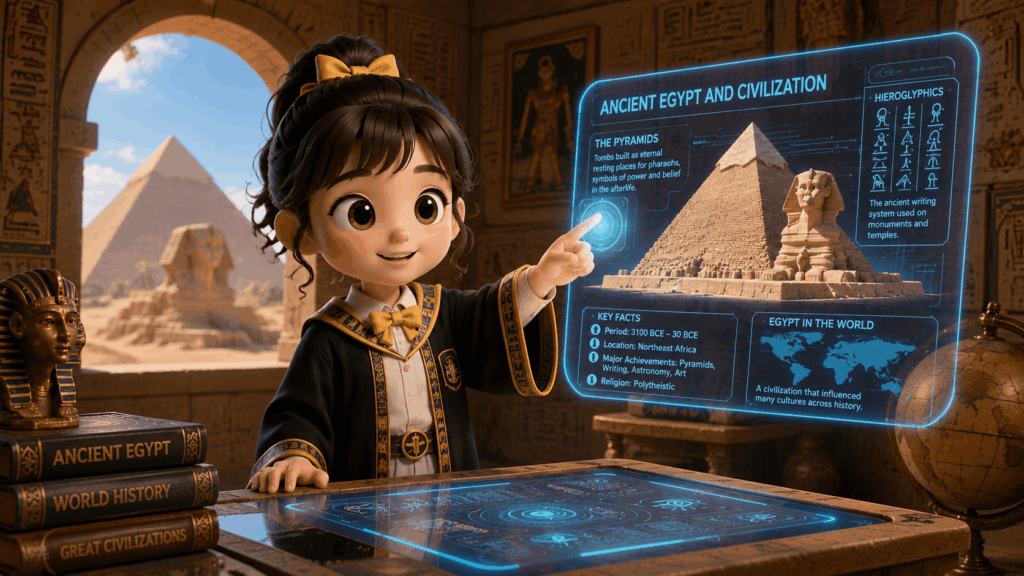
For Educators & Students (School): Engaging Multi-Modal Courseware
Static bullet-point presentations no longer capture attention. Educators can upload historical portraits or literary character concept art into NoteGPT’s reference matrix to generate animated, cinematic clips. Because realistic environmental sounds are natively synchronized by the Gemini Omni engine, teachers save hours of editing time, turning abstract lessons into highly immersive classroom experiences.
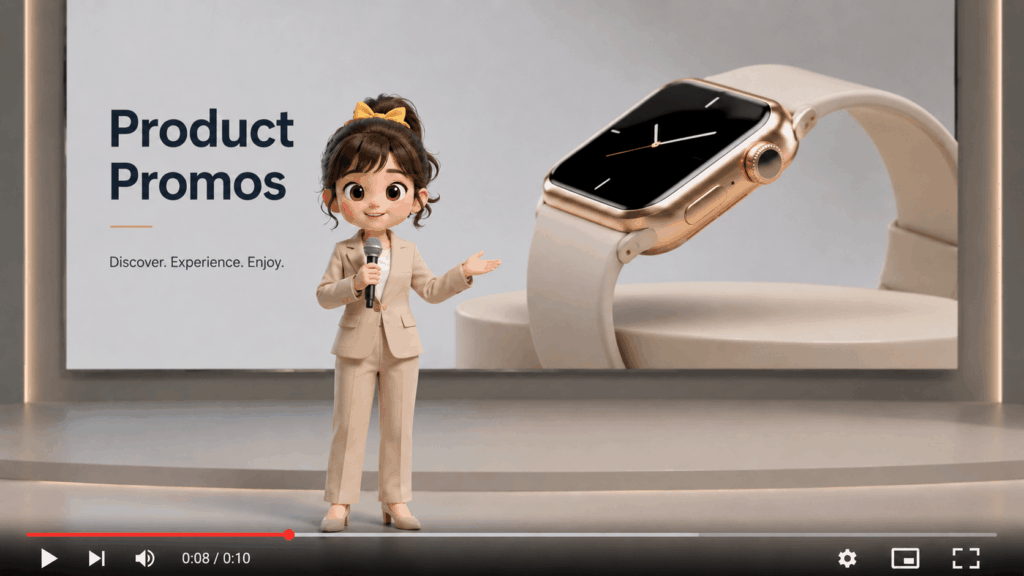
For Marketing & Entrepreneurs (Business): Cost-Effective Product Promos
Hiring an agency, booking a studio, and paying for commercial sound licensing can easily drain a startup's marketing budget. NoteGPT flattens this financial barrier. Entrepreneurs can drop 3D product renders or design sketches into the reference slots to showcase merchandise in various luxury lifestyle environments. The native audio integration delivers crisp, automatic sound effects, yielding premium product ads for a fraction of the traditional cost.
FAQs: Everything You Need to Know About NoteGPT AI Videos
To help you get the absolute most out of your rendering credits and avoid common pitfalls, we’ve gathered the most frequent questions from our creator community regarding the Gemini Omni vs Sora vs Kling ecosystem.
How many reference images should I upload for the best consistency?
The sweet spot is 3 to 5 high-quality images. Upload a clean front shot, a 45-degree angle, and a side profile. Avoid mixing different lighting setups like dark night selfies with bright studio headshots, as consistency drops if the AI gets confused by conflicting background data.
Does the NoteGPT AI Video generator support native audio sync?
Yes! This is Gemini Omni's core advantage over Sora and Kling. Just ensure the Audio toggle is switched to ON before rendering. The engine will instantly synchronize realistic environmental soundscapes directly onto your visual timeline in a single generation.
What is the ideal video length and aspect ratio for YouTube Shorts?
Choose the 9:16 aspect ratio in your settings. NoteGPT’s default 6-second high-dynamic generations are perfectly optimized for social algorithms. These punchy, loopable, sound-synced shorts yield maximum completion rates on TikTok, Shorts, and Instagram Reels.
Can I combine both realistic and stylized prompts within the same workflow?
Yes, absolutely. Gemini Omni’s 7-Slot Engine locks your character's core geometry, not just a flat image. This means you can upload a realistic portrait and seamlessly render them across different universes—whether it’s a 3D Pixar-style animation or a hyper-realistic cyberpunk scene.
Do I need a high-end GPU to process Gemini Omni videos?
Not at all. You don't need expensive hardware or a local rendering setup.
Because Gemini Omni on NoteGPT runs entirely on a cloud-based ecosystem, 100% of the heavy lifting happens on our remote servers. You can easily build, render, and download high-res videos using an entry-level laptop, tablet, or any standard web browser.
Conclusion
The showdown of Gemini Omni vs Sora vs Kling isn't about flashy Hollywood tech demos; it’s about solving daily creation bottlenecks. While other platforms leave you with silent, single-shot clips, NoteGPT delivers a production-ready assembly line straight to your browser.
By merging 7 character reference slots with native multi-modal audio sync, NoteGPT transforms AI video from an unpredictable guessing game into a reliable business asset. Stop wasting credits on character blinking and fragmented tools. Reclaim your creative workflow and launch your first project with the NoteGPT ai video generator today.