


GPT-5.4 is finally here! Just three weeks after the launch of GPT-5.3, OpenAI has rolled out a groundbreaking update—not a minor tweak, but an all-in-one "ultimate productivity assistant" that integrates reasoning, coding, and native computer operation capabilities into a single model.
No more getting bogged down in technical jargon. This guide is in plain language: we’ll break down exactly what GPT-5.4 can do for ordinary people, how to use it cost-effectively, and actionable tips you can apply right away to save time. Whether you’re tackling office work, data processing, or daily routine tasks, you’ll find practical ways to leverage this tool—especially when you experience it directly on our AI Chat .
Who Can Use GPT-5.4 & How to Get Started
Let’s clear up access and version options to avoid wasted effort:
- Paid Users (ChatGPT Plus/Team/Pro): Simply log in to the web or mobile app, switch to "GPT-5.4 Thinking" in the model selector, and start using it. The old GPT-5.2 will be retained until June 5th for backward compatibility.
- Enterprise/Education Users: Ask your admin to enable early access in the backend settings.
- Free Users: Limited access is only available via automatic system allocation for now. Beware of third-party scams claiming to "unlock full features for a fee"—they’re all fake.
No need to overcomplicate version choices: GPT-5.4 Thinking is more than enough for regular office workers. Opt for the Pro version only if you’re handling highly complex tasks like advanced programming or investment banking modeling. And remember, you can test all these capabilities seamlessly on our AI Chat without switching platforms.
6 Practical Productivity Hacks for Everyone
1. Native Computer Operation: Automate Cross-Software Tasks
This is GPT-5.4’s most game-changing upgrade—it can operate your computer just like a human, no manual input required. Imagine: you’re swamped with a quarterly report, and you need to extract sales data from Excel, format it into a Word summary, and then turn that summary into a polished PPT deck. In the old days, this meant hours of switching between apps, copying, pasting, and formatting. With GPT-5.4’s native computer operation, you can say goodbye to that drudgery.
The model can use Playwright to write code and control browsers, interpret screen screenshots to send mouse and keyboard commands, and even automate routine desktop tasks like replying to emails, scheduling calendar events, and organizing folders. In the OSWorld desktop automation test, GPT-5.4 achieved a 75.0% accuracy rate—surpassing the 72.4% of human evaluators. That’s right: in some cases, the AI is better at clicking the right buttons than you are.
How to Use: Upload a screenshot of your software interface and state your request in natural language, e.g., "Calculate the total March sales for each department in this Excel sheet, compile the results into a table, and save it to my desktop." The AI executes tasks with precision, freeing you up to focus on the creative, high-value work that actually matters. You can test this automation workflow directly on our AI Chat to see how it integrates with your daily tools.
2. 1M Token Context: Process Long Documents in One Go
Previously, analyzing long reports, contracts, or research papers with AI meant splitting files into small chunks, which often led to lost context and inconsistent outputs. You’d feed it a section of a 500-page legal contract, get a summary, then feed it the next section, and hope the AI remembered the first part. Spoiler: it usually didn’t.
GPT-5.4 now supports a 1M token super context window—equivalent to reading a 5,000-page document in one hit. This is a game-changer for anyone who deals with large volumes of text. For lawyers, it means reviewing an entire contract and identifying all the risk clauses in minutes, not days. For researchers, it means digesting an entire thesis and extracting key findings without missing critical connections between chapters.
How to Use: Upload the full file (e.g., an entire legal contract or industry whitepaper) and specify your need, e.g., "Summarize the core clauses of this contract and flag all risk points" or "Outline the research logic and conclusions of this paper." The AI delivers concise, context-rich insights without repeated follow-ups. Just be mindful: while the model can "eat" 1M tokens, its accuracy drops to 21.4% in the 256K-1M range, so for ultra-detailed analysis, it’s still best to split content into 128K chunks. Our AI Chat is optimized to handle these large file uploads and context-heavy queries smoothly.
3. Supercharge Office Work: Excel, PPT, and Word Integration
Let’s be real: most of us hate office admin. We’d rather be brainstorming creative ideas or closing deals than wrestling with Excel pivot tables or formatting PPT slides. GPT-5.4’s integration with Microsoft Office tools turns these tedious tasks into a breeze, making it the ultimate sidekick for every desk worker.
The new ChatGPT for Excel plugin (in beta) embeds AI directly into your spreadsheets. You can use natural language to create and modify financial models, explain complex formulas, and even run scenario analysis—all without leaving Excel. In OpenAI’s internal investment banking modeling test, GPT-5.4’s accuracy jumped from 43.7% (GPT-5) to 87.3%, making it a professional-level financial assistant.
For PPT and Word, the improvements are equally impressive. 68% of users rate GPT-5.4’s PPT outputs more professional than the previous version, with better design and more logical structure. For Word, it writes proposals and meeting minutes with a 33% lower error rate, so you spend less time proofreading and more time on impactful work.
How to Use: For Excel, install the beta plugin and type your request directly into the chat bar, e.g., "Use this sales data to create a quarterly forecast model with sensitivity analysis." For PPT and Word, upload your draft or start from scratch with a prompt like, "Create a monthly work report PPT with data charts, key achievements, and next-month plans." You can also draft these prompts on our AI Chat first to refine your requests before applying them to your office tools.
4. Intervene Mid-Task: Avoid Rewriting from Scratch
We’ve all been there: you ask the AI to write a 10-page market strategy report, you go grab a coffee, and when you come back, the AI has spent 20 minutes writing a masterpiece… about the wrong market. It’s a soul-crushing experience that forces you to start over from square one.
GPT-5.4 solves this frustration with its intervenable thinking process. When processing complex tasks, the model first displays a structured thinking outline, giving you a sneak peek into its plan of attack. If you see that the outline is missing a critical section (like "budget allocation" in a project proposal), you can interrupt the AI mid-flow and adjust the direction instantly. No more waiting for a full, off-topic response—you course-correct in real time.
This feature is a game-changer for content creators, strategists, and anyone who works on iterative projects. It turns the AI from a "set it and forget it" tool into a collaborative partner, reducing rework and saving hours of valuable time.
How to Use: When starting a complex task, wait for the AI to generate its thinking outline. If it’s off track, simply type, "Adjust the outline to include a section on budget allocation, focusing on labor costs," and the AI will revise its plan accordingly. Our AI Chat supports this real-time intervention seamlessly, making it ideal for iterative content creation.
5. Fast Coding for Beginners: No Expertise Required
Coding used to be a skill reserved for computer science graduates and self-taught hackers. GPT-5.4’s upgraded Codex module changes that, making coding accessible to anyone with a problem to solve—even if you can’t tell the difference between Python and Pascal.
The new fast mode boosts token generation speed by up to 1.5x, meaning faster code writing and shorter waiting times. It excels in complex front-end tasks, with generated results that are significantly better than all previous models in both aesthetics and functionality. OpenAI’s official developer showcase features 9 runnable projects—from browser FPS games to 3D city generators—all generated by Codex + GPT-5.4, with no handwritten code.
For the average office worker, this means you can automate repetitive data tasks without hiring a developer. Need to extract names and contact info from 100 Excel files? Just ask the AI. Want to build a simple web app to track team tasks? It can do that too.
How to Use: Enable fast mode and state your request in plain English, e.g., "Use Python to batch extract names and contact info from all Excel files in this folder and save the results to a new CSV." The AI provides complete, runnable code with step-by-step instructions, so you don’t need to understand the syntax to get results. You can test these coding prompts and run generated snippets directly on our AI Chat for a frictionless experience.
6. Deep Research & Data Compilation: Save Hours on Analysis
Research is the bane of many professionals’ existence. Writing a market report or a business proposal means sifting through dozens of websites, academic papers, and industry reports to find the right data. It’s time-consuming, tedious, and often leads to information overload.
GPT-5.4’s deep search capability is 17% more accurate than its predecessor, delivering curated, high-quality insights in minutes. It can access integrated financial data from providers like Moody’s and FactSet, extract structured information from earnings call transcripts, and even generate referenced outputs that you can export directly to PDF or Word.
For marketers, this means getting the latest industry user data in seconds. For financial analysts, it means compiling a comparables analysis in minutes instead of hours. For anyone who needs to make data-driven decisions, it’s an indispensable tool.
How to Use: Frame your research request clearly, e.g., "Find 2024 China short-video industry user scale data from authoritative sources and compile it into a summary table with citations." The AI will handle the rest, saving you hours of scrolling and clicking. Our AI Chat is optimized to pull in these external data sources and present them in a structured, easy-to-use format.
Common Pitfalls to Avoid with GPT-5.4
While GPT-5.4 is a powerful tool, it’s not a magic wand. To get the most out of it, you need to avoid these common pitfalls:
- Don’t waste money on the Pro version unnecessarily: GPT-5.4 Thinking handles all regular office tasks—spreadsheets, drafts, basic coding—flawlessly. The Pro version, which costs 10x more, is only for heavy-duty professional work like advanced investment banking modeling. For 95% of users, it’s overkill. You can test both versions on our AI Chat to see which fits your needs best.
- The more specific your request, the better the result: Vague prompts like "Help me with this report" lead to vague results. Instead, be specific: "Create a March sales detail sheet, grouped by department, with YoY growth rate calculations and a visual trend chart." More details = fewer follow-up questions from the AI. Our AI Chat provides prompt suggestions to help you craft more effective queries.
- Use AI as a helper, not a decision-maker: The AI excels at data processing and document organization, but core judgments (e.g., project risk assessment, proposal direction) still require human oversight. It’s a tool to augment your skills, not replace them.
- Beware of ultra-long context accuracy drops: While the 1M token context is impressive, the model’s accuracy drops sharply after 256K tokens. For ultra-detailed analysis, split your content into 128K chunks to ensure reliable results. Our AI Chat will alert you if your content exceeds the optimal context window for accuracy.
Is GPT-5.4 Worth It for Everyday Users?
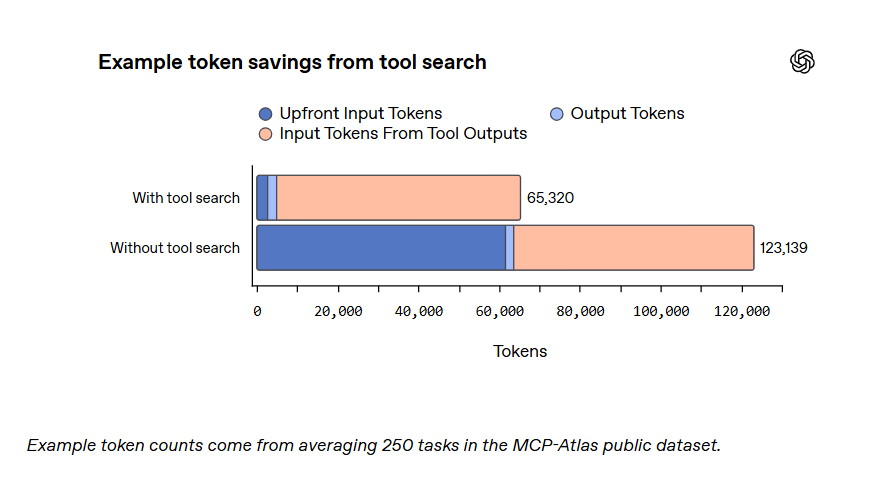
At first glance, GPT-5.4’s price tag might seem daunting. The API input cost is $2.50 per million tokens, up from $1.75 for GPT-5.2. But here’s the catch: the model’s new tool search feature saves 47% of tokens on average by only loading tool definitions on demand. For many users, this means the total cost per task is actually lower than before.
But the real value of GPT-5.4 isn’t in the dollars and cents—it’s in the time it saves. The hours you used to spend on repetitive, mechanical work can now be cut down to minutes. This frees you up to focus on the work that demands creativity, critical thinking, and human connection—the work that actually moves the needle in your career.
For the everyday user, GPT-5.4 is worth every penny. It’s not just an upgrade to a chatbot; it’s a complete overhaul of how we work. And with our AI Chat, you can access all these powerful features in one place, without the hassle of switching between multiple platforms.
Final Thoughts: Upgrade Your Workflow with GPT-5.4
GPT-5.4 is more than just a new version of OpenAI’s model—it’s a shift in AI’s role: from a "passive responder" to an "active executor." Its 6 core upgrades—1M token context, native computer operation, tool search, fast coding, intervenable thinking, and upgraded visual understanding—all target one goal: to make AI a practical productivity tool that can replace repetitive manual work and streamline real-world workflows.
While it still has limitations—ultra-long text accuracy needs improvement, some coding scenarios are outperformed by the previous generation, and the Excel plugin is only in beta—its strengths far outweigh its weaknesses. For anyone looking to boost productivity, GPT-5.4 is a game-changer that turns text prompts into actionable results.
And when you experience GPT-5.4 on our AI Chat, you unlock even more value: integrating its powerful capabilities into a seamless AI productivity ecosystem, with no limits on experimentation and no tool switching friction.
GPT-5.4 is here, and AI productivity has entered a new era—now it’s your turn to leverage it to redefine your work efficiency. Start by testing these hacks on our AI Chat today.