


AI is evolving at a pace that sometimes feels impossible to keep up with. Just when users start getting comfortable with one model, a new version appears promising better reasoning, faster responses, and more powerful tools. That’s exactly what happened with GPT-5.4, the newest generation of AI Chat technology.
But here’s the important question for everyday users:
Does this upgrade actually change how we use AI Chat, or is it just another technical update filled with benchmark numbers?
The answer is: it changes quite a lot.
GPT-5.4 isn’t just a small improvement to an AI Chat assistant. It combines stronger reasoning, larger context windows, better coding capabilities, and even computer control into a single model. In simple terms, it pushes AI Chat tools closer to becoming true digital assistants rather than just text generators.
In this guide, we’ll break down six major upgrades in GPT-5.4 and explain what they mean for real users—whether you're using AI Chat for writing, coding, research, business tasks, or daily productivity.
What Is GPT-5.4 and Why Does It Matter?
GPT-5.4 is the latest model in the GPT-5 series, designed to improve the overall AI Chat experience. While earlier models focused heavily on conversational ability, GPT-5.4 aims to combine multiple capabilities into one powerful system.
Think of previous AI Chat models as excellent conversational partners. They could answer questions, summarize articles, and generate content.
GPT-5.4 goes further.
It attempts to act like a multifunctional AI assistant that can reason through problems, interact with software tools, analyze complex documents, and even operate parts of a computer.
For users who rely on AI Chat tools every day—writers, developers, analysts, students, marketers—this shift matters a lot.
Instead of switching between multiple specialized tools, you can increasingly rely on a single AI Chat assistant to handle many tasks.
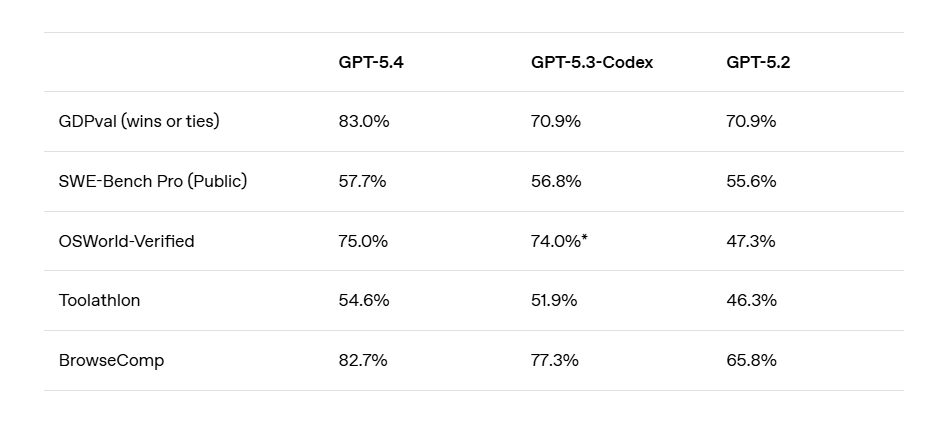
Screenshot from OpenAI’s official website.
What Changed Compared With Previous GPT Models
Earlier versions of GPT already transformed how people interact with AI Chat systems. GPT-4 made AI Chat assistants capable of producing surprisingly human-like responses. GPT-5 introduced stronger reasoning abilities.
GPT-5.4 takes another step forward by combining several improvements at once:
• A massive 1 million token context window • Built-in computer operation abilities • Smarter tool usage through Tool Search • Faster and stronger coding performance • Interactive reasoning users can interrupt • Improved image and document understanding
Each of these upgrades may sound technical at first. But when you translate them into everyday usage, they fundamentally change what AI Chat models can do.
For example, instead of pasting a document in small chunks, you can upload an entire project. Instead of manually performing steps on a website, the AI may eventually handle those actions for you.
That’s why GPT-5.4 feels less like a traditional chatbot and more like a working digital assistant.
Why This Upgrade Is More Than Just Better Benchmarks
Whenever a new AI model launches, the announcement is usually filled with benchmark scores. These numbers measure things like reasoning ability, coding accuracy, and knowledge performance.
Benchmarks are useful—but they rarely show how AI Chat actually feels to use.
The real significance of GPT-5.4 lies in usability.
For example:
Old AI workflow:
- Copy a document
- Paste a section into AI Chat
- Ask a question
- Repeat the process several times
New workflow with GPT-5.4:
Upload the entire document once and ask questions freely.
Another example:
Old workflow:
Open multiple tools for coding, research, automation, and writing.
New workflow:
Ask a single AI Chat assistant to coordinate everything.
In other words, GPT-5.4 isn’t just improving intelligence. It’s improving how humans collaborate with AI.
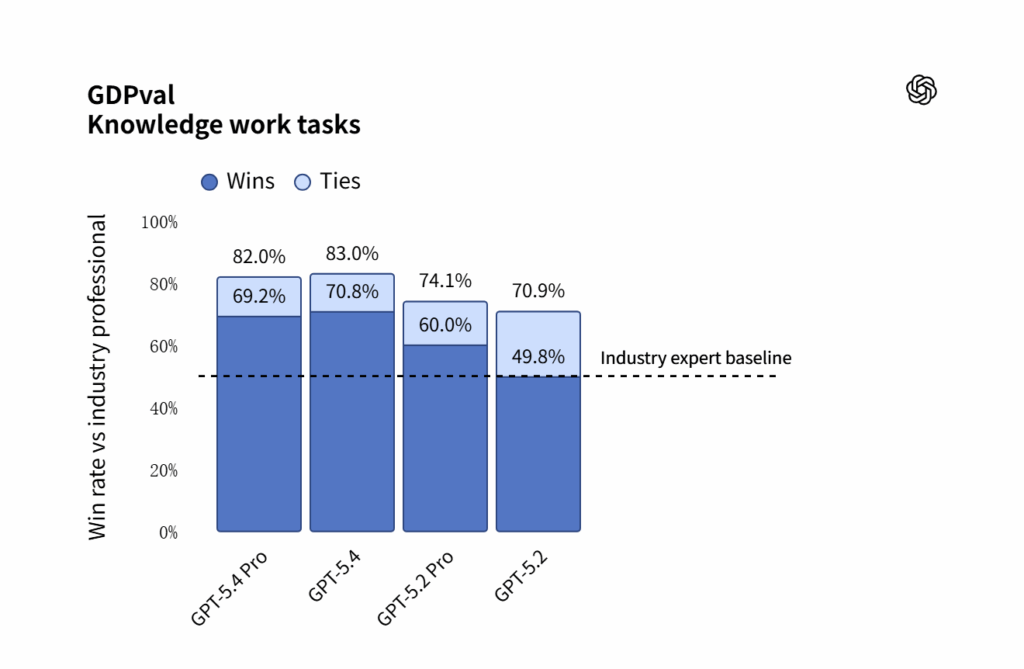
The image is from OpenAI’s official website.
Upgrade 1: A 1M Token Context Window
One of the most talked-about improvements in GPT-5.4 is the 1 million token context window.
For people who don’t spend their days reading AI research papers, that phrase might sound intimidating. But the idea is actually simple—and extremely powerful.
What a 1M Token Context Window Actually Means
A “context window” determines how much information an AI Chat model can remember in a single conversation.
Older models had strict limits. You could only provide a relatively small amount of text before the AI started forgetting earlier parts of the discussion.
GPT-5.4 dramatically expands this limit.
With a 1 million token context window, the model can theoretically process:
• Entire books • Long legal contracts • Large research reports • Full codebases • Massive documentation sets
To visualize this, imagine giving an AI Chat assistant a 400-page report and asking questions about any section without splitting it into pieces.
For many users, this changes the way they interact with AI Chat tools entirely.
How This Changes the Way People Use AI
The larger context window unlocks many practical uses for AI Chat systems.
Research and Analysis
Students and analysts can upload long research papers or reports and ask targeted questions.
Instead of searching manually, the AI Chat assistant becomes a research companion that understands the entire document.
Software Development
Developers can provide an entire project structure rather than pasting individual files.
This allows the AI Chat model to understand how different parts of the code interact.
Business and Legal Work
Companies often deal with long documents such as contracts, compliance reports, or policy manuals.
With a larger context window, AI Chat tools can help review and summarize these documents much faster.
Creative Writing
Writers working on long novels or scripts can keep entire chapters in context, making the AI more consistent with characters, tone, and plot.
In short, GPT-5.4 enables AI Chat assistants to think about bigger pieces of information instead of isolated paragraphs.
The image is from OpenAI’s official website.
Upgrade 2: AI Can Now Operate a Computer
If the context window upgrade makes AI smarter, the next upgrade makes it more active.
GPT-5.4 introduces the ability for AI to interact with computer environments—something many people have been waiting for.
This feature marks a major step toward AI agents that can perform real tasks.
What “Computer Use” Means in GPT-5.4
Traditional AI Chat models only generate text. They provide instructions, but humans must carry them out.
GPT-5.4 changes this dynamic by allowing AI to interact with software environments through tools like browser automation.
In practice, this means the AI Chat assistant could potentially:
• Click buttons on a webpage • Fill out online forms • Navigate between pages • Collect information from multiple sources • Trigger workflows in applications
Instead of telling you how to do something, the AI may eventually help do it directly.
Of course, safeguards and permissions are necessary, but the direction is clear: AI Chat tools are evolving from advisors into operators.
Real-World Tasks AI Can Perform
While this technology is still developing, the potential applications are exciting.
Here are some examples of tasks future AI Chat assistants could handle.
Web Research
Imagine asking an AI Chat tool to research competitors.
Instead of manually opening dozens of tabs, the AI could browse relevant websites, collect information, and summarize it.
Administrative Tasks
Scheduling meetings, sending emails, or updating spreadsheets could eventually become automated workflows managed by AI.
Online Shopping and Booking
An AI agent might compare flight prices, check hotel availability, and complete bookings.
Data Collection
Businesses often gather data from multiple online sources. AI could automate this process and present the results clearly.
In short, GPT-5.4 moves AI Chat technology closer to becoming a real digital assistant that helps complete tasks—not just talk about them.
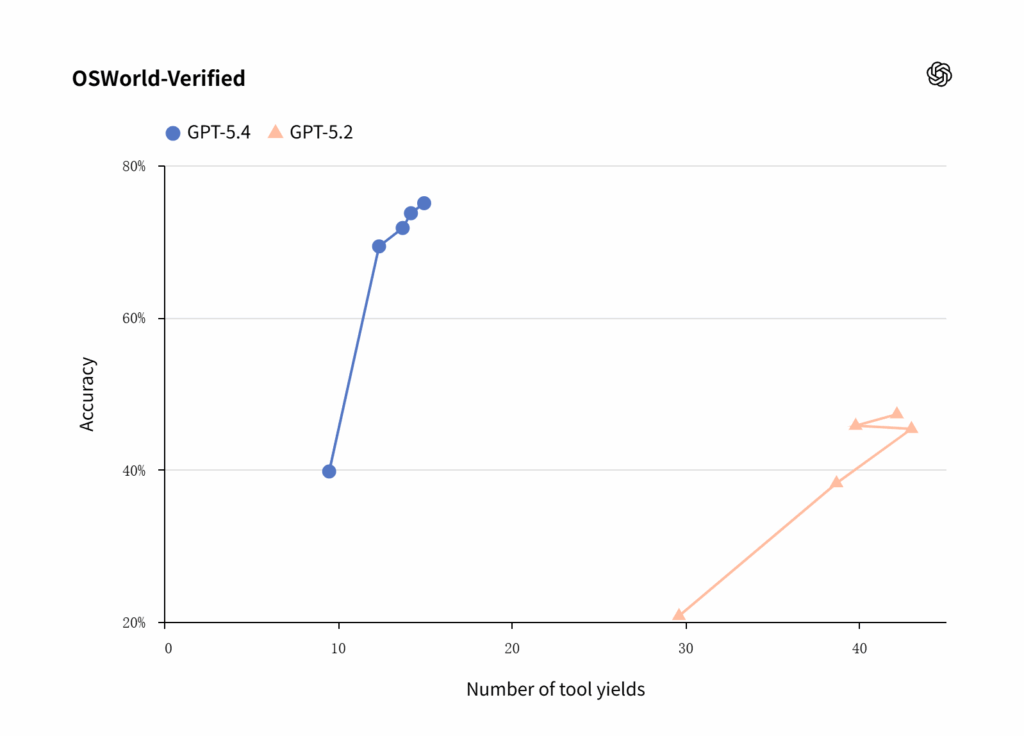
The image is from OpenAI’s official website.
Upgrade 3: Smarter Tool Usage With Tool Search
Another important improvement in GPT-5.4 is something called Tool Search. While the name may sound technical, the idea behind it is surprisingly practical.
Modern AI Chat tools often connect with external systems such as APIs, databases, or productivity apps. These tools allow the AI to perform tasks beyond generating text.
However, there used to be a problem.
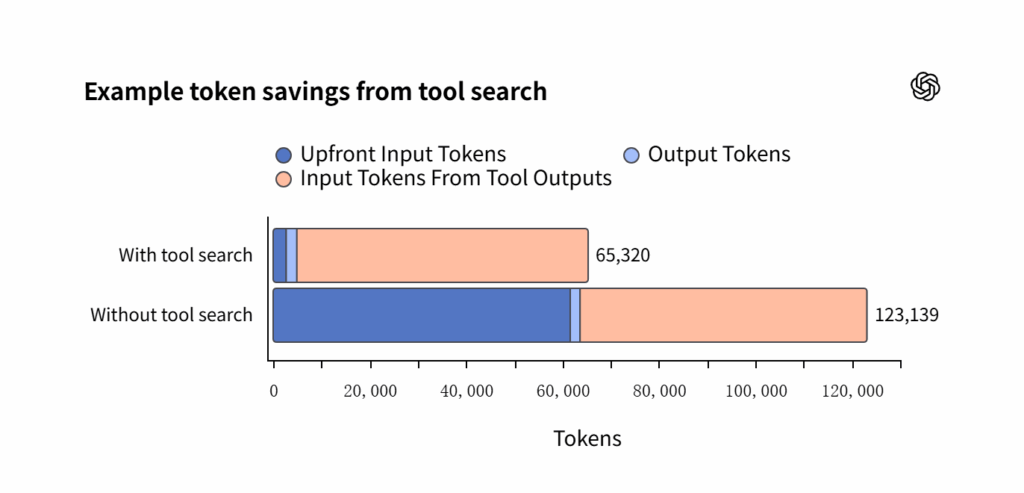
When developers connected many tools to an AI Chat assistant, the model needed to read all tool descriptions at once. If dozens of tools were available, the instructions alone could consume huge amounts of tokens.
GPT-5.4 introduces a smarter solution.
How Tool Search Works
Instead of loading every tool description into the prompt, GPT-5.4 first sees a simple list of available tools.
Then, when the AI Chat model decides it needs a specific tool, it retrieves the detailed instructions only at that moment.
Think of it like a library.
Rather than placing every book on your desk, the AI simply checks the catalog and grabs the book when necessary.
This makes the entire AI Chat system much more efficient.
Benefits include:
• Lower token usage • Faster responses • Better scalability when many tools are connected • Cleaner prompts for developers
For users, the technical details happen behind the scenes—but the result is a smarter AI Chat assistant that can handle more complex tasks without slowing down.
Why This Makes AI More Efficient for Complex Tasks
The real advantage of Tool Search appears when AI needs to coordinate multiple tools.
Imagine asking an AI Chat assistant to perform a business analysis.
The workflow might involve:
- Searching financial databases
- Accessing company reports
- Running calculations
- Generating a written summary
Without efficient tool management, the AI Chat model might struggle to process all these tools at once.
Tool Search allows the system to use tools selectively, which keeps conversations faster and more accurate.
In the long run, this feature supports the rise of AI-powered workflows, where a single AI Chat system manages many different services behind the scenes.
The image is from OpenAI’s official website.
Upgrade 4: Faster and More Capable Coding
Coding has become one of the most important use cases for modern AI Chat tools.
Developers now rely on AI to generate code snippets, debug programs, explain documentation, and even build entire applications.
GPT-5.4 improves this experience significantly.
Coding Improvements in GPT-5.4
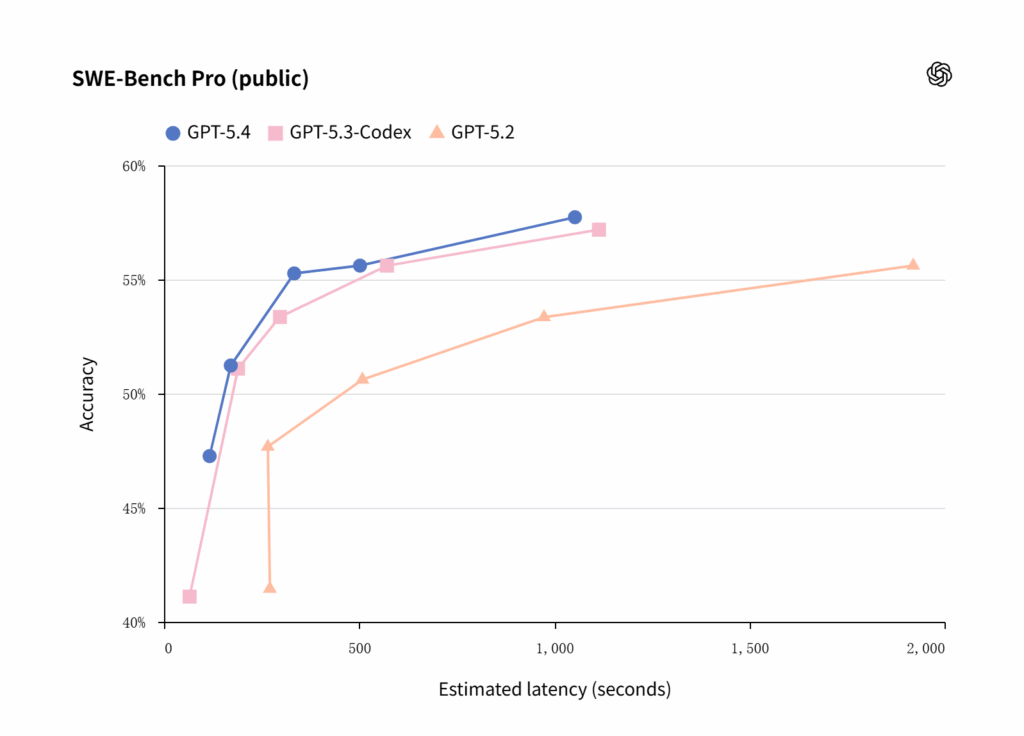
One of the biggest improvements in GPT-5.4 is its coding accuracy and speed.
Compared with earlier AI Chat models, GPT-5.4 performs better in tasks such as:
• Writing structured code • Fixing bugs • Understanding large codebases • Generating front-end interfaces • Building working prototypes
Another improvement is response speed.
Some development environments offer a fast mode that allows GPT-5.4 to generate code up to 1.5 times faster. This makes AI feel more like a real-time collaborator rather than a slow assistant.
For developers using AI Chat assistants, these improvements translate into faster iterations and fewer errors.
What Developers Can Do With It Now
The coding abilities of GPT-5.4 open up new possibilities for both professional developers and beginners.
Rapid Prototyping
Developers can describe an idea and quickly generate a working prototype.
For example, an AI Chat tool could help create:
• a simple web application • a landing page • a data visualization dashboard • a small browser game
Learning Programming
Beginners often struggle with error messages and confusing documentation.
An AI Chat assistant can explain problems in plain language, making programming much more accessible.
Debugging Complex Projects
When working with large codebases, developers can ask the AI Chat model to analyze multiple files and suggest improvements.
This is where the large context window from earlier upgrades becomes especially powerful.
Together, these capabilities make GPT-5.4 one of the most capable AI Chat tools for coding available today.
The image is from OpenAI’s official website.
Upgrade 5: Interactive Thinking
One of the most fascinating changes in GPT-5.4 is something called interactive thinking.
Earlier AI Chat models would process a question silently and then present the final answer. If the result wasn’t quite right, users had to start over.
GPT-5.4 introduces a more collaborative approach.
How GPT-5.4 Shows Its Thinking Process
When solving complex problems, GPT-5.4 can display a structured reasoning outline before producing the final result.
This allows users to see how the AI Chat assistant is approaching a task.
For example, if you ask the model to analyze a business strategy, it might outline steps such as:
- Identify market trends
- Evaluate competitors
- Estimate potential risks
- Suggest growth opportunities
By presenting this structure early, the AI Chat model makes its reasoning easier to follow.
For many users, this creates a more transparent AI Chat experience.
Why Being Able to Interrupt the AI Matters
Even more interesting is the ability to interrupt the AI’s thinking process.
Instead of waiting for the full answer, users can modify the direction mid-task.
For example:
• “Focus more on the marketing strategy.” • “Ignore the financial section.” • “Use a simpler explanation.”
This turns the interaction into a real collaboration rather than a one-sided response.
In practical terms, it saves time and produces better results.
The AI Chat assistant becomes more like a coworker who adjusts their approach based on your feedback.
Upgrade 6: Better Vision and Document Understanding
AI Chat is no longer limited to text.
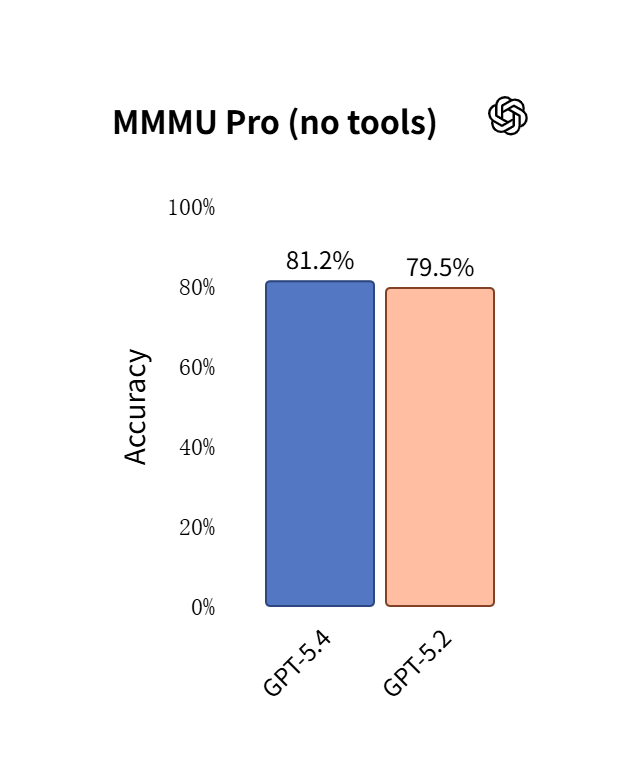
Modern AI Chat tools can analyze images, charts, screenshots, and scanned documents. GPT-5.4 improves these visual abilities significantly.
Improved Image and Document Analysis
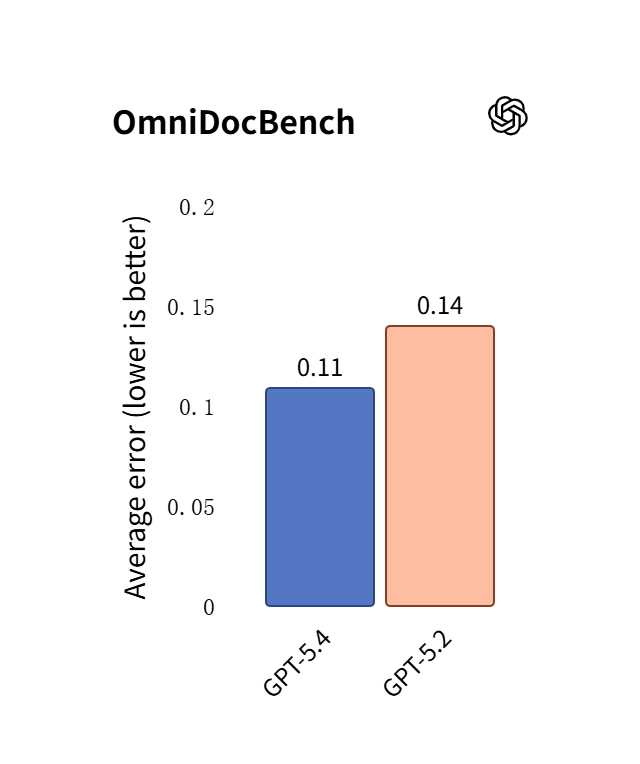
GPT-5.4 introduces higher-resolution image processing and improved document understanding.
This means the AI Chat model can interpret complex visual content more accurately, including:
• screenshots • diagrams • scanned PDFs • spreadsheets • presentation slides
For professionals who deal with visual data, this improvement is extremely useful.
Instead of manually explaining a chart, users can simply upload it and ask the AI Chat assistant for insights.
Use Cases for Screenshots, Charts, and Design Files
Here are a few practical scenarios where these upgrades shine.
UI and Product Design
Designers can upload screenshots of a website interface and ask the AI Chat assistant for usability suggestions.
Data Analysis
Business users can provide charts or dashboards and ask the AI to identify trends.
Document Processing
Researchers can upload scanned papers or reports and ask for summaries.
Technical Support
Users can send screenshots of error messages and receive troubleshooting guidance.
In all these situations, AI Chat tools become visual problem solvers, not just text generators.
How GPT-5.4 Compares With Other AI Models
With so many powerful AI Chat models available today, it’s natural to wonder how GPT-5.4 compares to its competitors.
GPT-5.4 vs Previous GPT Versions
Compared with earlier GPT models, GPT-5.4 offers several clear advantages:
• much larger context window • improved reasoning • stronger coding capabilities • integrated tool usage • computer interaction features
These upgrades push the AI Chat assistant closer to functioning as a general-purpose AI helper rather than a simple chatbot.
The image is from OpenAI’s official website.
How It Stacks Up Against Other Models
Other leading AI Chat models, such as Claude and Gemini, also offer impressive capabilities.
Some models may perform better in certain specialized benchmarks like coding or scientific reasoning.
However, GPT-5.4 stands out for its balanced combination of features, including:
• strong reasoning • flexible tool usage • powerful coding abilities • visual understanding • emerging AI agent capabilities
For many users, this combination makes GPT-5.4 one of the most versatile AI Chat tools currently available.
For readers who want to actually try these new capabilities, tools built around AI Chat interfaces are already beginning to support the latest models.
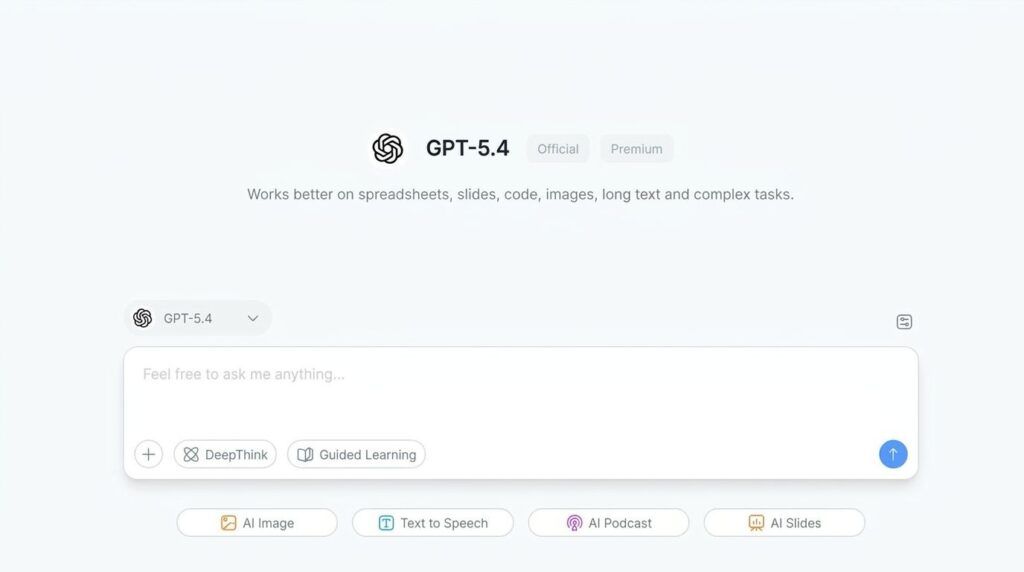
For example, platforms like NoteGPT AI Chat allow users to experiment with advanced models such as GPT-5.4 directly in conversation. This makes it easier to experience improvements like longer context memory, better reasoning, and smarter coding assistance in real workflows — whether you're writing, researching, or brainstorming ideas.
Of course, the most interesting part isn’t just the model itself. It’s how these upgrades start to change the way people interact with AI Chat tools in everyday tasks.
Conclusion
If you look closely at the upgrades in GPT-5.4, a pattern begins to emerge. These improvements aren’t just about making an AI model smarter. They’re about making AI more usable in real life.
A 1M token context window means AI can finally handle entire projects instead of fragments. Computer operation means AI can move from advice to action. Tool search means AI can orchestrate multiple systems. Interactive thinking turns conversations with AI Chat into something closer to collaboration.
In other words, GPT-5.4 pushes AI beyond being a clever chatbot. It starts behaving more like a digital coworker.
This shift matters more than any benchmark score. For years, AI tools have been impressive but limited. You could ask questions, generate text, or brainstorm ideas, but the AI was always confined to a small conversational box.
With upgrades like those in GPT-5.4, that box is starting to disappear.
AI Chat tools are evolving into universal interfaces for working with information, software, and knowledge itself. Instead of jumping between apps, documents, and search engines, users can increasingly manage complex workflows inside a single AI conversation.
And that may be the most important upgrade of all.
The future of AI isn’t just better models. It’s a world where talking to an AI becomes one of the primary ways we work, learn, and create.
GPT-5.4 is another step toward that future.