


The AI landscape just shifted. On April 23, 2026, the rumors were finally laid to rest as the GPT-5.5 System Card appeared on OpenAI’s official deployment hub. We aren't just looking at a "smarter chatbot" anymore. We are witnessing the pivot from reactive AI chat to proactive AI agents.
If you’ve been following the evolution from GPT-4 to the GPT-5 family, you know the trajectory has been toward deeper reasoning. But GPT-5.5 (code-named "Spud") is the model that finally breaks the "chat" barrier.
What Is GPT-5.5?
GPT-5.5 is OpenAI’s latest frontier model, specifically architected for complex, real-world work. Unlike its predecessors, which were optimized for text generation, GPT-5.5 is optimized for agentic tool use and autonomous reasoning.
It represents the pinnacle of the GPT-5 series, running on the state-of-the-art NVIDIA GB200 NVL72 infrastructure. This hardware allows the model to process massive "System 2" thinking—a cognitive process where the AI plans, evaluates, and self-corrects before it ever outputs a word to the user.
Why Everyone Is Talking About GPT-5.5 Right Now
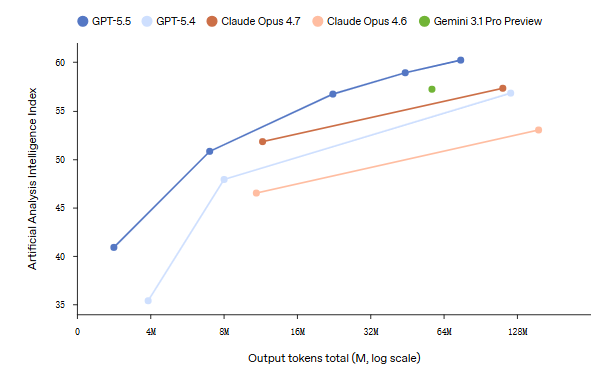
The buzz isn't just about "better answers." It’s about reliability. In early benchmarks, GPT-5.5 showed a massive leap in "task completion" rather than just "word prediction." It’s the first model that can reliably handle an entire afternoon of research, document creation, and data analysis with a single prompt.
Is GPT-5.5 an Official Model or a Trend Name?
For months, "GPT-5.5" was a trend name used by the community to describe the rumored "Orion" or "Spud" models. However, as of April 2026, OpenAI has officially adopted the nomenclature within its System Card documentation. While some users still refer to it as the "GPT-5 Full Release," the official technical designation is GPT-5.5, distinguishing it from the faster, lighter GPT-5.1 or the specialized GPT-5.4.
What Makes GPT-5.5 Different from Previous Models?
The difference between GPT-4 and GPT-5.5 isn't incremental—it’s architectural.
Faster Responses That Actually Feel Instant
While the model performs much more complex internal reasoning, the time-to-first-token has been optimized. Thanks to new inference scaling laws, GPT-5.5 delivers a "stream of consciousness" feel. You no longer wait for a block of text; the agent starts executing and reporting its progress immediately.
Better Reasoning in Multi-Step Tasks
The "ruthless" part of GPT-5.5 is its Long-Horizon Planning. If you ask it to "build a competitor analysis for a new SEO tool," it doesn't just write a list. It:
- Searches the web for top players.
- Analyzes their pricing pages.
- Synthesizes their backlink profiles.
- Creates a formatted spreadsheet.
- Summarizes the "gap in the market."
Improved Context Understanding in Longer Conversations
With a 1.0M token input context window, GPT-5.5 doesn't "forget" what you said 20 minutes ago. It treats a month-long project as a single, continuous session. This "infinite memory" is a core requirement for a true AI agent, and GPT-5.5 delivers it with near-perfect recall.
Why AI Chat Is Starting to Feel Like an AI Agent
The most significant change in 2026 is the death of the "Prompt-Reply" loop.
From Simple Q&A to Multi-Step Task Handling
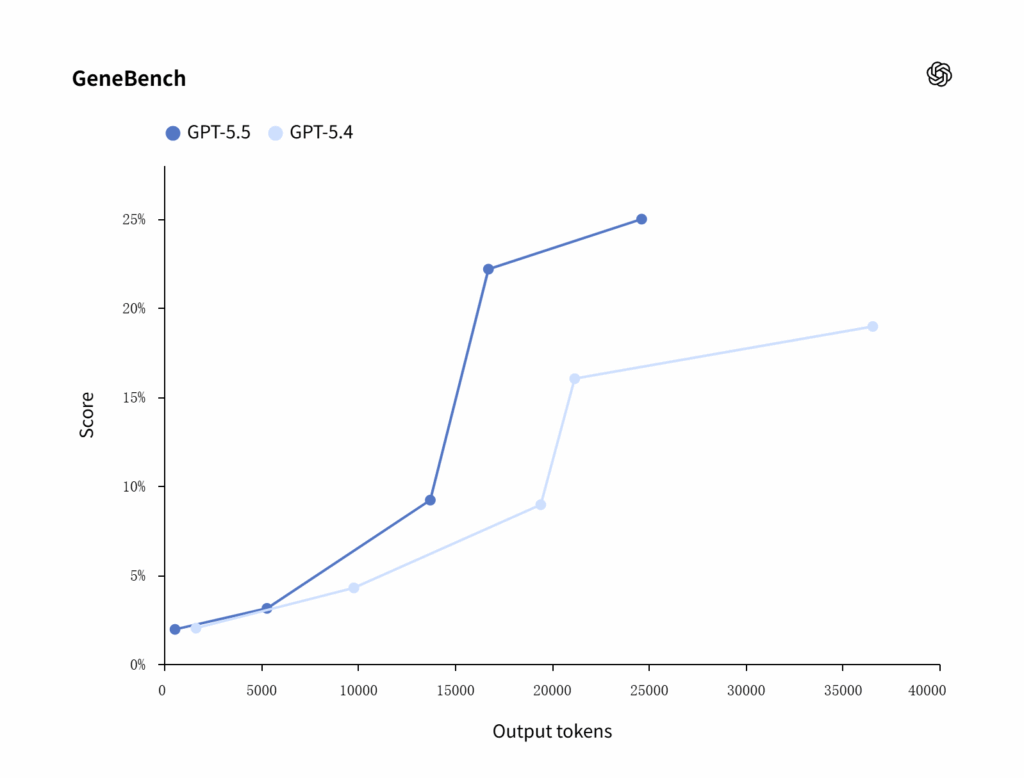
An AI Agent doesn't just answer; it acts. GPT-5.5 is the first model to show "high-agency" behavior. When it encounters a broken link or an ambiguous instruction, it doesn't just fail or hallucinate. It asks for clarification or tries an alternative tool (like switching from Python to a Search tool) to get the job done.
Memory, Context, and Continuous Interaction
We are moving toward Persistent Agents. GPT-5.5 uses "Chain of Thought" (CoT) not just to solve a math problem, but to manage its own memory. It can remember your specific SEO writing style or your company’s internal jargon across different threads, making it feel less like a tool and more like a remote employee.
Where AI Chat Still Falls Short of True Agents
Despite the hype, we aren't at "Total AGI" yet. GPT-5.5 still operates within a digital sandbox. While it can use "Computer Use" features to navigate a browser, it still requires human oversight for high-stakes financial or legal decisions. It is an Agentic Assistant, not a replacement for human judgment.
Real Use Cases You Can Try Right Now
The beauty of GPT-5.5 is that it doesn’t require a PhD in prompt engineering to be effective. Because it operates as an agentic AI, you can give it a goal rather than a set of instructions.
Writing, Summarizing, and Content Creation
For content professionals, the "blank page" problem is gone. GPT-5.5 can handle Recursive Content Creation.
- The Workflow: Give it a raw transcript of a 2-hour podcast. It won't just summarize it; it will extract the key themes, draft five LinkedIn posts in your specific voice, create a 2,000-word blog post (like this one!), and even suggest image prompts for the headers.
- The Difference: The nuance in tone. GPT-5.5 has significantly reduced the "robotic" flow of AI writing, making it much harder for AI detectors to flag and much easier for humans to read.
Coding and Problem Solving
In the coding domain, GPT-5.5 achieved a staggering 82.7% on Terminal-Bench 2.0. This means it doesn’t just write "snippets"—it manages entire repositories.
- Agentic Debugging: You can now provide a bug report and a link to your GitHub repo. GPT-5.5 will "think" through the dependency tree, identify the conflicting package, write the patch, and verify the fix by running a virtual terminal environment. It’s effectively a Junior DevOps Engineer in your browser.
Learning, Research, and Workflow Support
GPT-5.5 excels at Synthesized Research.
- Example: "I need to learn the history of the semiconductor industry to prepare for an investment meeting. Find the top 5 turning points, explain the current tension between major manufacturers, and draft a 10-slide deck outline."
- Agentic Action: It will browse real-time news, cross-reference financial reports, and deliver a structured knowledge base in minutes.
Continuing where we left off, here is the second half of the blog post, diving into real-world use cases, the competitive landscape, and the future of AI agents.
Real Use Cases You Can Try Right Now
The beauty of GPT-5.5 is that it doesn’t require a PhD in prompt engineering to be effective. Because it operates as an agentic AI, you can give it a goal rather than a set of instructions.
Writing, Summarizing, and Content Creation
For content professionals, the "blank page" problem is gone. GPT-5.5 can handle Recursive Content Creation.
- The Workflow: Give it a raw transcript of a 2-hour podcast. It won't just summarize it; it will extract the key themes, draft five LinkedIn posts in your specific voice, create a 2,000-word blog post (like this one!), and even suggest image prompts for the headers.
- The Difference: The nuance in tone. GPT-5.5 has significantly reduced the "robotic" flow of AI writing, making it much harder for AI detectors to flag and much easier for humans to read.
Coding and Problem Solving
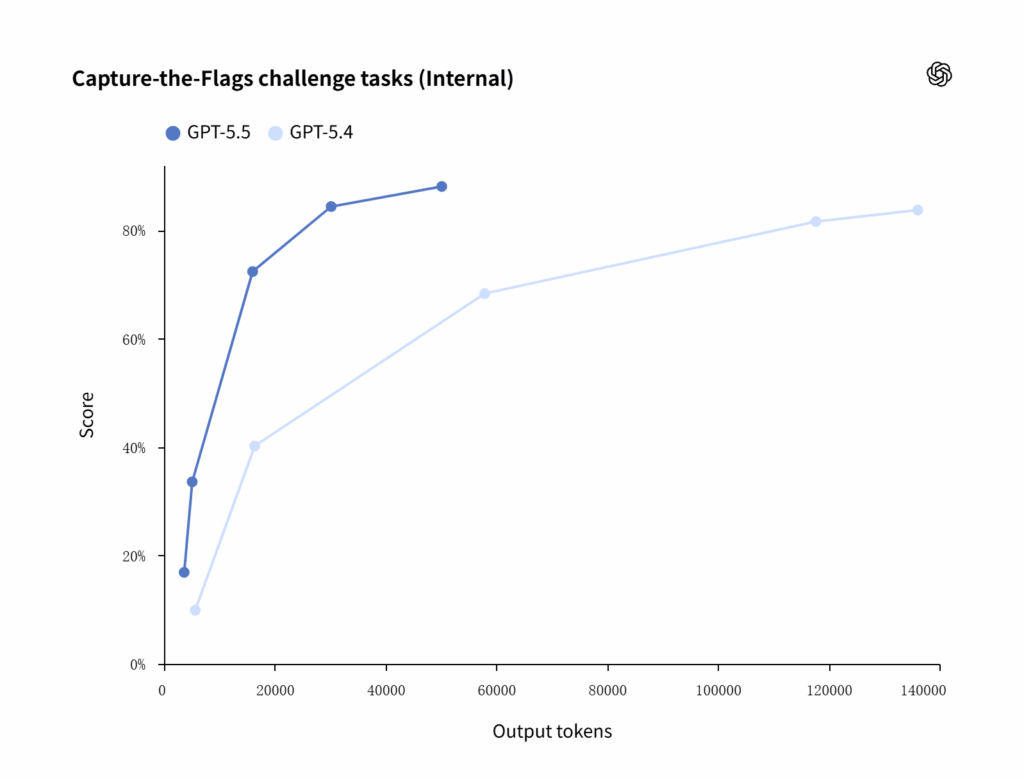
In the coding domain, GPT-5.5 achieved a staggering 82.7% on Terminal-Bench 2.0. This means it doesn’t just write "snippets"—it manages entire repositories.
- Agentic Debugging: You can now provide a bug report and a link to your GitHub repo. GPT-5.5 will "think" through the dependency tree, identify the conflicting package, write the patch, and verify the fix by running a virtual terminal environment. It’s effectively a Junior DevOps Engineer in your browser.
Learning, Research, and Workflow Support
GPT-5.5 excels at Synthesized Research.
- Example: "I need to learn the history of the semiconductor industry to prepare for an investment meeting. Find the top 5 turning points, explain the current tension between major manufacturers, and draft a 10-slide deck outline."
- Agentic Action: It will browse real-time news, cross-reference financial reports, and deliver a structured knowledge base in minutes.
How to Use GPT-5.5 in AI Chat Today
If you’re wondering where to find this beast, it’s already rolling out across the OpenAI ecosystem.
What You Can Do Inside an AI Chat Interface
For ChatGPT Plus, Pro, and Enterprise users, GPT-5.5 is accessible via the model selector. The most notable change is the "Planning Bar." As the model works, you’ll see a drop-down showing its thought process: "Searching for pricing data... Analyzing competitors... Verifying facts..." This transparency is key to the agentic experience.
Tips to Get Better Results from AI Chat
To truly unlock the GPT-5.5 Agentic Mode, change how you talk to it:
- Define the Outcome, Not the Steps: Instead of "Search for X and then write Y," say "Your goal is to provide a complete market analysis report on X."
- Give it Tool Permission: Explicitly say "Use the web search and Python tool as needed" to ensure it leverages its full agentic toolkit.
- Use the 1M Token Context: Don’t be afraid to upload 500-page PDFs. The model can "reason" across the entire document without losing the thread.
Why AI Chat Is the Easiest Way to Experience GPT-5.5
You don't need to know how to use an API or write Python scripts. The ChatGPT interface translates your natural language into agentic actions. It acts as the "operating system" for the model, making it the most accessible entry point for experiencing the next generation of AI.
Continuing where we left off, here is the second half of the blog post, diving into real-world use cases, the competitive landscape, and the future of AI agents.
Real Use Cases You Can Try Right Now
The beauty of GPT-5.5 is that it doesn’t require a PhD in prompt engineering to be effective. Because it operates as an agentic AI, you can give it a goal rather than a set of instructions.
Writing, Summarizing, and Content Creation
For content professionals, the "blank page" problem is gone. GPT-5.5 can handle Recursive Content Creation.
- The Workflow: Give it a raw transcript of a 2-hour podcast. It won't just summarize it; it will extract the key themes, draft five LinkedIn posts in your specific voice, create a 2,000-word blog post (like this one!), and even suggest image prompts for the headers.
- The Difference: The nuance in tone. GPT-5.5 has significantly reduced the "robotic" flow of AI writing, making it much harder for AI detectors to flag and much easier for humans to read.
Coding and Problem Solving
In the coding domain, GPT-5.5 achieved a staggering 82.7% on Terminal-Bench 2.0. This means it doesn’t just write "snippets"—it manages entire repositories.
- Agentic Debugging: You can now provide a bug report and a link to your GitHub repo. GPT-5.5 will "think" through the dependency tree, identify the conflicting package, write the patch, and verify the fix by running a virtual terminal environment. It’s effectively a Junior DevOps Engineer in your browser.
Learning, Research, and Workflow Support
GPT-5.5 excels at Synthesized Research.
- Example: "I need to learn the history of the semiconductor industry to prepare for an investment meeting. Find the top 5 turning points, explain the current tension between major manufacturers, and draft a 10-slide deck outline."
- Agentic Action: It will browse real-time news, cross-reference financial reports, and deliver a structured knowledge base in minutes.
How to Use GPT-5.5 in AI Chat Today
If you’re wondering where to find this beast, it’s already rolling out across the OpenAI ecosystem.
What You Can Do Inside an AI Chat Interface
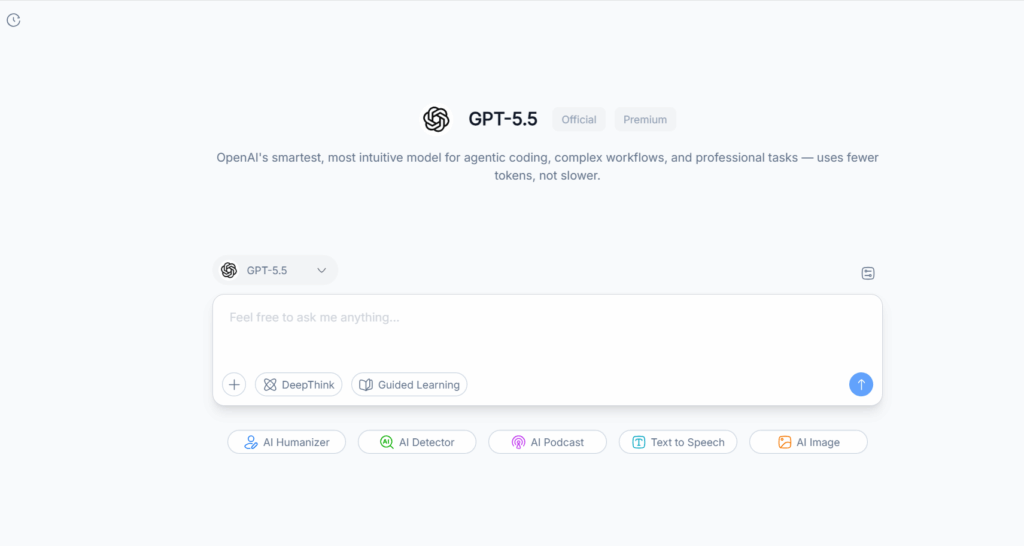
For ChatGPT Plus, Pro, and Enterprise users, GPT-5.5 is accessible via the model selector. The most notable change is the "Planning Bar." As the model works, you’ll see a drop-down showing its thought process: "Searching for pricing data... Analyzing competitors... Verifying facts..." This transparency is key to the agentic experience.
Tips to Get Better Results from AI Chat
To truly unlock the GPT-5.5 Agentic Mode, change how you talk to it:
- Define the Outcome, Not the Steps: Instead of "Search for X and then write Y," say "Your goal is to provide a complete market analysis report on X."
- Give it Tool Permission: Explicitly say "Use the web search and Python tool as needed" to ensure it leverages its full agentic toolkit.
- Use the 1M Token Context: Don’t be afraid to upload 500-page PDFs. The model can "reason" across the entire document without losing the thread.
Why AI Chat Is the Easiest Way to Experience GPT-5.5
You don't need to know how to use an API or write Python scripts. The ChatGPT interface translates your natural language into agentic actions. It acts as the "operating system" for the model, making it the most accessible entry point for experiencing the next generation of AI.
GPT-5.5 vs GPT-4 and Other AI Models
Is the upgrade actually worth the hype? Let’s look at the benchmarks.
What Feels Different in Daily Use
| Feature | GPT-4 / GPT-4o | GPT-5.5 |
| Logic | Probabilistic (best guess) | Agentic (plans before acting) |
| Tool Use | One at a time | Parallel tool calls |
| Hallucination | Occasional | Extremely Rare (Self-correcting) |
| Coding | Snippets | Full System Architecture |
Where the Gap Is Noticeable
The "Gap" is most visible in complex research. If a task requires checking three different sources and synthesizing them into a table, GPT-4 often loses the thread. GPT-5.5 maintains a "plan" throughout the conversation, ensuring the final output is cohesive and accurate.
Conclusion
As we move through 2026, the distinction between "Chatting" and "Doing" is evaporating. GPT-5.5 proves that a chat interface can handle complex, multi-part work with the precision of an expert assistant.
While we are still waiting for "Full AGI," the agent-like intelligence within GPT-5.5 is already changing how we work. By combining this advanced model with the structured tools in NoteGPT, you aren't just chatting with an AI—you're managing a world-class productivity machine.
Are you ready to see what GPT-5.5 can do? Start your next project in NoteGPT and feel the difference of agent-level intelligence.