

You’re applying for a marketing coordinator position. Your resume has two jobs, a summer internship, and a college project. After adding your latest responsibilities, three lines spill onto a second page. The AI suggests that you “increased engagement by 40%,” although you never supplied that number. Then you discover that downloading another revised PDF uses another free export.
Those are the kinds of details that matter when choosing a resume builder.
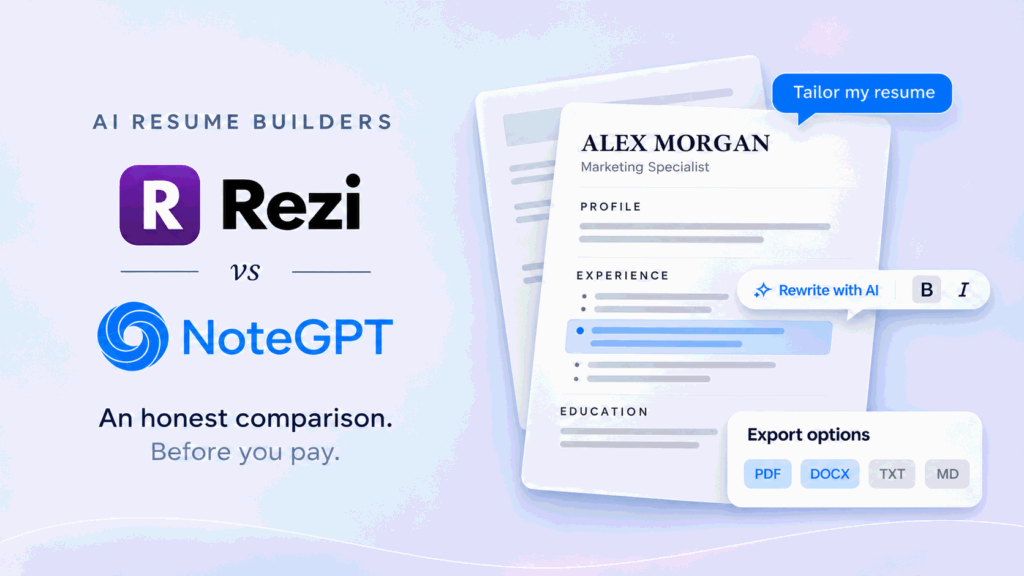
Rezi and NoteGPT’s AI Resume Builder take different approaches to getting a resume finished. Rezi combines structured editing, an AI Agent, resume feedback, and job-description targeting. NoteGPT starts with a direct input area: describe your background, generate a draft, and adjust its presentation.
My preference is Rezi when the main task is revising an existing resume for several applications. NoteGPT makes more sense as a starting point when you have useful experience in rough notes and need to turn it into a document.
The deciding factor isn’t which tool produces the most impressive first paragraph. It’s which leaves you with fewer problems to fix before submitting.
Rezi vs NoteGPT at a Glance
| Decision area | Rezi | NoteGPT AI Resume Builder |
| Starting material | Blank resume, PDF/DOCX, LinkedIn through an extension, or Agent conversation | Written background, uploaded material, or LinkedIn input |
| AI workflow | Section-specific tools and AI Resume Agent | Resume generation; upcoming update connects follow-up conversation with the document |
| Manual editing | Section editor and editable preview | Upcoming editor provides direct document editing and formatting controls |
| Reviewing AI changes | Writing and feedback tools within the resume workflow | Upcoming editor presents current and suggested module versions before acceptance |
| Templates | Multiple styles and formatting adjustments | Template selection by style and career stage; premium designs are paid |
| Detailed feedback | Rezi Score and job-description keyword targeting | Do not treat writing assistance as equivalent to a dedicated scoring system |
| Free access | One resume, three PDF downloads, and limited advanced functionality | Login required; two free uses, excluding designated paid features |
| Payment approach | Subscription or Lifetime plan | Existing NoteGPT Agent credit rules for paid usage |
Getting Started: Creating Your First Resume
Starting from Scratch
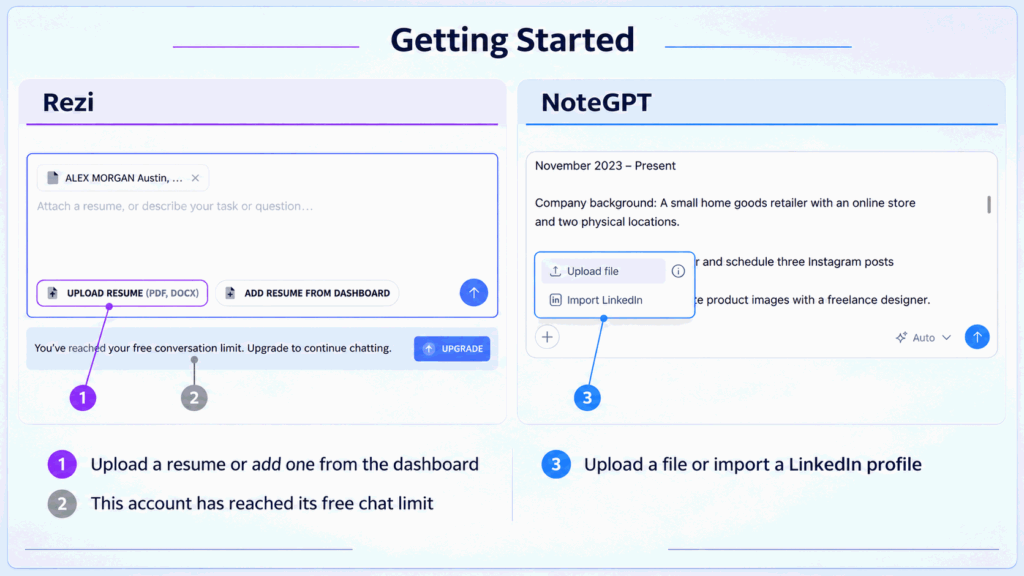
Rezi begins with resume setup information, including experience level and optional details about a target position. You can then work through sections or use its AI Resume Agent.
That structure helps when you aren’t sure whether to put an internship under employment or a class assignment under projects. It also introduces more decisions before you see a finished page.
NoteGPT’s input starts with your background and the role you want. Its upcoming interface adds popular-role suggestions and sample prompts to help you begin.
I prefer examples that show what information to provide. A recent graduate might enter an economics degree, an internship involving Excel reports, a SQL project, and the target role “junior data analyst.” That is far more useful than asking for “an impressive resume.”
A suggested role should help frame your request. It should never become permission to generate experience you haven’t supplied.
Uploading an Existing Resume or Using LinkedIn
Both products offer alternatives to starting from an empty page.
Rezi accepts PDF and DOCX files. Its LinkedIn route uses a Chrome extension. NoteGPT also supports LinkedIn input, with its updated interface placing a profile-link field inside the main input area.
That distinction is relevant if LinkedIn contains your most current employment history. NoteGPT’s approach is designed to keep the starting task on one screen rather than send you through a separate extension workflow.
An imported profile still needs editing. LinkedIn may include six previous jobs, a conversational About section, and activities that don’t belong on a one-page resume. The goal is to reuse accurate information, then select what matters for this application.
AI Resume Writing: Comparing the Output
Resume Summaries
Rezi offers dedicated summary assistance. NoteGPT’s workflow begins with a complete draft and is moving toward reviewing and revising its individual modules.
I like reviewing the summary after the work experience. Otherwise, it is easy to accept a confident introduction that promises more than the rest of the resume demonstrates.
For example, a graduate who used SQL in two projects should not become an “experienced analytics leader.” A useful summary might identify their degree, technical skills, and project focus.
Two specific sentences generally tell me more than four lines of polished adjectives.
Work Experience and Bullet Points
A good AI rewrite makes your work easier to understand without changing what happened.
Suppose your notes say:
Posted on Instagram three times a week and answered customer questions.
A clear version could read:
Planned and published three Instagram posts per week and responded to customer questions through comments and direct messages.
There is no need to add a 40% engagement increase unless you have that result.
Rezi’s section-level writing tools fit the task of improving an existing experience entry. NoteGPT’s upcoming workflow offers two approaches: explain the change in conversation or work inside the document editor.
The important detail is that NoteGPT’s editor is designed to revise the current module, not necessarily only the highlighted sentence. If you request help in the experience section, review the whole proposed revision.
Accuracy and Manual Revisions
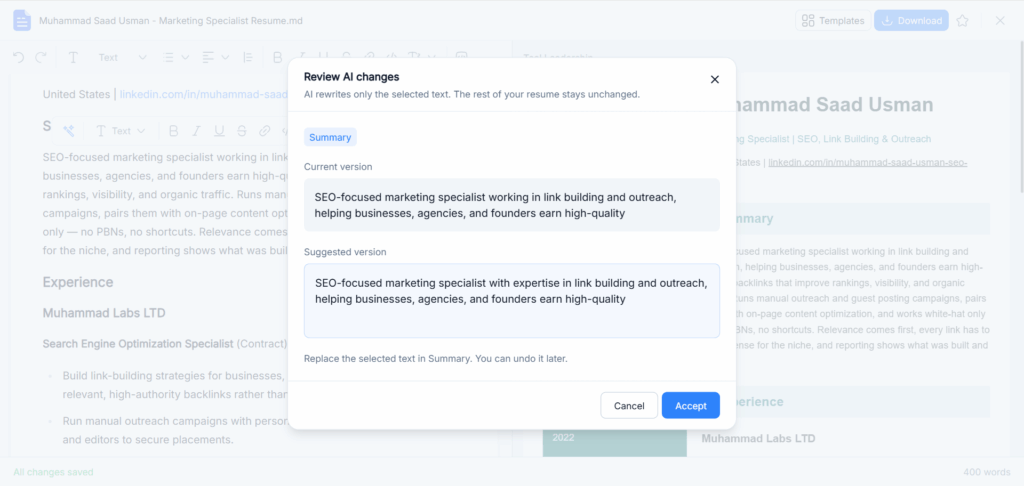
NoteGPT’s upcoming comparison dialog is a meaningful part of that workflow. It places the current module beside a suggested version and asks you to accept or cancel.
I favor this interaction because it makes factual changes easier to notice. You can catch “supported a product launch” becoming “led a product launch” before replacing the original.
It doesn’t make the AI automatically accurate. It gives you a clear point at which to exercise judgment.
With either tool, check job titles, dates, tools, ownership, and results. Strong wording is valuable only when you can explain it comfortably in an interview.
Resume Templates and Design
Template Styles and Layouts
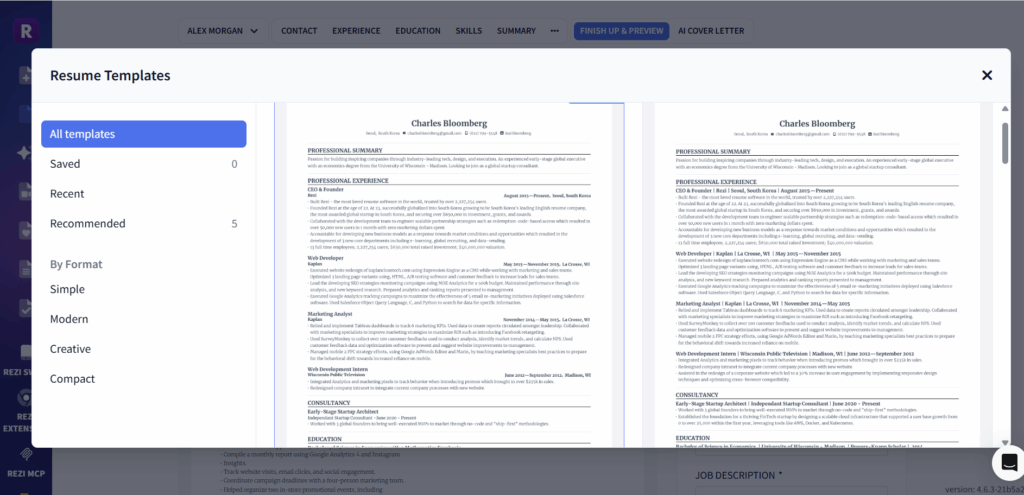
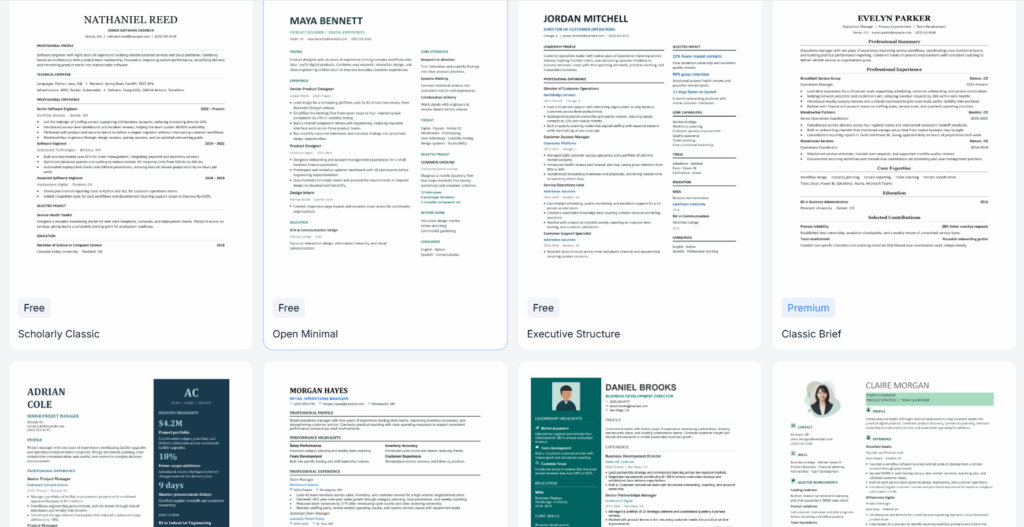
NoteGPT’s updated template selection includes styles such as Simple, Professional, Modern, Creative, and Classic, alongside categories such as One Page, Entry-Level, Experienced, and Career Change.
That categorization is more helpful than choosing a layout solely because its thumbnail looks attractive. A graduate with one internship needs different content emphasis from a manager with three substantial positions.
The upcoming template-switching workflow is designed to retain the resume content while applying another style. That matters: changing the layout should not require rebuilding the work history.
Rezi also provides multiple templates within its editing environment. I would compare either product using my actual content, especially long job titles and entries containing four or five bullets.
Fonts, Colors, and Spacing
Rezi offers font, spacing, indentation, accent, and automatic layout adjustments.
NoteGPT’s upcoming editor brings familiar document controls into a toolbar, including font family, size, emphasis, alignment, links, and text color. Undo and redo are visible rather than buried behind an AI conversation.
These controls are useful when a mostly finished resume needs small corrections. They won’t solve an overloaded document.
If three lines spill onto page two, shorten a repetitive summary or remove an irrelevant bullet before shrinking the text. A readable two-page resume is preferable to one page of cramped type.
Editing Your Resume
Editing Content and Reviewing Changes
The earlier distinction between “Rezi for editing” and “NoteGPT for generation” is too simplistic.
Rezi has an established combination of section editing, preview editing, and document-management actions. NoteGPT’s upcoming update is explicitly designed to continue after generation.
Its result view places a conversation beside the resume preview. You can ask for changes there or open the editor to work directly on the document. That creates a useful division: conversation for explaining what you want, direct editing for corrections you already know how to make.
Changing “June 2023” to “July 2023” should not require another generated resume.
Using AI Without Losing Control
A practical request might be: “Shorten my summary to two sentences and keep the reference to email marketing.”
In NoteGPT’s upcoming editor, the module comparison and acceptance step are designed to make that revision reviewable. The interface also distinguishes saving, successful saving, and a failed save with a retry option.
I consider those details more valuable than another promise to create a resume instantly. Losing a corrected paragraph or applying an unwanted rewrite creates real work.
Rezi’s Agent also supports follow-up requests with the resume in context. For both products, my preference is to make a focused change and inspect it before requesting the next one.
ATS Features and Job-Specific Tailoring
Resume Checks and Feedback
Rezi has the stronger established diagnostic offering. Its score and content feedback provide specific places to begin revising.
The explanation matters more than the number. A warning about vague wording can help you improve a sentence. A score alone cannot tell you whether your background is compelling for a particular employer.
NoteGPT’s conversational writing and revision controls should be evaluated on their own merits. They do not establish the same capabilities as a dedicated resume-scoring system.
For an applicant whose main problem is “I don’t know what’s wrong with this resume,” I lean toward Rezi’s feedback tools.
Matching Your Resume to a Job Description
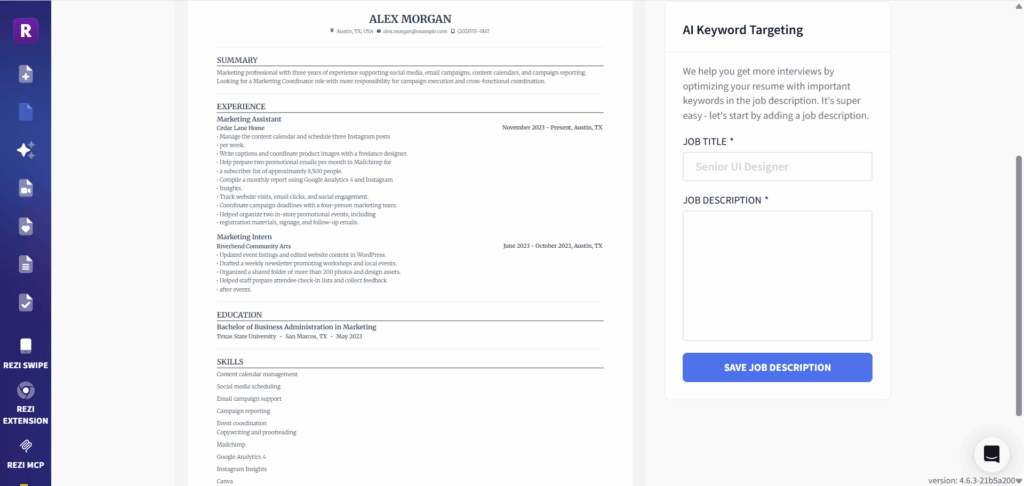
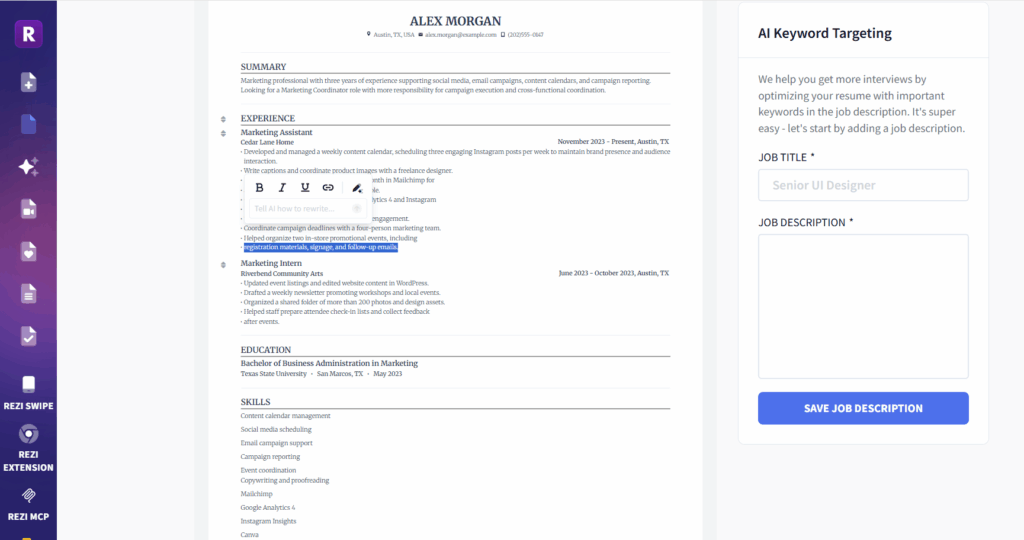
Rezi lets you connect the document to a job description and examine keyword-related suggestions.
For NoteGPT, include the target position and relevant requirements in your request. The useful task is to emphasize applicable experience, not manufacture missing qualifications.
Imagine a marketing coordinator opening that prioritizes email campaigns, reporting, and scheduling. A relevant newsletter project should receive more attention than an unrelated college activity.
I’d move that evidence higher and describe it clearly before trying to match every phrase in the posting. A resume earns relevance through its content, not through repetition.
Downloads and Export Options
Available File Formats
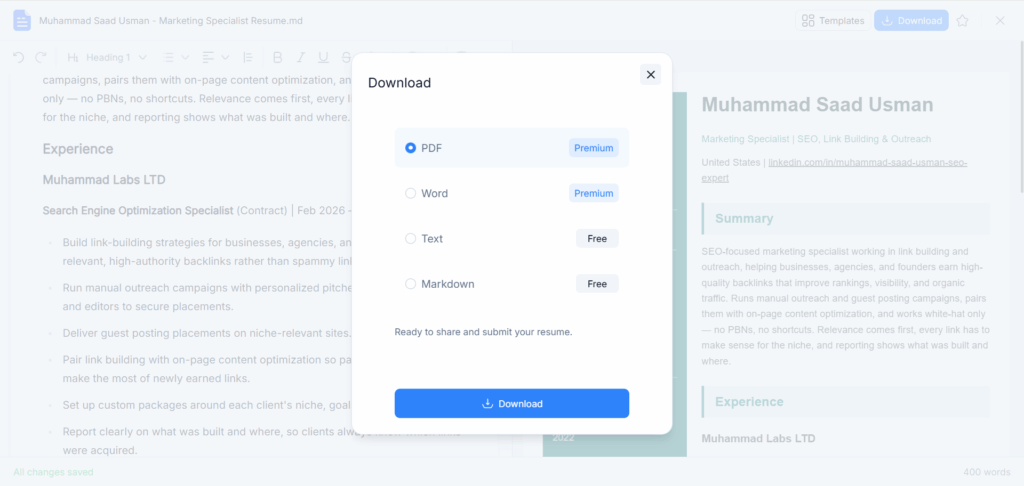
NoteGPT’s planned export options include PDF, DOCX, TXT, and Markdown. TXT and Markdown are free; PDF and DOCX require paid access. That distinction matters: you can take your resume content with you without paying for a formatted document.
For an application form with separate boxes for your work history, education, and skills, a TXT file is a practical option. You can copy the relevant content into each field without carrying over font styles or page formatting. Markdown is more useful if you keep your career notes in a text-based workspace and want a version you can continue editing.
Neither format replaces a finished resume attachment. If a recruiter asks you to email a PDF, exporting plain text leaves you with another step: moving the content into a document editor and formatting it yourself.
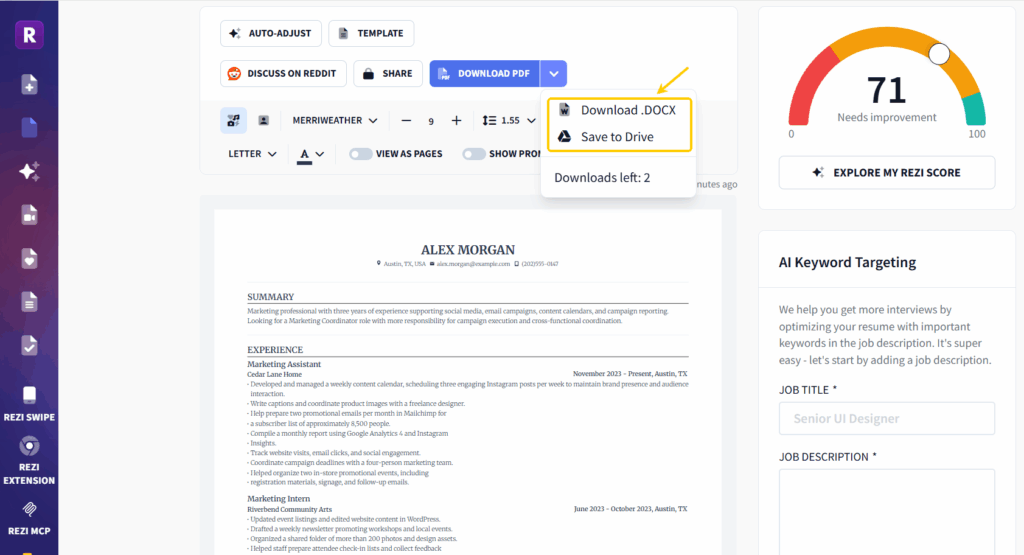
Rezi’s free plan includes three PDF downloads. For someone who needs a formatted resume without paying, that gives Rezi a meaningful advantage. NoteGPT’s free exports serve a different purpose: keeping the written content accessible while reserving PDF and Word output for paid users.
Choosing Between PDF and Word
My preference is PDF when the employer accepts it and I want to submit a finished document. DOCX makes more sense when a recruiter specifically requests Word or expects to edit the resume before sharing it with a hiring manager.
Consider a marketing specialist applying directly to a company and also working with a staffing agency. The direct application may call for a PDF, while the agency may request a Word copy to adjust the presentation. In that situation, access to both formats has practical value.
I would still open the exported file before submitting it. For a one-page resume, I would check that the last skills line has not slipped onto a second page, that contact details remain readable, and that a job title is not separated from its bullet points. A download button confirms that a file can be exported; it does not establish how every template will render in Word.
Free Plans and Pricing: What Do You Actually Get?
What You Can Do for Free
NoteGPT requires an account and provides two free uses. The trial includes features outside the designated paid options, while premium AI models, premium templates, and PDF or DOCX exports sit behind paid access. The export design also includes free TXT and Markdown downloads.
That makes the free experience more useful than a preview you cannot take away. You can evaluate the writing and retain the content in a portable text format. I would use the trial with my actual work history rather than a sample profile: whether the tool preserves my responsibilities, dates, and accomplishments tells me far more than a polished fictional resume.
Two free uses are still a limited evaluation window. I would prepare my source material before generating anything, including my current resume or LinkedIn profile and the role I am targeting.
What Is Worth Paying For?
For me, NoteGPT’s clearest reason to upgrade is the step from usable content to a document I can submit or hand to a recruiter. Free TXT and Markdown exports let me keep the writing. Paid PDF and Word exports can remove the work of transferring that writing into another editor and rebuilding the presentation.
That is a worthwhile convenience when the draft is already accurate and needs only a few corrections. It is much less compelling if the resume still needs substantial rewriting. I would judge the content first, then pay for the finished format.
Premium templates are secondary. A straightforward layout with clear headings is enough for many applications, so I would not upgrade solely for a more decorative design. The same applies to premium AI models: access to more models matters only if it improves the revisions I actually need.
Which Payment Model Makes More Sense?
Paid usage follows NoteGPT Agent’s existing credit rules. For someone already using NoteGPT’s other tools, that can make occasional resume work convenient within an existing account. It does not automatically make NoteGPT cheaper: the cost depends on credit consumption and how often you generate or revise.
Rezi’s $29 monthly Pro plan is easier to evaluate for a concentrated job search. If I were preparing several tailored resumes each week and regularly using its resume checks and keyword tools, a fixed monthly subscription would be appealing.
My recommendation is straightforward. For a free, formatted PDF, I would favor Rezi. For someone already using NoteGPT who wants to turn existing career material into a draft, refine it, and keep a text copy before deciding whether to pay for PDF or Word, NoteGPT’s approach has a clear place.
Which AI Resume Builder Should You Choose?
When to Choose Rezi
Choose Rezi when your priority is systematic resume improvement: reviewing feedback, targeting postings, revising individual sections, and maintaining application versions.
I also favor its free plan for someone who needs a downloadable PDF today and cannot justify paying.
When to Choose NoteGPT AI Resume Builder
Choose NoteGPT AI Resume Builder when your starting material is spread across notes, an older resume, and LinkedIn, and you want to bring it into an AI-assisted document workflow.
Its upcoming editor is particularly relevant if you prefer direct text editing, conversational instructions, and a clear opportunity to review a suggested module before accepting it.
Existing NoteGPT users have an additional reason to consider it: resume work can fit into an account and credit system they already use. That is a convenience advantage, not proof of lower cost.
Frequently Asked Questions
Can I Download a Resume from NoteGPT for Free?
The planned export options include free TXT and Markdown downloads. PDF and DOCX exports require paid access. You also need to sign in, and the free trial provides two uses.
The distinction is between downloading the resume’s content and downloading a formatted document. If you need a PDF attachment for an application, the free text formats will not complete that step for you.
Can I Create and Download a Resume for Free?
Rezi includes three PDF downloads with its free plan. NoteGPT provides two free uses after login, but Word/PDF export remains paid.
Can I Start with LinkedIn?
Both products support LinkedIn input. Rezi uses a browser extension; NoteGPT’s updated interface provides a profile-link input within the creation area.
Does NoteGPT Only Generate a First Draft?
No. Its upcoming update includes conversational revision, direct editing, module-level AI changes, confirmation before applying revisions, and template switching.
Should I Pay for a Premium AI Model?
Not automatically. Start by judging whether the available output is accurate and useful. Paying more is justified only if it improves the writing or handling of your material enough to reduce meaningful editing work.
Conclusion
Rezi is my stronger choice for an active job search built around repeated tailoring, resume checks, and formatted PDF downloads. Its free PDF allowance also makes it the more practical starting point when paying is out of the question.
NoteGPT AI Resume Builder makes sense for someone bringing in an existing resume or LinkedIn profile and looking for a conversational way to develop the content. Its planned editing and export workflow adds a useful progression: refine the draft, keep a free TXT or Markdown copy, and pay for PDF or Word when the document is ready.
I would base the purchase on how much work remains after the draft. Accurate content that needs a few targeted edits makes paid export convenient. A polished template wrapped around vague or inaccurate writing does not.