


If you've spent any time in AI image generation circles this year, you've probably seen the same debate pop up over and over: Nano Banana 2 vs GPT Image 2, which one actually deserves your prompts? Both models launched major upgrades in 2026, both claim to be the best AI image generator on the market, and both have loud, opinionated fan clubs on Reddit. We decided to stop scrolling through hot takes and actually test them side by side — same prompts, same settings, same expectations. Here's everything we found.
Nano Banana 2 vs GPT Image 2 at a Glance
Before we get into the weeds, let's answer the question you actually came here for.
Quick Verdict — Which AI Image Model Should You Choose?
There's no single universal winner in the Nano Banana 2 vs GPT Image 2 matchup, and honestly, any article that tells you otherwise is oversimplifying. Choose GPT Image 2 when your image lives or dies by readable text, ordered layouts, infographics, or exact object placement. Choose Nano Banana 2 when the image needs to feel photographed — skin texture, cinematic lighting, and material realism are where it shines. Think of GPT Image 2 as the meticulous graphic designer of the two, and Nano Banana 2 as the photographer with a great eye for light.
Nano Banana 2 vs GPT Image 2 Scorecard (Test Results Table)
Here's the short version of our five-round AI image model test, before we dig into the details below.
| Round | Test | Winner |
| 1 | Portrait Realism & Skin Detail | Nano Banana 2 |
| 2 | Text Rendering Accuracy | GPT Image 2 |
| 3 | Infographic & Layout Precision | GPT Image 2 |
| 4 | Product Photography | Nano Banana 2 |
| 5 | Generation Speed | Nano Banana 2 |
Both AI image models pulled their weight, but they clearly specialize in different jobs — which is exactly why this 2026 comparison isn't as simple as picking a single "best" tool.
Nano Banana 2 vs GPT Image 2: Features and Pricing
Nano Banana 2 is Google's latest image model, built on the Gemini image lineage and tuned for photorealism, natural lighting, and fast iteration. GPT Image 2 is OpenAI's current flagship image model, engineered around precise text rendering, structured layouts, and reasoning before it renders a single pixel. Here's how the two stack up on paper, based on each company's official API documentation.
| Nano Banana 2 | GPT Image 2 | |
| Developer | OpenAI | |
| Strongest at | Photorealism, lighting, materials | Text accuracy, layouts, diagrams |
| Official API cost per 1024×1024 image | ~$0.067 (standard tier) | $0.006–$0.211 (low to high quality tier) |
| Generation modes | Standard | Fast / Think |
A note on pricing: According to official Google API pricing, Nano Banana 2 image output is billed at $60 per million tokens, which works out to roughly $0.067 per 1K-resolution image. According to official OpenAI API pricing, GPT Image 2 uses token-based billing across three quality tiers, with per-image costs ranging from about $0.006 at low quality to $0.211 at high quality for a 1024×1024 output. Actual costs can vary based on prompt complexity and reference images, so treat these as official-rate estimates rather than fixed price tags.
On paper, the specs only tell half the story. Let's see how these two AI image models actually perform when you hand them the exact same prompt.
Real Prompt Image Comparison (Nano Banana 2 vs GPT Image 2)
We ran five identical prompts through both models with no prompt-tuning per model — the goal was to see which one understood the brief faster and executed it more faithfully.
Test 1: Portrait Realism and Skin Detail
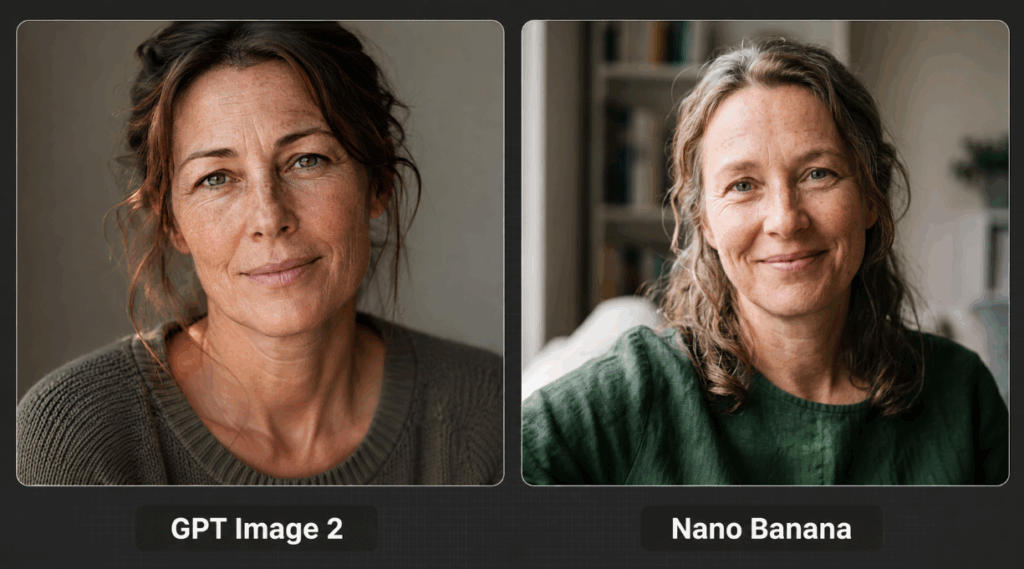
Prompt: "A close-up portrait of a middle-aged woman with freckles, natural skin texture, soft window lighting, shot on a 50mm lens, shallow depth of field, no makeup, realistic pores and fine wrinkles, neutral background."
This is the classic photorealism showdown. Nano Banana 2 nailed the skin texture — pores, fine lines, and natural light falloff all read like an actual photograph rather than a render. GPT Image 2's version was competent but slightly smoother, with a touch of that familiar "AI polish" that gives away the game.
Verdict: Nano Banana 2 wins for realism and natural imperfection.
Test 2: Text Rendering Accuracy in AI-Generated Images
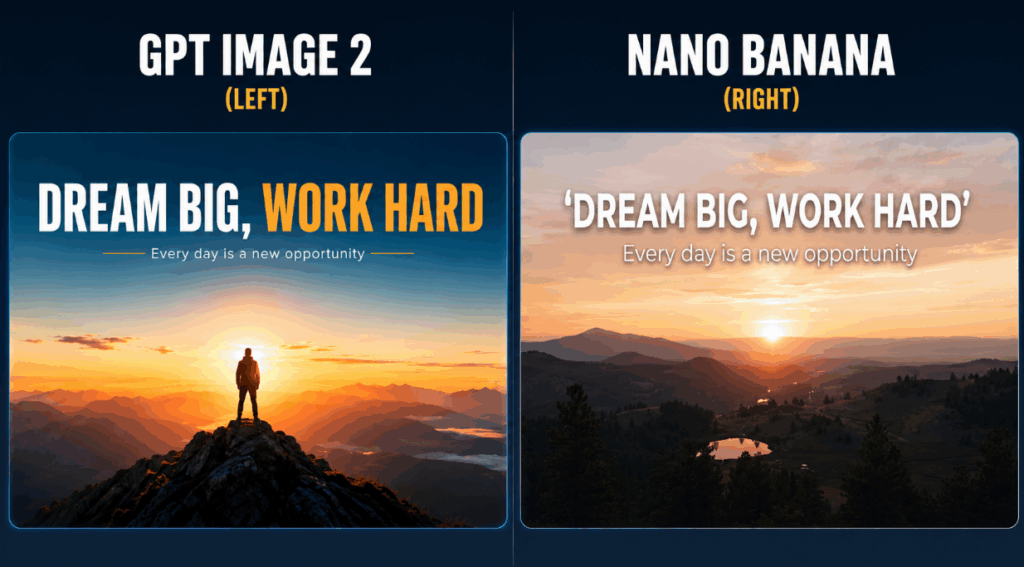
Prompt: "A motivational poster with the bold headline text 'DREAM BIG, WORK HARD' at the top, a subheading that says 'Every day is a new opportunity' below it, minimalist design, sunrise background, clean sans-serif typography."
Text rendering has historically been the Achilles' heel of every AI image generator, and this test shows how far things have come — and how much of a gap still exists between the two models. GPT Image 2 spelled every word correctly with clean, evenly-spaced typography. Nano Banana 2 got close but introduced a small spelling slip in the subheading.
Verdict: GPT Image 2 wins decisively on text accuracy.
Test 3: Infographic and Layout Precision
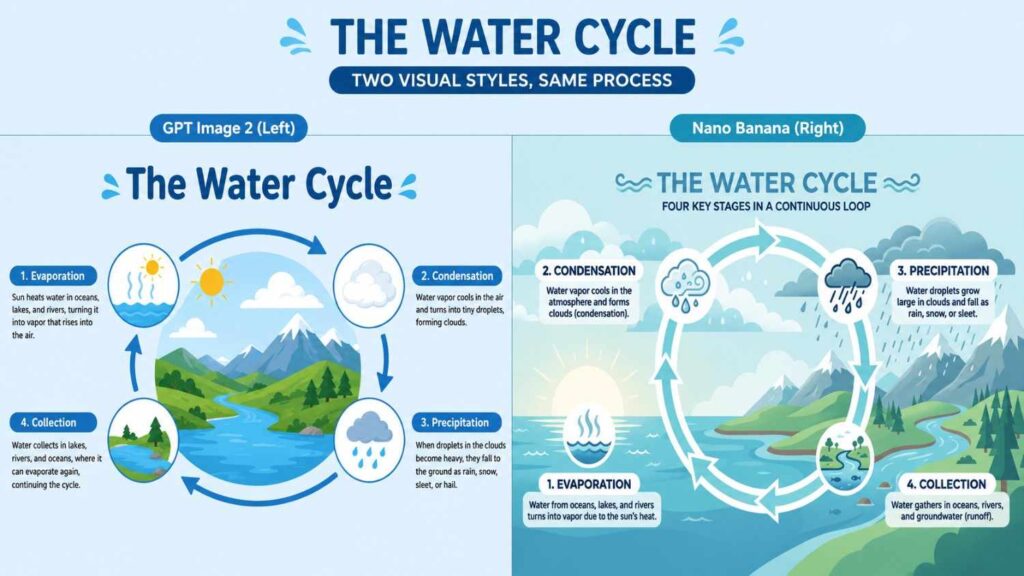
Prompt: "An educational infographic titled 'The Water Cycle' showing 4 labeled stages in a circular flow: Evaporation, Condensation, Precipitation, Collection, each with a small icon and one-line description, clean flat design style, light blue color palette."
This is where structured, information-dense image generation gets tested. GPT Image 2 kept every label attached to the correct icon and maintained a clean circular flow that actually made logical sense. Nano Banana 2's version looked pretty, but a couple of labels drifted from their icons and the flow direction was a little ambiguous.
Verdict: GPT Image 2 wins on layout logic and readability.
Test 4: Product Photography and Marketing Images
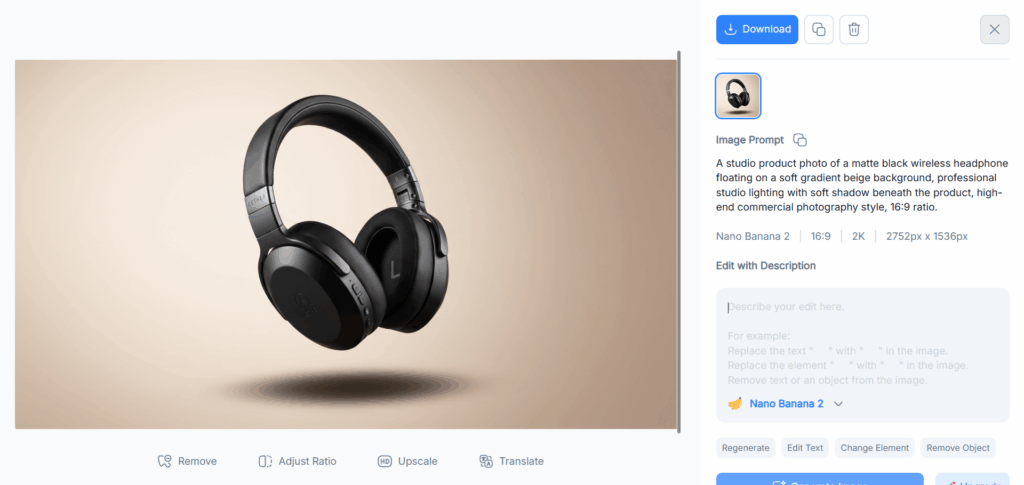
Prompt: "A studio product photo of a matte black wireless headphone floating on a soft gradient beige background, professional studio lighting with soft shadow beneath the product, high-end commercial photography style, 16:9 ratio."
For e-commerce and marketing images, material realism matters more than almost anything else. Nano Banana 2 rendered the matte finish and soft shadow with genuinely convincing studio-light physics — the kind of image you could drop straight into a product listing. GPT Image 2's version was solid but read slightly more "rendered" than "photographed."
Verdict: Nano Banana 2 wins for commercial-grade realism.
Test 5: Speed Comparison — Which AI Image Model Generates Faster?
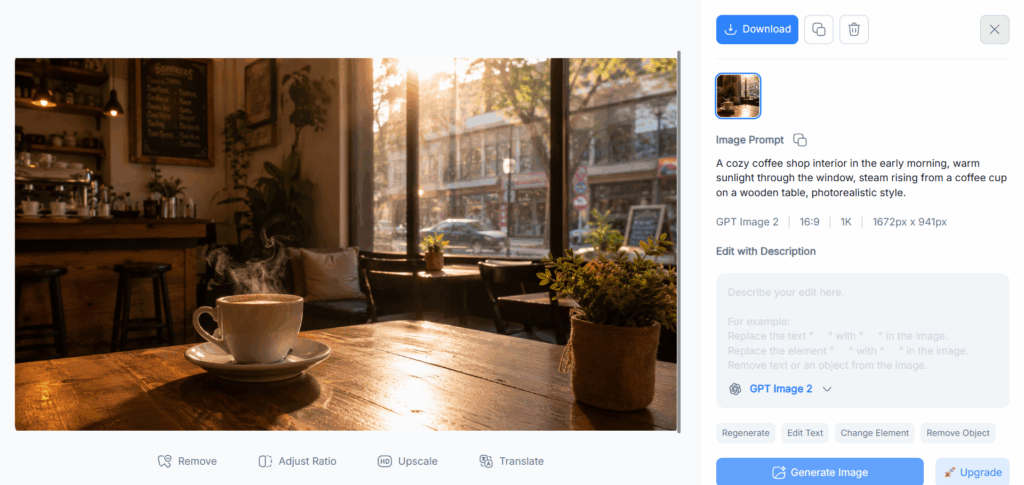
Prompt: "A cozy coffee shop interior in the early morning, warm sunlight through the window, steam rising from a coffee cup on a wooden table, photorealistic style."
We ran this prompt three times on each model and averaged the generation time. Nano Banana 2 consistently generated faster, which matters a lot if your workflow involves generating 15–20 variations before picking a favorite. GPT Image 2's reasoning-first approach adds a few extra seconds per image, though the trade-off is often better prompt adherence.
Verdict: Nano Banana 2 wins on raw speed, especially in Fast mode.
How to Choose the Best AI Image Model in 2026
So, Nano Banana 2 or GPT Image 2 — which one should actually be your go-to? It depends entirely on what you're making.
Best for Photorealism and Portraits
If your project depends on skin texture, natural lighting, or a "shot on camera" feel, Nano Banana 2 is the stronger AI image model. It consistently produced more believable portraits and product shots throughout our tests.
Best for Text, Posters, and Infographics
If your image needs to communicate information — labeled diagrams, posters, UI mockups, or anything with readable copy — GPT Image 2 is the safer bet. Its text rendering accuracy and layout discipline are hard to beat.
Best for Speed and Budget-Friendly Projects
If you're iterating quickly or generating in bulk, Nano Banana 2's faster generation time and the free Nano Banana 2 Lite option make it the more budget-friendly AI image model for high-volume workflows.

How to Use Both Nano Banana 2 and GPT Image 2 in NoteGPT
Here's the good news: you don't actually have to pick a side. NoteGPT lets you switch between both AI image models in the same workspace, so you can match the model to the task instead of committing to one subscription. Unlike the official API pricing above, access inside NoteGPT works on its own credit and free-tier system:
| Feature | In NoteGPT |
| Nano Banana 2 / Nano Banana 2 Lite | Credit-based access, Lite option for faster/cheaper generations |
| GPT Image 2 | 2 free generations daily, plus credit-based access beyond that |
| Speed control | Fast mode and Think mode toggle |
| Switching models | One dropdown, no separate sign-ups |
Switch Between Nano Banana 2, Nano Banana 2 Lite, and GPT Image 2 in One Tool
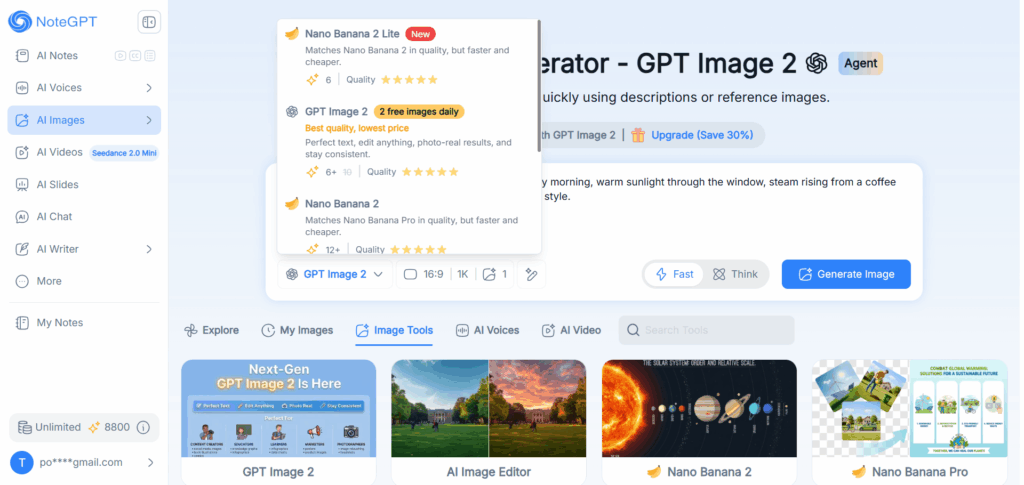
Instead of juggling separate accounts for OpenAI and Google, NoteGPT's AI Images tool gives you a single dropdown to switch between Nano Banana 2, the faster Nano Banana 2 Lite, and GPT Image 2 — all in one interface. Need a photorealistic hero shot and a text-heavy infographic in the same session? Just switch models, no extra sign-ups required.
Free Daily Images and Flexible Credit Options
NoteGPT offers 2 free GPT Image 2 generations every day, plus flexible credit-based access to Nano Banana 2 and Nano Banana 2 Lite. That means you can actually run your own Nano Banana 2 vs GPT Image 2 comparison on your own prompts, for free, before deciding which model fits your project best.
Fast Mode vs Think Mode: Choosing the Right Generation Speed
NoteGPT also gives you control over generation speed with Fast and Think modes. Fast mode prioritizes quick turnaround for rapid iteration, while Think mode leans into deeper reasoning for more complex, detail-heavy prompts — handy when you're testing which AI image model handles a tricky layout better.
Nano Banana 2 vs GPT Image 2: Frequently Asked Questions
Are Nano Banana 2 and GPT Image 2 the Same Model?
No. Nano Banana 2 is Google's image model, part of its Gemini image lineage, while GPT Image 2 is OpenAI's image model. They're built by different companies on entirely different architectures — the similar naming trend across the AI image space just makes it easy to mix them up.
Which Model Is Better at Realistic Photos, Nano Banana 2 or GPT Image 2?
Nano Banana 2 generally produces more convincing photorealism, with better skin texture, natural lighting, and material detail. GPT Image 2 is capable but tends to look slightly more processed in portrait and product shots.
Which Model Renders Text More Accurately in Images?
GPT Image 2 is the stronger choice when accurate text matters. It consistently spells words correctly and keeps typography clean, while Nano Banana 2 occasionally introduces small spelling or spacing errors in text-heavy images.
Is Nano Banana 2 or GPT Image 2 Faster to Generate?
Nano Banana 2 is faster in most side-by-side tests, making it the better pick for rapid iteration or generating multiple variants. GPT Image 2's reasoning-based approach trades some speed for more deliberate prompt adherence.
Can I Use Both Nano Banana 2 and GPT Image 2 in the Same Platform?
Yes. NoteGPT lets you switch between Nano Banana 2, Nano Banana 2 Lite, and GPT Image 2 in the same AI Images tool, so you don't need separate subscriptions to compare or use both models.
Final Verdict: Nano Banana 2 vs GPT Image 2 in 2026
After five rounds of head-to-head testing, the Nano Banana 2 vs GPT Image 2 debate doesn't have a single winner — it has two specialists. Nano Banana 2 is your photographer: fast, natural, and convincing when realism is the priority. GPT Image 2 is your designer: precise, text-accurate, and dependable when structure matters. The smartest move in 2026 isn't picking a favorite — it's using the right AI image model for the right job, which is exactly what NoteGPT lets you do without paying for two separate tools.