


Creating presentations used to take forever.
You opened PowerPoint, stared at a blank slide for ten minutes, changed fonts fifteen times, then somehow spent an hour aligning tiny icons nobody would even notice.
You opened PowerPoint, stared at a blank slide for ten minutes, changed fonts fifteen times, then somehow spent an hour aligning tiny icons nobody would even notice.
Most of the time was not spent thinking—it was spent formatting.
Now things are different.
Today, more people create slides with AI instead of building presentations manually. Modern AI presentation tools can turn text, PDFs, articles, and YouTube videos into presentation-ready decks automatically.
Instead of starting from scratch, you can now turn:
- Text into slides
- PDFs into presentations
- Articles into presentation outlines
- Notes into PowerPoint decks
- YouTube videos into structured slides
That is why AI slide generators are becoming popular among students, marketers, teachers, startups, and business teams.
In this guide, you will learn:
- What it means to create slides with AI
- How AI presentation makers work
- How to generate presentations faster
- How to use NoteGPT Agent Slides
What Does It Mean to Create Slides with AI?
To create slides with AI means using artificial intelligence to generate presentation content and structure automatically.
Instead of manually creating every title, layout, and section, AI analyzes source content and turns it into presentation slides.
Most AI presentation tools can:
- Generate slide titles
- Summarize long content
- Build presentation outlines
- Create layouts automatically
- Organize ideas into sections
- Suggest formatting and visual structure
- Export presentations into PPT or PDF
The process is simple:
Input content → AI analysis → Slide generation → Editing → Export
Rather than spending hours formatting, users focus on improving ideas and presentation quality.
This is why AI-powered presentation creation is becoming a standard productivity workflow.

Why More People Create Slides with AI
Presentation work usually contains two parts:
- Thinking
- Formatting
Most people enjoy the first and dislike the second.
When users create slides with AI, repetitive formatting work is greatly reduced.
Save Hours of Presentation Work
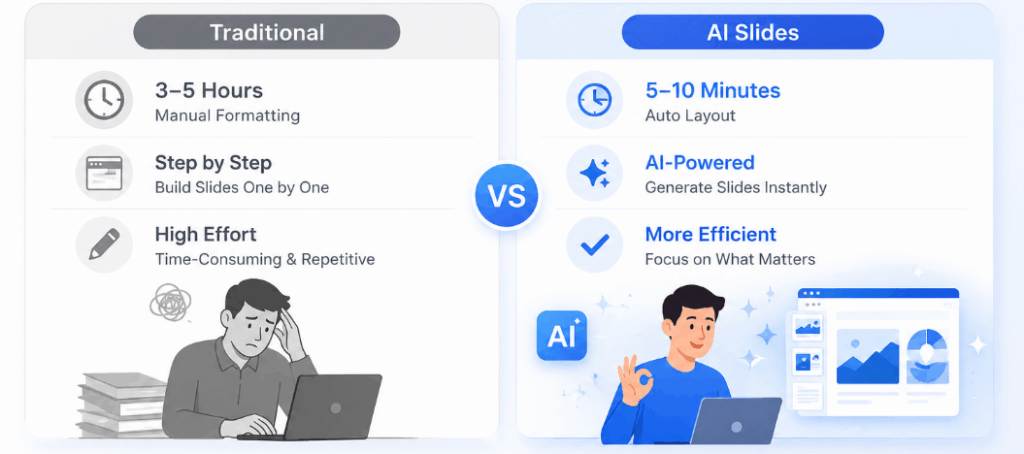
One of the biggest advantages of AI slide generation is speed.
Tasks that traditionally required several hours can often be completed in under ten minutes.
Whether you are preparing:
- Weekly reports
- Startup pitch decks
- Class presentations
- Client proposals
- Team updates
AI reduces manual work dramatically.
Many users now rely on an AI PPT Maker workflow to generate a strong first draft and spend their time polishing rather than building.
Create Professional Presentations Without Design Skills
Many people avoid presentations because they feel they are not good at design.
AI changes that.
Modern AI presentation makers automatically improve:
- Slide spacing
- Text hierarchy
- Layout balance
- Content grouping
- Visual consistency
This allows users to create cleaner presentations without advanced PowerPoint knowledge.
You still control the final result—but you no longer start from zero.
Turn Existing Content into Presentation Slides
Another reason people create slides with AI is flexibility.
Instead of rewriting information manually, users can reuse content they already have.
Typical inputs include:
- Text notes
- Meeting summaries
- PDF files
- Articles
- Blog posts
- Web pages
- YouTube videos
AI then converts the information into presentation-ready sections.
This makes AI tools extremely useful for content repurposing.
How AI Presentation Makers Generate Slides Automatically
AI presentation tools combine language understanding with content organization.
The system usually follows four steps:
Step 1: Analyze Content
The AI reads your text, document, or video transcript.
Step 2: Extract Key Information
Important points are identified and grouped.
Step 3: Build Presentation Structure
The content becomes logical presentation sections.
Example:
- Introduction
- Main ideas
- Supporting examples
- Key insights
- Summary
Step 4: Generate Slides
The system creates layouts and converts information into readable slides.
This process feels much faster than traditional presentation creation.
That is why more teams now use an AI Presentation Maker instead of starting with blank templates.
What Is NoteGPT Agent Slides?
NoteGPT Agent Slides is an AI presentation tool designed to help users create slides with AI faster.
Instead of manually building every page, users can generate presentations from:
- Text
- Documents
- PDFs
- Articles
- Links
- Videos
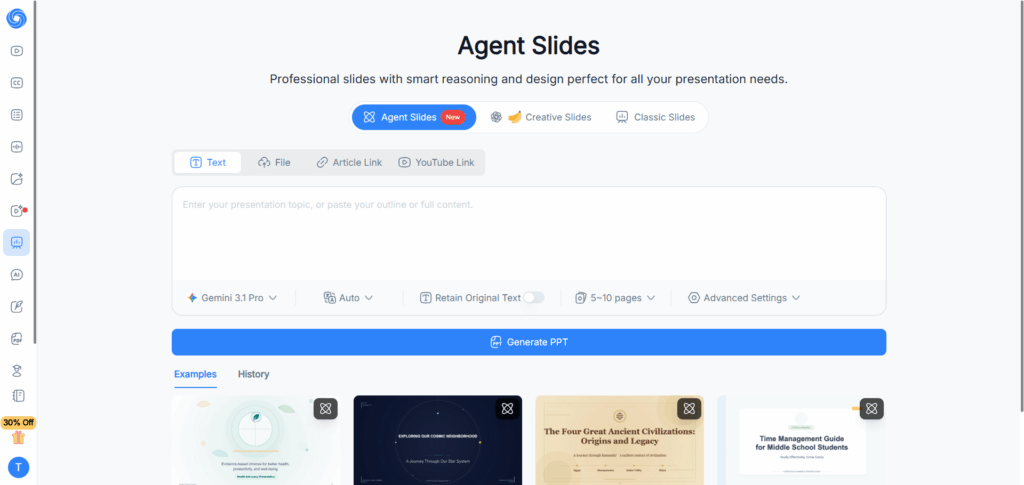
The platform focuses on three things:
- Speed
- Automation
- Simplicity
Its goal is to remove repetitive work while helping users produce presentation-ready results.
Key Features of NoteGPT Agent Slides
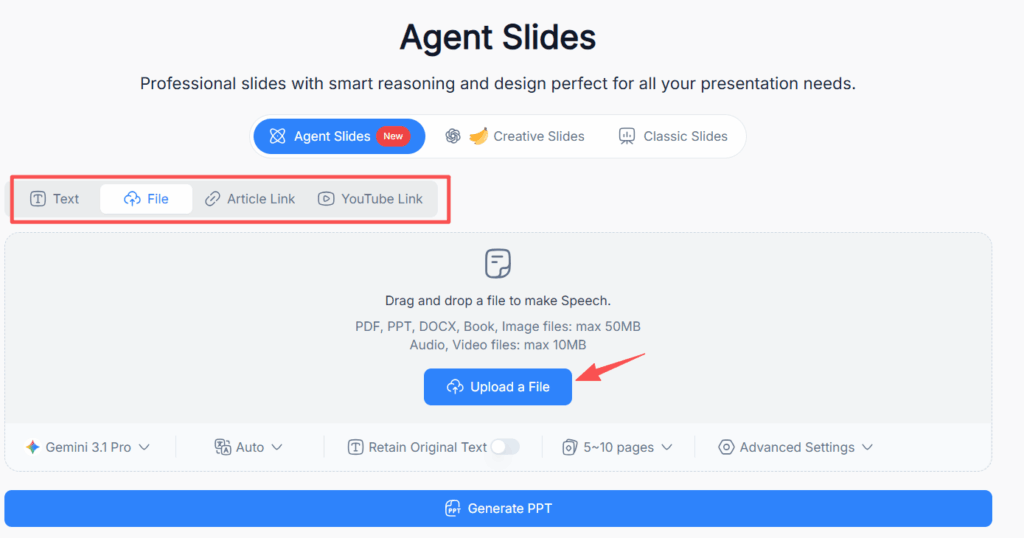
Generate Slides from Multiple Content Types
Users are not limited to typing prompts.
You can:
- Paste text
- Upload PDFs
- Add article links
- Insert YouTube URLs
This flexibility makes it easier to create presentations from existing materials.
Smart Layout Generation
Many people spend more time arranging slides than writing.
AI reduces that burden.
Instead of adjusting elements manually, layouts are generated automatically to improve structure and readability.
Fast Export and Editing
After generating slides, users can continue editing:
- Fonts
- Colors
- Logos
- Images
- Content
Finished presentations can then be exported for sharing and delivery.
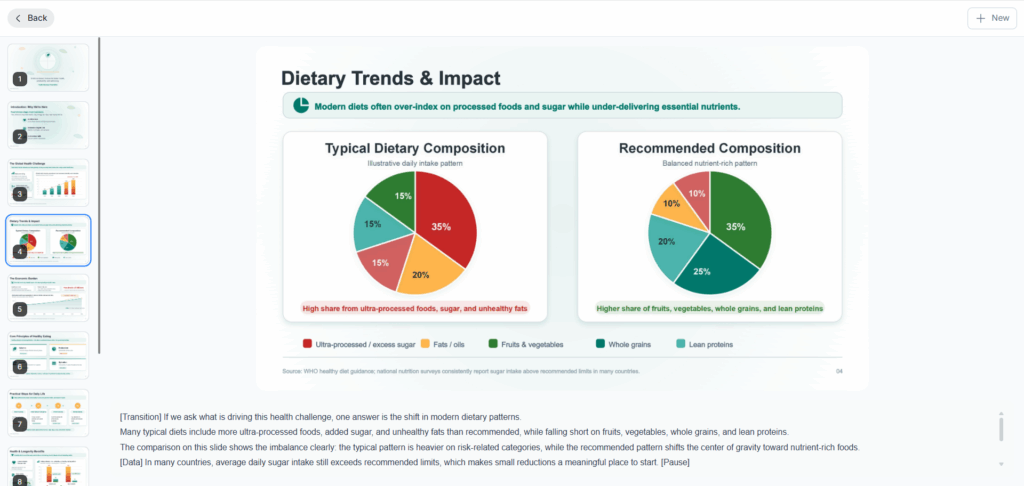
How to Create Slides with AI Using NoteGPT Agent Slides
The process is surprisingly simple.
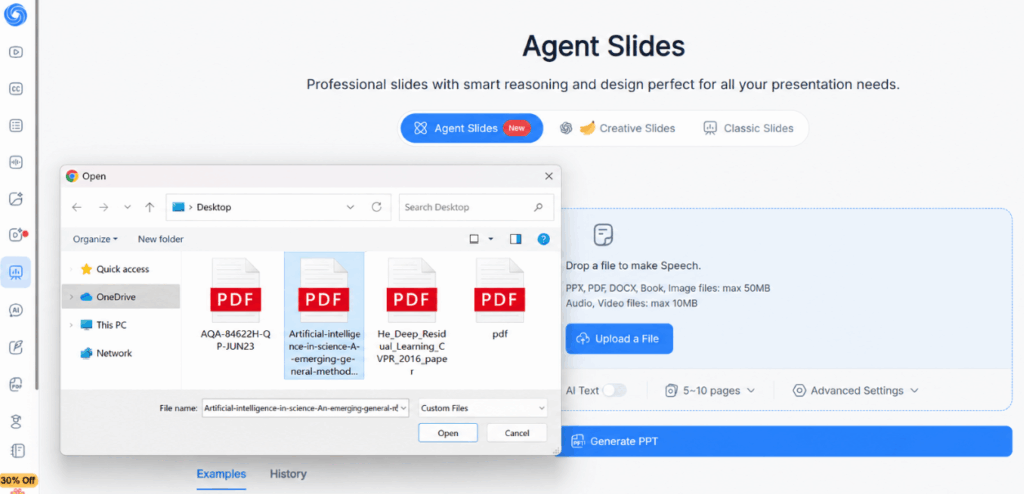
Step 1: Add Your Content
Choose one:
- Paste text
- Upload PDFs
- Insert article links
- Add YouTube videos
The AI analyzes your content automatically.
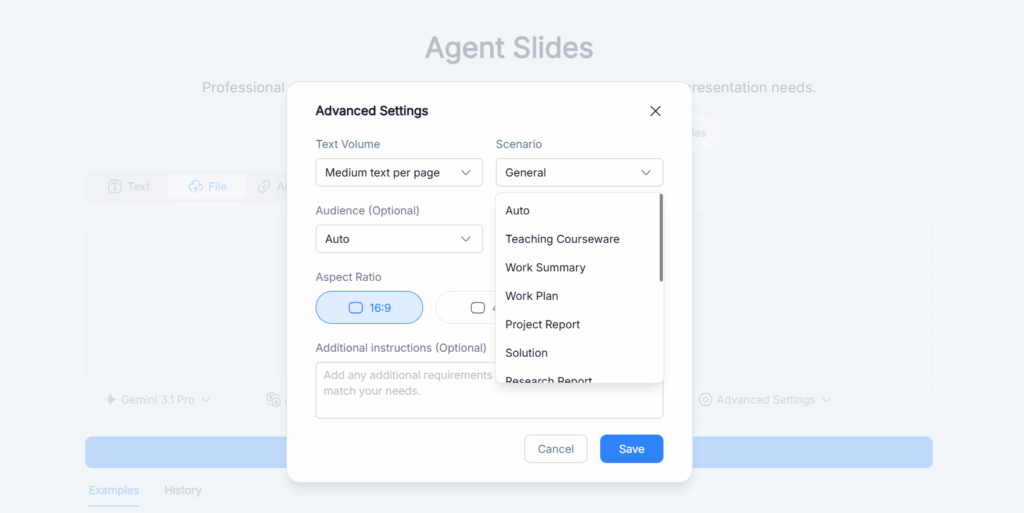
Step 2: Customize Presentation Settings
Most AI presentation tools allow customization.
Typical options include:
- Presentation length
- Style
- Language
- Tone
- Visual direction
These settings influence the final output.
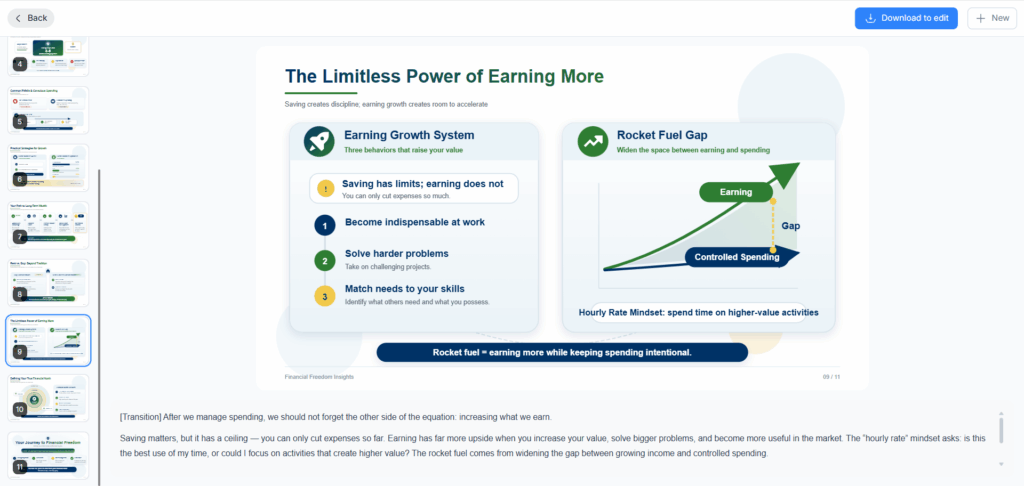
Step 3: Create Slides with AI Automatically
Once settings are ready, generate the presentation.
The AI:
- Builds structure
- Writes headlines
- Creates layouts
- Formats content
Instead of copying huge paragraphs into slides, the system turns information into presentation-friendly points.
What Types of Presentations Can You Create with AI?
One reason AI presentation tools continue to grow is versatility.
Whether you work, study, teach, or create content, there are practical ways to create slides with AI and reduce repetitive work.
Business Presentations and Team Reports
Business presentations often involve gathering information from multiple sources.
Instead of manually organizing documents and reports, teams can upload content and create structured presentations automatically.
Common scenarios include:
- Weekly business reviews
- Internal updates
- Strategy presentations
- Product launch decks
- Client proposals
When deadlines are tight, using an AI PPT Maker can dramatically reduce preparation time.
Startup Pitch Decks and Investor Presentations
Startup teams often need presentation materials quickly.
Creating investment decks manually can become time-consuming because founders must balance storytelling, business logic, and design.
AI presentation tools help simplify the process by generating:
- Market overview slides
- Product explanation pages
- Revenue model summaries
- Growth strategy sections
- Roadmap presentations
Teams can then focus on refining messaging rather than formatting.
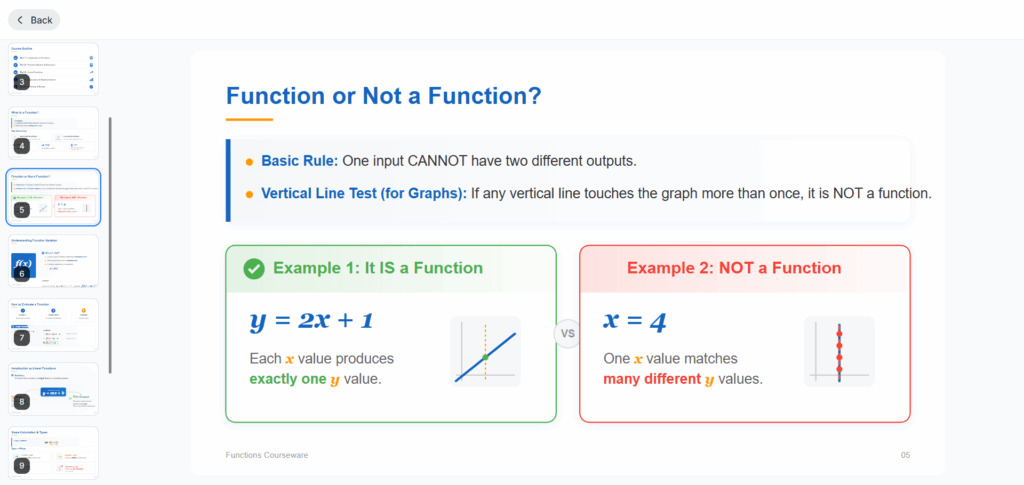
Educational Slides for Students and Teachers
Education is another strong use case.
Students frequently need to turn notes and research into presentations.
Teachers often convert teaching materials into slides for class delivery.
You can create slides with AI from:
- Study notes
- Research papers
- Reading summaries
- Course materials
- Educational videos
Instead of rebuilding information manually, content becomes presentation-ready much faster.
Marketing and Sales Presentations
Marketing and sales teams constantly create decks.
Typical examples include:
- Campaign reports
- Competitor analysis
- Client proposals
- Product overviews
- Performance reviews
Rather than designing presentations from scratch every time, teams can generate presentation drafts and refine messaging afterward.
As a result, more marketing and sales teams now rely on an AI PPT Maker to create slides with AI and accelerate presentation delivery.
Generate Presentations from Different Content Types
One major advantage of NoteGPT Agent Slides is input flexibility.
Instead of starting with empty slides, users can build presentations from existing content.
Turn Text and Notes into Presentation Slides
Text remains the fastest input method.
Paste:
- Meeting notes
- Brainstorm ideas
- Outlines
- Reports
The AI converts information into organized presentation sections automatically.
This is especially useful for turning rough ideas into clear communication.
Convert PDFs into Presentations
PDFs often contain valuable information but are difficult to present directly.
AI helps extract:
- Key insights
- Important sections
- Supporting data
- Summary points
Users can create slides with AI from long documents without manually rewriting everything.
Turn Articles and Web Pages into Slide Decks
Articles already contain structure.
That makes them ideal sources for AI presentation generation.
Users can transform:
- Blog posts
- Research content
- Industry reports
- Internal knowledge pages
into presentation-ready formats.
This supports efficient content reuse.
Convert YouTube Videos into Presentations
Video-to-slide workflows are becoming increasingly popular.
Instead of pausing and taking notes manually, AI extracts:
- Core concepts
- Key explanations
- Important examples
- Summary sections
This dramatically improves information processing efficiency.
Tips for Creating Better AI-Generated Slides
AI helps accelerate creation—but quality still depends on input.
These practices usually produce stronger results.
Start with Better Input
Good input creates better presentations.
Instead of entering:
Make a presentation.
Try:
Create a 10-slide presentation explaining AI productivity tools for marketing teams.
Specific instructions improve output quality.
Keep Slides Simple
A common mistake is placing too much content onto each slide.
Better presentations usually contain:
- One idea per slide
- Short text blocks
- Clear structure
- Simple visual hierarchy
AI performs better when information remains focused.
Adjust Slides to Match Your Brand
AI creates a strong starting point.
Final polishing should still include:
- Brand colors
- Company logos
- Typography
- Images
- Tone consistency
This helps presentations feel more professional.
Always Review Before Exporting
AI accelerates production but should not replace review.
Check for:
- Repetition
- Long paragraphs
- Formatting issues
- Missing context
Think of AI as a collaborator—not a replacement.
FAQs About Creating Slides with AI
Can AI Create PowerPoint Presentations Automatically?
Yes.
Modern AI presentation tools can generate complete presentations automatically from text, files, videos, and other sources.
Users typically review and edit before final delivery.
Can AI Generate Slides from PDFs and YouTube Videos?
Yes.
Platforms like NoteGPT Agent Slides support extracting content from PDFs and video links and converting them into structured presentations.
Do I Need Design Experience?
No.
One of the biggest reasons users create slides with AI is eliminating the need for advanced design skills.
AI helps with layout, spacing, and organization automatically.
Is AI Presentation Generation Suitable for Business Use?
Yes.
Business teams frequently use AI-generated presentations for:
- Reports
- Sales decks
- Strategy reviews
- Client communication
Manual refinement can improve final quality further.
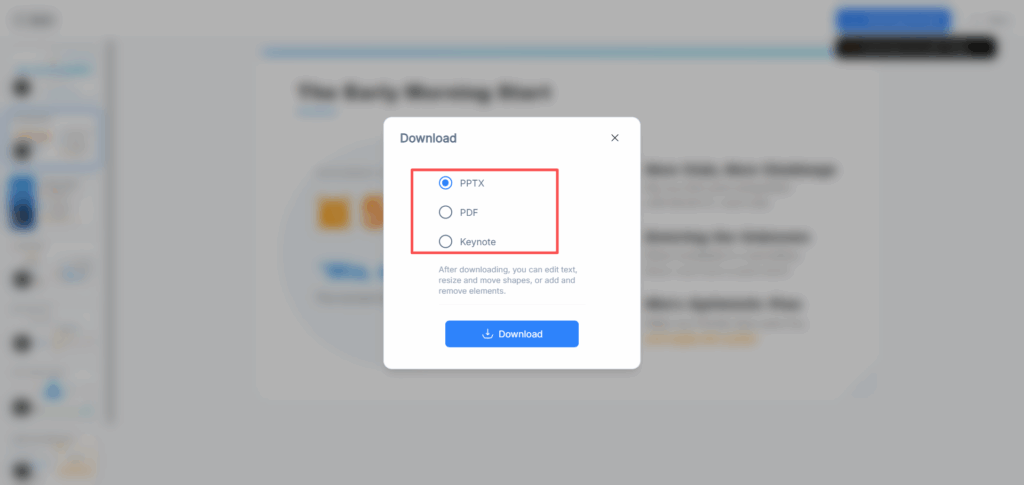
What Export Formats Are Common?
Most AI presentation tools support:
- PPTX
- Keynote
These formats make presentations easy to edit and share.
Conclusion: Why More People Create Slides with AI
Presentation creation is changing.
Instead of spending hours adjusting layouts and moving text boxes, more people now create slides with AI and focus their energy on ideas, communication, and decision-making.
Modern AI tools reduce repetitive work while improving presentation speed.
For users who regularly organize documents, summarize videos, and prepare reports, NoteGPT Agent Slides offers a practical way to generate presentation drafts faster.
Whether you are creating business decks, educational materials, startup presentations, or content summaries, AI makes the process easier.
If your goal is to create professional presentations without starting from a blank page every time, now is a good time to start using an AI Presentation Maker.
Create better presentations, save time, and let AI handle more of the formatting work.