


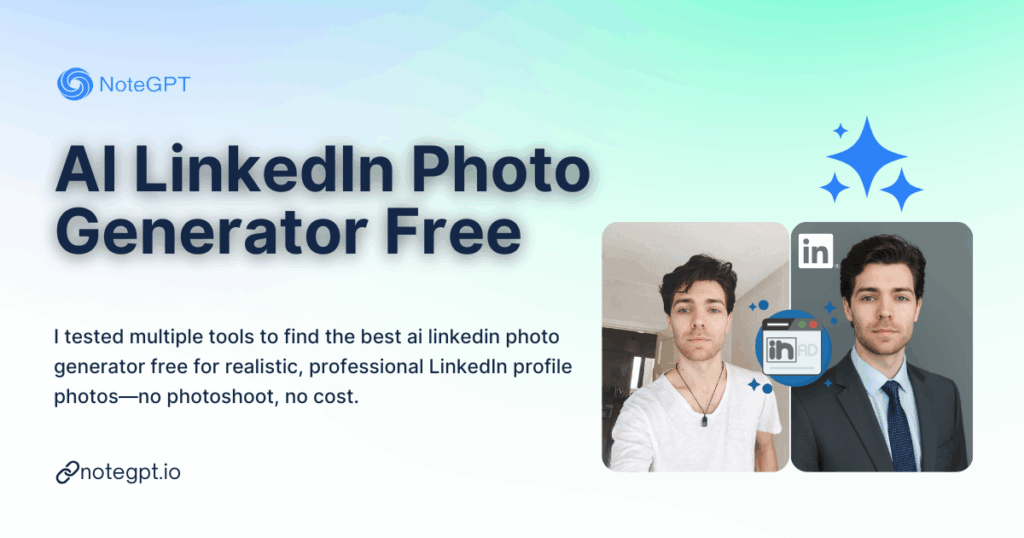
Let’s be honest. Most people don’t hate LinkedIn — they hate their LinkedIn profile photo.
You know the feeling. Your resume is solid. Your experience is real. Your skills are sharp. But your profile photo? Either too old, too casual, too stiff, or clearly cropped from a wedding.
Hiring managers won’t say it out loud, but everyone knows this: your LinkedIn profile photo silently decides whether someone clicks, scrolls, or connects.
That’s why the question keeps popping up on Reddit and Google:
What is the best ai linkedin photo generator free that actually looks realistic?
I had the same question. So instead of guessing, I tested multiple AI tools myself.
No studio. No photographer. No $100 “AI headshot packages”.
Just real tools, real results, and a very practical goal: finding a free AI LinkedIn photo generator that creates professional, realistic LinkedIn profile photos without looking fake.
This article is the result.
Why LinkedIn Profile Photos Matter More Than Ever
LinkedIn isn’t Instagram. It’s not about beauty. It’s about trust.
A good LinkedIn profile photo does three things instantly:
- Makes you look credible
- Signals professionalism
- Feels human, not staged
A bad one does the opposite. Even if the rest of your profile is strong.
According to multiple recruiting studies, profiles with professional headshots get significantly more views and connection requests. And in 2025, “professional” doesn’t mean stiff suit and forced smile anymore. It means natural, clean, and confident.
This is exactly where AI LinkedIn photo generators come in.
Why People Are Searching for an AI LinkedIn Photo Generator Free
After reading dozens of Reddit threads, YouTube comments, and Quora answers, the reasons are surprisingly consistent.
People want:
- A realistic LinkedIn profile photo
- Without hiring a photographer
- Without learning Photoshop
- Without paying upfront
- Without obvious “AI vibes”
That’s why the keyword ai linkedin photo generator free has real intent behind it. People aren’t browsing. They’re trying to solve a real problem.
But here’s the catch.
Most “AI LinkedIn photo generators” fall into one of three traps:
- They look too artificial
- They require payment before preview
- They over-style the image and ruin realism
So I tested multiple tools to see which ones actually work.
How I Tested These AI LinkedIn Photo Generators
Before naming any tools, let me explain the testing rules. Otherwise, comparisons are meaningless.
Every ai linkedin photo generator free in this review was tested under the same conditions:
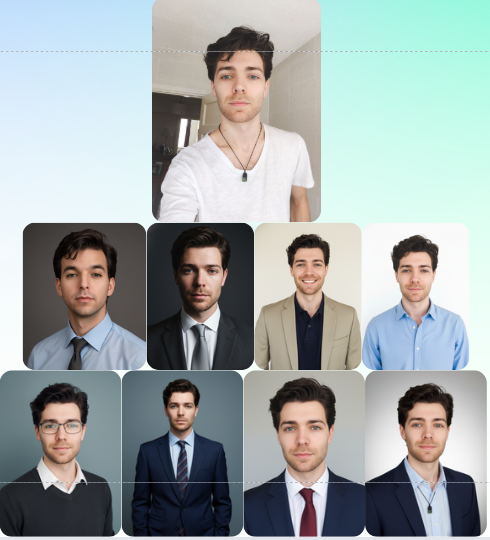
- One casual selfie (neutral lighting, no studio)
- No professional camera
- Same goal: LinkedIn profile photo
- Focus on realism, not glamour
I evaluated each tool based on:
- Realism (does it look like a real person?)
- Professional LinkedIn style
- Ease of use
- Free access (or at least meaningful free output)
- Whether the result feels “LinkedIn-safe”
No marketing promises. Just results.
Tool Category 1: Generic AI Avatar Generators
Many people start here, because they’re popular and heavily advertised.
These tools are usually branded as:
- AI avatar generators
- AI profile picture makers
- AI portrait tools
They often claim to work for LinkedIn too.
The Problem With Generic AI Avatars
Here’s what I noticed immediately.
Yes, these tools can create nice images. But nice doesn’t equal usable for LinkedIn.
Common issues:
- Skin looks too smooth
- Lighting looks artificial
- Background feels fake
- Facial proportions slightly off
- The “AI look” is obvious to recruiters
Some avatars looked great for social media, Discord, or creative profiles. But for LinkedIn? They felt risky.
A LinkedIn profile photo should blend in, not stand out for the wrong reason.
Verdict: Generic AI avatar tools are not ideal if your goal is a realistic LinkedIn profile photo.
Tool Category 2: Paid AI Headshot Platforms (With “Free” Teasers)
Next, I tested tools that position themselves as AI headshot generators.
These platforms often rank well for keywords like:
- ai linkedin photo generator free
- ai headshot generator linkedin
- professional ai profile photo
But “free” here usually means limited previews.
What They Do Well
To be fair, these tools do a few things right:
- Professional framing
- Clean backgrounds
- Office-style clothing
- Clear focus on LinkedIn-style images
If you pay, results can be solid.
Where They Fall Short
The main issues:
- Free tier is often unusable
- Watermarks or locked downloads
- Forced payment before meaningful testing
- Over-processed faces
Also, many require uploading 10–20 photos, which defeats the purpose of convenience.
Verdict: Good results, but not truly a free ai linkedin photo generator. Not ideal for users who want to test before committing.
Tool Category 3: AI Tools That Focus on Realism and Context
This is where things get interesting.
A smaller group of tools doesn’t advertise loudly as “AI headshot generators”, but they approach the problem differently:
- Less aggressive face alteration
- More focus on realism
- Smarter background and lighting adjustments
- Designed for professional contexts
These tools don’t try to “upgrade” your face. They try to present you better.
And for LinkedIn, that matters a lot.
What Makes an AI LinkedIn Photo Look Real
After testing multiple tools, I noticed patterns.
A realistic LinkedIn profile photo usually has:
- Natural skin texture (not plastic)
- Subtle lighting, not studio drama
- Neutral professional background
- Slight imperfections (yes, really)
- A pose that feels human, not posed
The best ai linkedin photo generator free doesn’t try to make you look like a model. It makes you look like a competent professional on a good day.
This realization changed how I evaluated the tools.
The Hidden Problem Nobody Talks About
Here’s something most reviews ignore.
LinkedIn has an unspoken visual standard.
If your photo looks too perfect, it raises suspicion. If it looks AI-generated, it hurts trust.
The goal is not “wow”. The goal is “this looks normal, credible, and professional”.
Many AI tools fail exactly here.
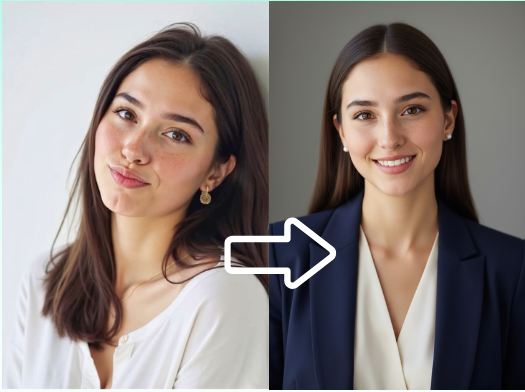
They optimize for visual impact, not professional realism.
Where NoteGPT Enters the Picture
During my testing, I didn’t expect to include NoteGPT at all.
I knew NoteGPT primarily as an AI productivity and learning platform. But while researching tools that focus on professional context rather than flashy avatars, I came across NoteGPT’s AI LinkedIn Photo Generator.
What caught my attention wasn’t marketing claims.
It was the positioning:
- LinkedIn-specific
- Realistic profile photos
- Focus on professional use
- Free access without immediate paywalls
That immediately put it in a different category from most tools I had tested.
But does it actually work?
In the next part, I’ll break down:
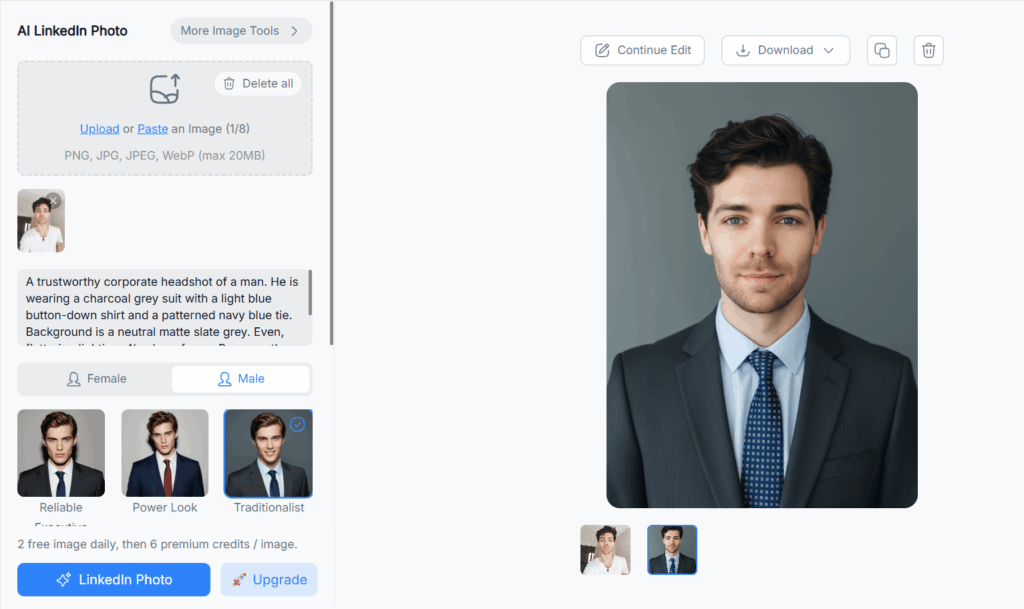
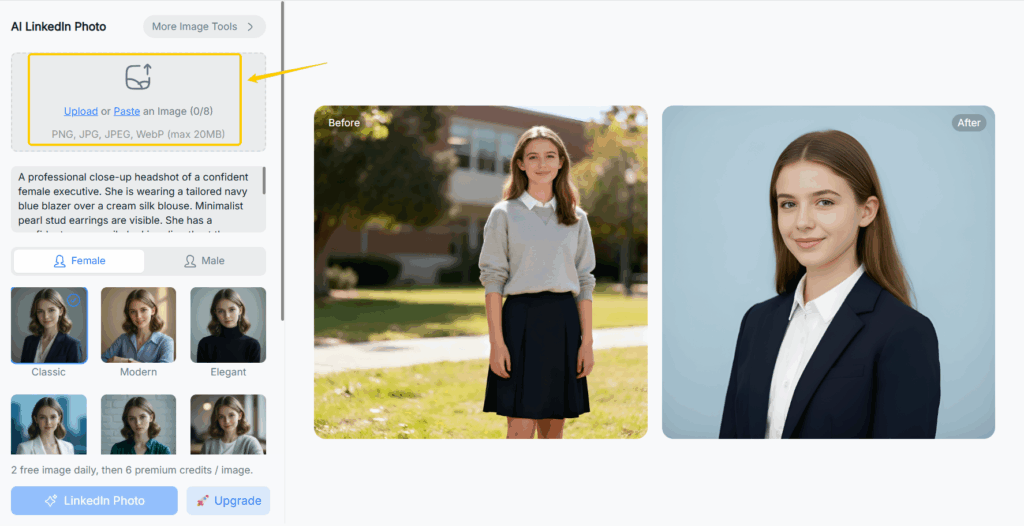
- How NoteGPT’s AI LinkedIn Photo Generator works
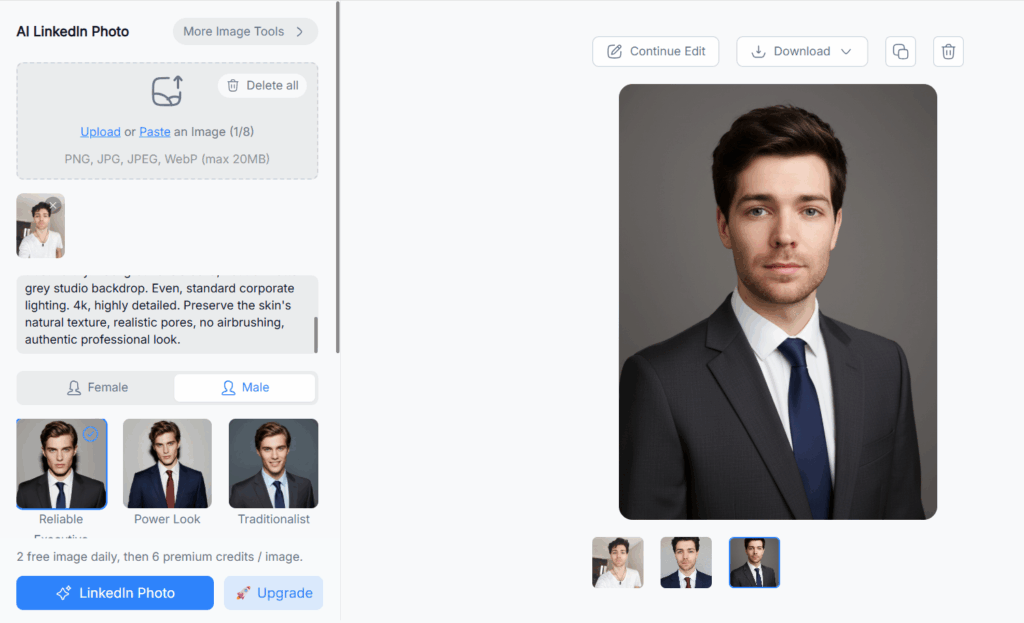
- What results I got
- How it compares directly with other tools
- And whether it truly deserves the title of best ai linkedin photo generator free
Testing NoteGPT’s AI LinkedIn Photo Generator
By the time I reached NoteGPT, my expectations were clear.
I wasn’t looking for a dramatic transformation. I wasn’t looking for “wow”. I was looking for something very specific:
A realistic LinkedIn profile photo that looks like me on my best professional day.
First Impressions
The first thing I noticed was how simple the process was.
No long onboarding. No demand for 20 photos. No pressure to upgrade before seeing results.
For anyone searching for an ai linkedin photo generator free, this already matters more than it sounds. Most tools hide the real output behind a paywall. NoteGPT lets you understand what you’re getting first.
Uploading the Photo
I uploaded one clear selfie. No studio lighting, no suit, just a normal photo.
What impressed me was that NoteGPT didn’t aggressively “correct” my face.
Some AI tools reshape your jaw, smooth your skin, and subtly change your identity. That’s great for avatars. It’s risky for LinkedIn.
NoteGPT did the opposite:
- Kept facial structure intact
- Preserved skin texture
- Improved lighting naturally
- Adjusted background in a subtle way
The result didn’t scream “AI”. It looked like a real professional photo.
The Results: Does It Look LinkedIn-Ready?
This is the most important question.
If I saw this photo on someone else’s LinkedIn profile, would I question it?
The honest answer: no.
The image felt:
- Clean
- Natural
- Professional
- Safe for recruiters
And that’s exactly what most people want from a LinkedIn profile photo.
It didn’t look like a fashion shoot. It didn’t look like a cartoon. It looked like a real person.
For an ai linkedin photo generator free, that’s rare.
Side-by-Side Comparison With Other Tools
After generating results with NoteGPT, I went back and compared it directly with other tools I had tested.
Here’s what stood out.
Realism Over Perfection
Many AI LinkedIn photo generators aim for perfection. NoteGPT aims for realism.
That difference matters.
Perfect skin, exaggerated lighting, and overly sharp features look impressive, but they don’t blend into LinkedIn feeds. NoteGPT’s results blend in naturally.
Professional Context Awareness
Some tools don’t understand LinkedIn as a platform. They generate “nice photos”, not LinkedIn photos.
NoteGPT clearly optimizes for:
- Neutral backgrounds
- Business-casual appearance
- Profile-friendly framing
This context-awareness is what separates a general AI image tool from a true AI LinkedIn photo generator.
Free Access That Actually Means Something
Let’s talk honestly about “free”.
Most tools using the keyword ai linkedin photo generator free either:
- Limit output severely
- Lock downloads
- Force upgrades instantly
NoteGPT offers meaningful free usage, which makes it practical for users who just need one good profile photo, not a subscription.
Who Should Use an AI LinkedIn Photo Generator Free Like NoteGPT
Based on my testing, this kind of tool is especially useful for:
- Job seekers updating their profiles quickly
- Freelancers and consultants
- Founders and solo builders
- Students entering the job market
- Remote professionals without access to studios
If you fall into any of these categories, an ai linkedin photo generator free can save time, money, and stress.
Common Concerns (And Honest Answers)
“Will Recruiters Know It’s AI?”
If the image looks realistic, no.
Recruiters don’t analyze pixels. They react to trust signals. A natural, professional-looking photo works better than an obviously staged one.
The bigger risk is using a bad photo, not using AI.
“Is It Ethical to Use AI for LinkedIn Photos?”
This comes up often.
Think of it this way: If AI adjusts lighting, background, and framing — the same things a photographer does — you’re not misrepresenting yourself. You’re presenting yourself professionally.
The key is realism, not deception.
“Does It Replace a Professional Photoshoot?”
For executive branding or high-stakes media profiles, maybe not.
For 90% of LinkedIn users? Yes, it’s more than enough.
Best AI LinkedIn Photo Generator Free?
After testing multiple tools, here’s my honest conclusion.
If you want:
- A realistic LinkedIn profile photo
- Minimal setup
- No obvious AI look
- Free access without tricks
NoteGPT’s AI LinkedIn Photo Generator stands out as one of the most practical options available right now.
It doesn’t try to impress you with unrealistic perfection. It helps you look like a real professional.
And for LinkedIn, that’s exactly the point.
How to Get the Best Results (Practical Tips)
Before you use any ai linkedin photo generator free, keep these tips in mind:
- Use a clear, front-facing selfie
- Avoid extreme lighting or shadows
- Neutral expressions work best
- Don’t overthink clothing — clean and simple is enough
AI works best when the input is honest.
Conclusion
Your LinkedIn profile photo is often the first impression you make.
You don’t need it to be perfect. You need it to be believable.
After testing multiple tools, I’m convinced that AI, when used correctly, can help more people present themselves confidently and professionally.
If you’ve been putting off updating your LinkedIn photo because it feels expensive, awkward, or inconvenient, tools like NoteGPT finally remove that barrier.
Sometimes, the best AI tools aren’t the flashiest ones. They’re the ones that quietly do the job right.
And in this case, that’s exactly what a good ai linkedin photo generator free should do.